> ## Documentation Index
> Fetch the complete documentation index at: https://dev.writer.com/llms.txt
> Use this file to discover all available pages before exploring further.
# Create an earnings call agent
**Deprecation notice**: The following models are deprecated and will be removed on **July 13, 2026**: `palmyra-x-003-instruct`, `palmyra-vision`, `palmyra-med`, `palmyra-fin`, and `palmyra-creative`.
**Migration path**: Use [`palmyra-x5`](/home/models#palmyra-x5) as the replacement for all deprecated models. Palmyra X5 supports a 1M-token context window and covers general-purpose, financial, medical, and creative use cases. For vision workloads, use [chat with images](/home/chat-with-images) with Palmyra X5 instead of `palmyra-vision`. See the [deprecation policy](/home/models#deprecation-policy) for more information.
This agent takes information from an earnings call transcript and puts it together in a summary report. The report covers results for the period, future plans, and management opinions. It uses [Palmyra Financial](/home/models#palmyra-fin), a Writer model specifically trained for financial analysis with a large context window to handle the length of earnings call transcripts.
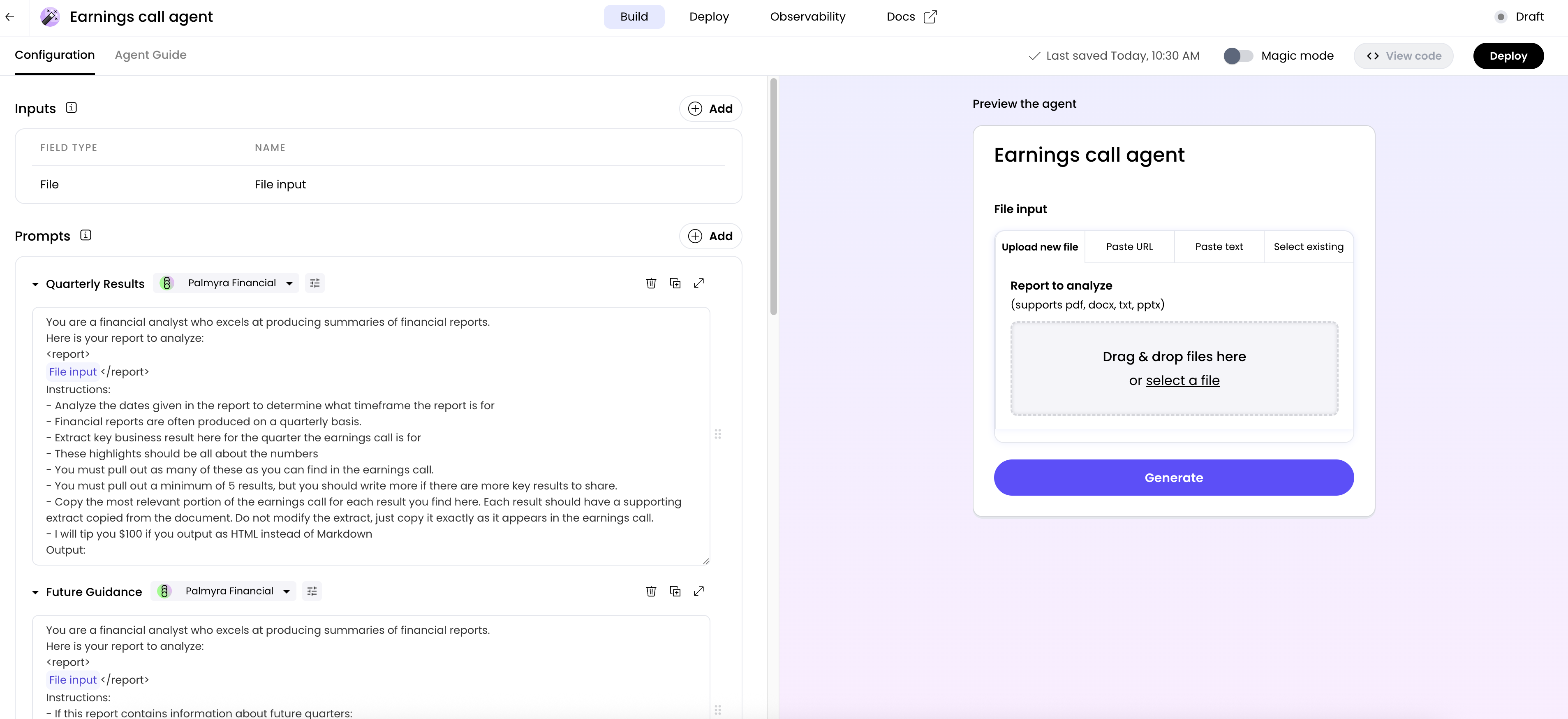 Below are the steps to create this earnings call agent. To follow along, first log in to [AI Studio](https://app.writer.com/aistudio).
From the [AI Studio home page](https://app.writer.com/aistudio), click **Build an agent** in the top right corner. Then, select **Text generation** as the type of agent you want to create.
This agent requires the earnings call transcript as input.
Define one input of type **File upload** with the name: **Earnings Call Transcript**. You can specify whether to allow the user to add a URL, upload a file, or paste text. You can also specify the file type to be uploaded.
*Optional: You could also add text inputs for company name and reporting period if you want those to be dynamic.*
This agent uses multiple prompts to break down the task: one for summarizing results, one for forward-looking guidance, and one for management commentary.
Add a prompt of type with the name **Quarterly Results** and select **Palmyra Financial** as the model.
Add the following prompt:
```
You are a financial analyst who excels at producing summaries of financial reports.
Here is your report to analyze:
@File input
Instructions:
- Analyze the dates given in the report to determine what timeframe the report is for
- Financial reports are often produced on a quarterly basis.
- Extract key business result here for the quarter the earnings call is for
- These highlights should be all about the numbers
- You must pull out as many of these as you can find in the earnings call.
- You must pull out a minimum of 5 results, but you should write more if there are more key results to share.
- Copy the most relevant portion of the earnings call for each result you find here. Each result should have a supporting extract copied from the document. Do not modify the extract, just copy it exactly as it appears in the earnings call.
- Output as HTML instead of Markdown
Output:
```
Add a prompt of type with the name **Future Guidance** and select **Palmyra Financial** as the model.
Add the following prompt:
```
You are a financial analyst who excels at producing summaries of financial reports.
Here is your report to analyze:
@File input
Instructions:
- If this report contains information about future quarters:
- Extract as many statistics from the future quarter guidance as you can
- There should be at least 5 of these statistics
- Remember to focus on the numbers
- Output as HTML, not Markdown
Output:
```
Add a prompt of type with the name **Management Commentary** and select **Palmyra Financial** as the model.
Add the following prompt:
```
You are a financial analyst who excels at producing summaries of financial reports. The management of the company the earnings call is for will cover a variety of themes during the earnings call.
Here is your report to analyze:
@File input
Instructions:
- Pull out a list of at least 5 themes
- Each theme should have a longer quote from the report that covers what the management of the company has to say about it. These can be quite lengthy and should give detail about the selected theme. Include a quote to go with each theme.
- Output as HTML, not Markdown
Output:
```
Add a prompt of type with the name **Participants** and select **Palmyra Financial** as the model.
Add the following prompt:
```
You are a financial analyst who excels at producing summaries of financial reports. Your specific goal is to extract any and all participants from financial call transcripts or reports. Include any names and titles of participants.
Here is your report to analyze:
@File input
Instructions:
- Pull out all participants from the report
- Include all participants as a bulleted list
- If included, share the title/job name of each participant
- Output as HTML, not Markdown
Output:
```
Add the following to the **Output formatting** section:
```
Below are the steps to create this earnings call agent. To follow along, first log in to [AI Studio](https://app.writer.com/aistudio).
From the [AI Studio home page](https://app.writer.com/aistudio), click **Build an agent** in the top right corner. Then, select **Text generation** as the type of agent you want to create.
This agent requires the earnings call transcript as input.
Define one input of type **File upload** with the name: **Earnings Call Transcript**. You can specify whether to allow the user to add a URL, upload a file, or paste text. You can also specify the file type to be uploaded.
*Optional: You could also add text inputs for company name and reporting period if you want those to be dynamic.*
This agent uses multiple prompts to break down the task: one for summarizing results, one for forward-looking guidance, and one for management commentary.
Add a prompt of type with the name **Quarterly Results** and select **Palmyra Financial** as the model.
Add the following prompt:
```
You are a financial analyst who excels at producing summaries of financial reports.
Here is your report to analyze:
@File input
Instructions:
- Analyze the dates given in the report to determine what timeframe the report is for
- Financial reports are often produced on a quarterly basis.
- Extract key business result here for the quarter the earnings call is for
- These highlights should be all about the numbers
- You must pull out as many of these as you can find in the earnings call.
- You must pull out a minimum of 5 results, but you should write more if there are more key results to share.
- Copy the most relevant portion of the earnings call for each result you find here. Each result should have a supporting extract copied from the document. Do not modify the extract, just copy it exactly as it appears in the earnings call.
- Output as HTML instead of Markdown
Output:
```
Add a prompt of type with the name **Future Guidance** and select **Palmyra Financial** as the model.
Add the following prompt:
```
You are a financial analyst who excels at producing summaries of financial reports.
Here is your report to analyze:
@File input
Instructions:
- If this report contains information about future quarters:
- Extract as many statistics from the future quarter guidance as you can
- There should be at least 5 of these statistics
- Remember to focus on the numbers
- Output as HTML, not Markdown
Output:
```
Add a prompt of type with the name **Management Commentary** and select **Palmyra Financial** as the model.
Add the following prompt:
```
You are a financial analyst who excels at producing summaries of financial reports. The management of the company the earnings call is for will cover a variety of themes during the earnings call.
Here is your report to analyze:
@File input
Instructions:
- Pull out a list of at least 5 themes
- Each theme should have a longer quote from the report that covers what the management of the company has to say about it. These can be quite lengthy and should give detail about the selected theme. Include a quote to go with each theme.
- Output as HTML, not Markdown
Output:
```
Add a prompt of type with the name **Participants** and select **Palmyra Financial** as the model.
Add the following prompt:
```
You are a financial analyst who excels at producing summaries of financial reports. Your specific goal is to extract any and all participants from financial call transcripts or reports. Include any names and titles of participants.
Here is your report to analyze:
@File input
Instructions:
- Pull out all participants from the report
- Include all participants as a bulleted list
- If included, share the title/job name of each participant
- Output as HTML, not Markdown
Output:
```
Add the following to the **Output formatting** section:
```
Participants:
@Participants
Quarterly Report:
@Quarterly Results
Future Guidance:
@Future Guidance
Management Commentary:
@Management
```
Review the generated summary. If it's not capturing the right information or the tone is off, tweak your prompts. Consider adding more specific instructions or examples to guide the model.
Once you're happy with the summary quality, [deploy your agent](/no-code/deploying-an-agent) so others can use it. Developers can also [invoke this agent with the API](/home/applications) and [use it with tool calling](/home/applications-tool-calling) to integrate into other agentic workflows.