> ## Documentation Index
> Fetch the complete documentation index at: https://dev.writer.com/llms.txt
> Use this file to discover all available pages before exploring further.
# Call a custom function in a chat
> Extend LLM capabilities with tool calling. Execute custom functions, query databases, fetch real-time data, and integrate results into chat responses.
This guide helps you understand how to use tool calling, sometimes known as function calling, with chat completions.
Tool calling allows you to extend the capabilities of [chats with LLMs](/home/chat-completion) by enabling the LLM to call custom functions, or tools.
Your custom tools can perform a wide range of tasks, such as querying databases, fetching real-time data from APIs, processing data, or executing business logic. You can then integrate the result of these tool calls back into the model's output.
Tool calling is available for Palmyra X4 and later models, as well as supported external models.
This guide discusses calling custom functions as tools. Writer also offers prebuilt tools that models can execute remotely:
* [Ask questions to a Knowledge Graph in a chat](/home/kg-chat)
* [Delegate questions to domain-specific LLMs](/home/model-delegation)
* [Analyze or interpret images](/home/vision-tool)
* [Translate text](/home/translation-tool)
You need an API key to access the Writer API. Get an API key by following the steps in the [API quickstart](/home/quickstart).
We recommend setting the API key as an environment variable in a `.env` file with the name `WRITER_API_KEY`.
## Overview
To use tool calling, follow these steps:
1. Define your functions in code
2. Pass the functions to the model in a chat completion request
3. Append the assistant's response (containing tool calls) to the message history
4. Check to see which functions the model wants to invoke and run the corresponding functions
5. Append the tool results to the message history
6. Pass the updated messages back to the model to get the final response
7. Append the final response to maintain complete conversation history
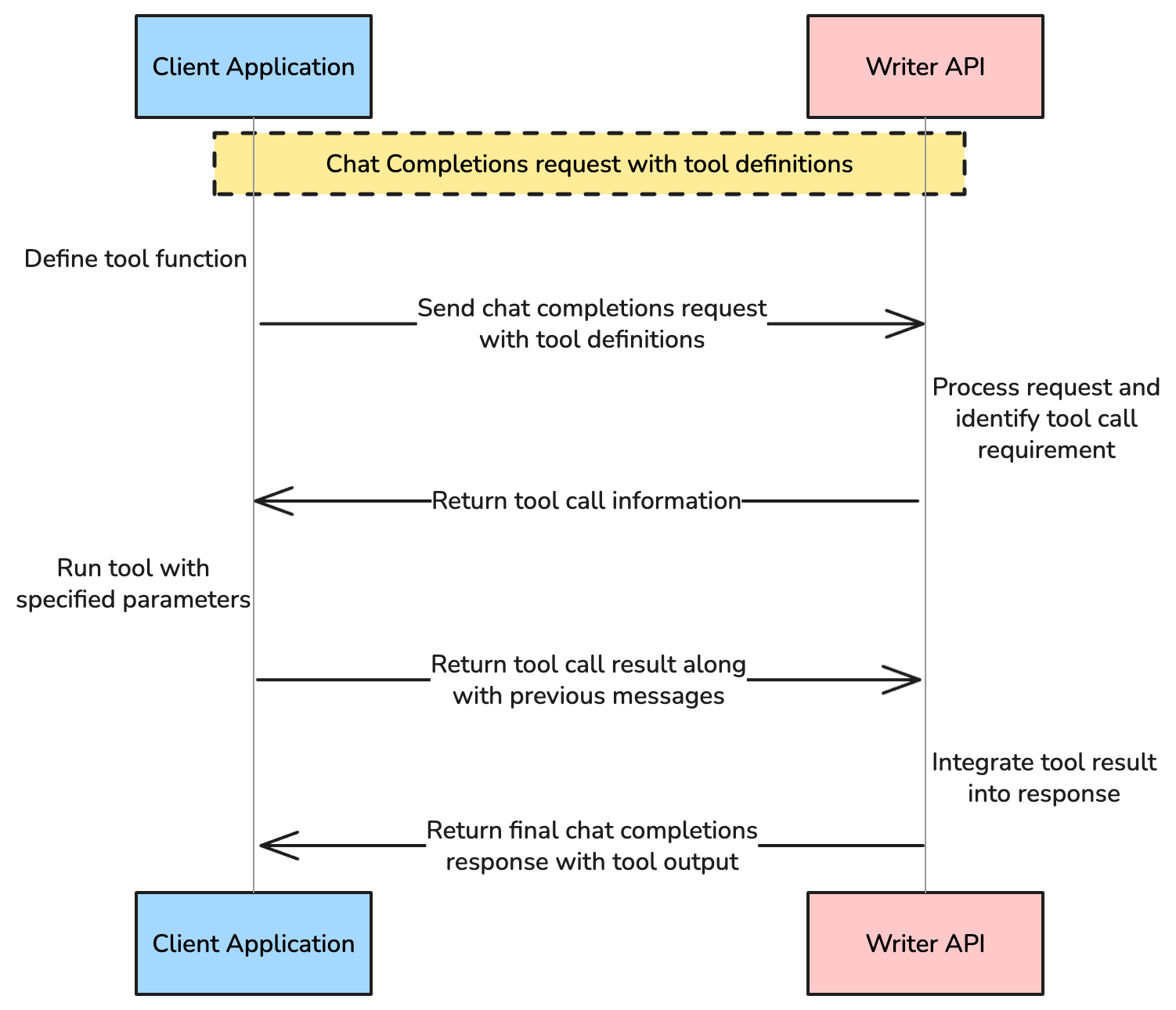
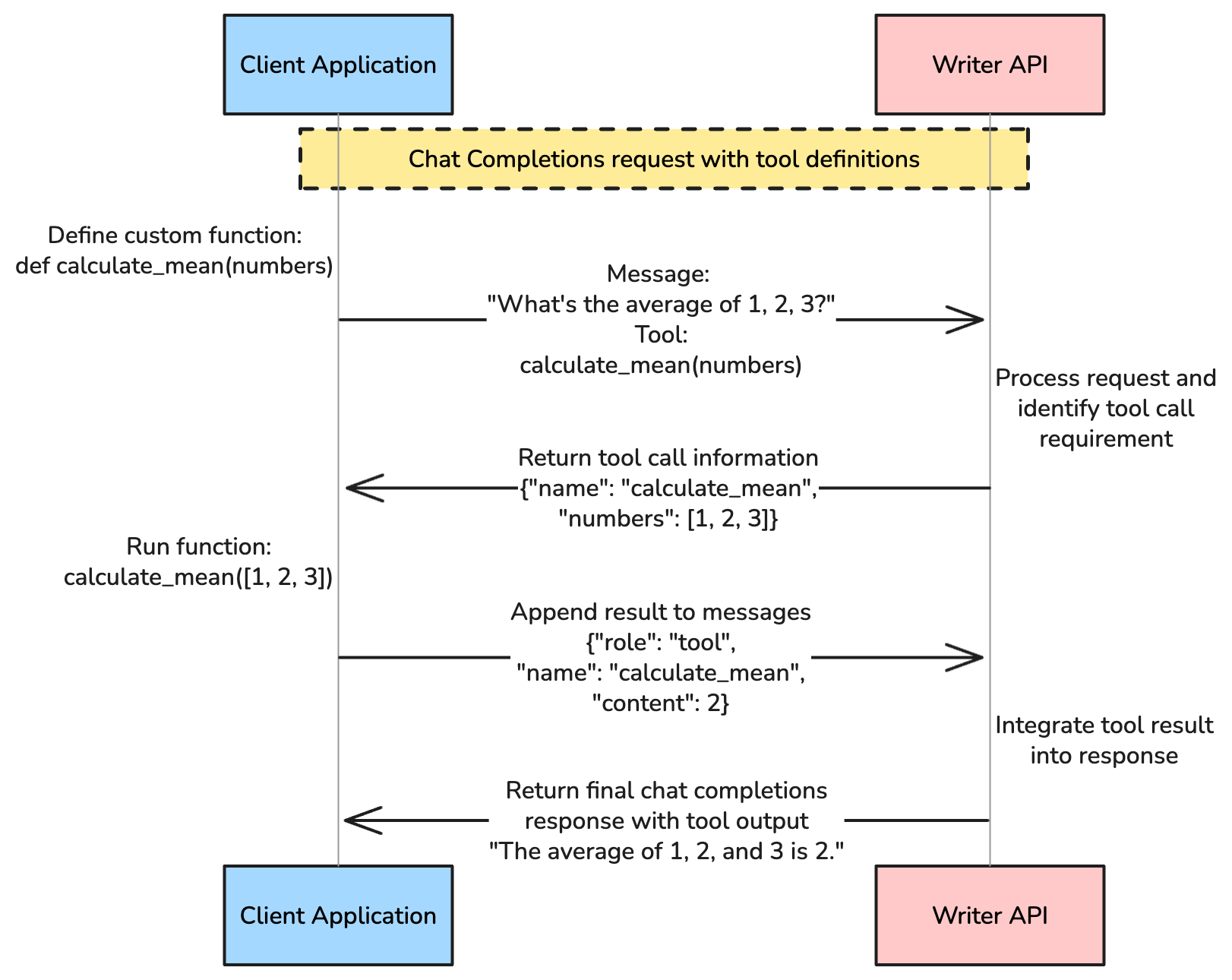
 Continue reading to learn more about each step.
## Define your custom functions
First, define the custom functions in your code. Typical use cases for tool calling include calling an API, performing mathematical calculations, or running complex business logic. You can define these functions in your code as you would any other function.
Here's an example of a function to calculate the mean of a list of numbers.
```python Python theme={null}
def calculate_mean(numbers: list) -> float:
return sum(numbers) / len(numbers)
```
```js JavaScript theme={null}
function calculateMean(numbers) {
if (numbers.length === 0) {
throw new Error("Cannot calculate mean of an empty array");
}
return numbers.reduce((sum, num) => sum + num, 0) / numbers.length;
}
```
## Describe functions as tools
After you've defined your functions, create a `tools` array to pass to the model.
The `tools` array describes your functions as tools available to the model. You describe tools in the form of a [JSON schema](https://json-schema.org/). Each tool should include a `type` of `function` and a `function` object that includes a `name`, `description`, and a dictionary of `parameters`.
### Tool structure
The `tools` array contains an object with the following parameters:
| Parameter | Type | Description |
| -------------------------------- | ------ | -------------------------------------------------------------------------------------------------------------------------------- |
| `type` | string | The type of tool, which is `function` for a custom function |
| `function` | object | An object containing the tool's description and parameter definitions |
| `function.name` | string | The name of the tool |
| `function.description` | string | A description of what the tool does and when the model should use it |
| `function.parameters` | object | An object containing the tool's input parameters |
| `function.parameters.type` | string | The type of the parameter, which is `object` for a JSON schema |
| `function.parameters.properties` | object | An object containing the tool's parameters in the form of a [JSON schema](https://json-schema.org/). See below for more details. |
| `function.parameters.required` | array | An array of the tool's required parameters |
See the full [tools object schema](/api-reference/completion-api/chat-completion#body-tools) for more details.
The `function.parameters.properties` object contains the tool's parameter definitions as a [JSON schema](https://json-schema.org/). The object's keys should be the names of the parameters, and the values should be objects containing the parameter's type and description.
When the model decides you should use the tool to answer the user's question, it returns the parameters that you should use when calling the function you've defined.
### Example tool array
Here's an example of a `tools` array for the `calculate_mean` function:
```python Python theme={null}
tools = [
{
"type": "function",
"function": {
"name": "calculate_mean",
"description": "A function that calculates the mean (average) of a list of numbers. Any user request asking for the mean of a list of numbers should use this tool.",
"parameters": {
"type": "object",
"properties": {
"numbers": {
"type": "array",
"items": {"type": "number"},
"description": "List of numbers"
}
},
"required": ["numbers"]
}
}
}
]
```
```js JavaScript theme={null}
const tools = [
{
type: "function",
function: {
name: "calculate_mean",
description: "A function that calculates the mean (average) of a list of numbers. Any user request asking for the mean of a list of numbers should use this tool.",
parameters: {
type: "object",
properties: {
numbers: {
type: "array",
items: { type: "number" },
description: "List of numbers",
},
},
required: ["numbers"],
},
},
},
];
```
To help the model understand when to use the tool, follow these best practices for the `function.description` parameter:
* Indicate that the tool is a function that invokes a no-code agent
* Specify the function's purpose and capabilities
* Describe when the tool should be used
An example description for a tool that invokes a function to calculate the mean of a list of numbers:
> "A function that calculates the mean of a list of numbers. Any user request asking for the mean of a list of numbers should use this tool."
## Pass tools to the model
Once the tools array is complete, pass it to the [chat completions endpoint](/home/chat-completion) along with the chat messages.
### Tool choice control
The chat completion endpoint has a [`tool_choice parameter`](/api-reference/completion-api/chat-completion#body-tool-choice) that controls how the model decides when to use the tools you've defined.
| Value | Description |
| ---------- | ------------------------------------------------------------------ |
| `auto` | The model decides which tools to use, if any. |
| `none` | The model doesn't use tools and only returns a generated response. |
| `required` | The model must use at least one of the tools you've defined. |
You can also use a JSON object to force the model to use a specific tool. For example, if you want the model to use the `calculate_mean` tool, you can set `tool_choice` to `{"type": "function", "function": {"name": "calculate_mean"}}`.
In this example, `tool_choice` is `auto`, which means the model decides which tools to use, if any, based on the message and tool descriptions.
```python Python theme={null}
import json
from writerai import Writer
# Initialize the Writer client. If you don't pass the `apiKey` parameter,
# the client looks for the `WRITER_API_KEY` environment variable.
client = Writer()
messages = [{"role": "user", "content": "what is the mean of [1,3,5,7,9]?"}]
response = client.chat.chat(
model="palmyra-x5",
messages=messages,
tools=tools,
tool_choice="auto"
)
```
```js JavaScript theme={null}
import { Writer } from "writer-sdk";
// Initialize the Writer client. If you don't pass the `apiKey` parameter,
// the client looks for the `WRITER_API_KEY` environment variable.
const client = new Writer();
let messages = [{"role": "user", "content": "what is the mean of [1,3,5,7,9]?"}];
const response = await client.chat.chat({
model: "palmyra-x5",
messages: messages,
tools: tools,
tool_choice: "auto"
});
```
## Process tool calls
When the model identifies a need to call a tool based on the user's input, it indicates it in the response and includes the necessary parameters to pass when calling the tool. You then execute the tool's function and return the result to the model.
Proper conversation history management requires appending the assistant's response, tool results, and final response to the message history.
The method for checking for tool calls and executing the tool's function differs depending on whether you're streaming the response or not. Each method is described below.
The examples below demonstrate processing a single tool call. For handling multiple tool calls in one request, see the [multiple tool calls](#multiple-tool-calls) section.
### Streaming
When using streaming, the tool calls come back in chunks inside of the delta object of the choices array. To process the tool calls:
1. Stream and collect tool calls from the response chunks
2. Reconstruct the assistant's response and append it to the message history
3. Execute functions and append tool results to the message history
4. Get the final response from the model and append it to the message history
#### Step 1: Stream and collect tool calls from the response chunks
First, stream and collect tool calls from the response chunks.
```python Python theme={null}
streaming_content = ""
function_calls = []
for chunk in response:
choice = chunk.choices[0]
if choice.delta:
# Collect tool calls as they stream in
if choice.delta.tool_calls:
for tool_call in choice.delta.tool_calls:
if tool_call.id:
# Start a new function call
function_calls.append({
"name": "",
"arguments": "",
"call_id": tool_call.id
})
if tool_call.function:
# Append to the most recent function call
if function_calls:
function_calls[-1]["name"] += tool_call.function.name or ""
function_calls[-1]["arguments"] += tool_call.function.arguments or ""
# Collect regular content (for cases where no tools are called)
elif choice.delta.content:
streaming_content += choice.delta.content
```
```js JavaScript theme={null}
let streamingContent = "";
const functionCalls = [];
for await (const chunk of response) {
const choice = chunk.choices[0];
if (choice.delta) {
if (choice.delta.tool_calls) {
for (const toolCall of choice.delta.tool_calls) {
if (toolCall.id) {
functionCalls.push({
name: "",
arguments: "",
call_id: toolCall.id
});
}
if (toolCall.function) {
if (functionCalls.length > 0) {
functionCalls[functionCalls.length - 1].name += toolCall.function.name || "";
functionCalls[functionCalls.length - 1].arguments += toolCall.function.arguments || "";
}
}
}
} else if (choice.delta.content) {
streamingContent += choice.delta.content;
}
}
}
```
#### Step 2: Check finish reason and reconstruct the assistant's response
Check the `finish_reason` to determine if tools were called, then reconstruct and append the assistant's response to the conversation history.
```python Python theme={null}
# Inside the streaming loop, check for finish_reason
if choice.finish_reason:
if choice.finish_reason == "stop":
# No tools were called, just regular response
messages.append({"role": "assistant", "content": streaming_content})
break
elif choice.finish_reason == "tool_calls":
# Reconstruct and append assistant message with tool calls
tool_calls_for_message = []
for func_call in function_calls:
tool_calls_for_message.append({
"id": func_call["call_id"],
"type": "function",
"function": {
"name": func_call["name"],
"arguments": func_call["arguments"]
}
})
assistant_message = {
"role": "assistant",
"content": None,
"tool_calls": tool_calls_for_message
}
messages.append(assistant_message)
```
```js JavaScript theme={null}
// Inside the streaming loop, check for finish_reason
if (choice.finish_reason) {
if (choice.finish_reason === "stop") {
// No tools were called, just regular response
messages.push({ role: "assistant", content: streamingContent });
break;
} else if (choice.finish_reason === "tool_calls") {
// Reconstruct and append assistant message with tool calls
const toolCallsForMessage = [];
for (const funcCall of functionCalls) {
toolCallsForMessage.push({
id: funcCall.call_id,
type: "function",
function: {
name: funcCall.name,
arguments: funcCall.arguments
}
});
}
const assistantMessage = {
role: "assistant",
content: null,
tool_calls: toolCallsForMessage
};
messages.push(assistantMessage); // Append assistant response
}
}
```
#### Step 3: Execute functions and append tool results
Execute each function in the `function_calls` list and append the results to the messages array.
```python Python theme={null}
# Inside the tool_calls finish_reason block
for function_call in function_calls:
function_name = function_call["name"]
if function_name == "calculate_mean":
try:
arguments_dict = json.loads(function_call["arguments"])
function_response = calculate_mean(arguments_dict["numbers"])
# Append tool result to conversation history
messages.append({
"role": "tool",
"content": str(function_response),
"tool_call_id": function_call["call_id"],
"name": function_name,
})
except Exception as e:
# Handle errors gracefully
messages.append({
"role": "tool",
"content": f"Error: {str(e)}",
"tool_call_id": function_call["call_id"],
"name": function_name,
})
```
```js JavaScript theme={null}
// Inside the tool_calls finish_reason block
for (const functionCall of functionCalls) {
const functionName = functionCall.name;
if (functionName === "calculate_mean") {
try {
const argumentsDict = JSON.parse(functionCall.arguments);
const functionResponse = calculateMean(argumentsDict.numbers);
// Append tool result to conversation history
messages.push({
role: "tool",
content: functionResponse.toString(),
tool_call_id: functionCall.call_id,
name: functionName,
});
} catch (error) {
// Handle errors gracefully
messages.push({
role: "tool",
content: `Error: ${error.message}`,
tool_call_id: functionCall.call_id,
name: functionName,
});
}
}
}
```
#### Step 4: Get and append the final response
After appending tool results, get the final response from the model and append it to maintain complete conversation history.
```python Python theme={null}
# Inside the tool_calls finish_reason block, after processing all functions
final_response = client.chat.chat(
model="palmyra-x5",
messages=messages,
stream=True
)
final_content = ""
for chunk in final_response:
choice = chunk.choices[0]
if choice.delta and choice.delta.content:
final_content += choice.delta.content
# Append final response to conversation history
messages.append({
"role": "assistant",
"content": final_content
})
```
```js JavaScript theme={null}
// Inside the tool_calls finish_reason block, after processing all functions
const finalResponse = await client.chat.chat({
model: "palmyra-x5",
messages: messages,
stream: true
});
let finalContent = "";
for await (const chunk of finalResponse) {
const choice = chunk.choices[0];
if (choice.delta && choice.delta.content) {
finalContent += choice.delta.content;
process.stdout.write(choice.delta.content);
}
}
// Append final response to conversation history
messages.push({
role: "assistant",
content: finalContent
});
```
#### Complete streaming code example
```python Python [expandable] theme={null}
import json
from writerai import Writer
# Initialize the Writer client. If you don't pass the `apiKey` parameter,
# the client looks for the `WRITER_API_KEY` environment variable.
client = Writer()
def calculate_mean(numbers: list) -> float:
return sum(numbers) / len(numbers)
tools = [
{
"type": "function",
"function": {
"name": "calculate_mean",
"description": "Calculate the mean (average) of a list of numbers.",
"parameters": {
"type": "object",
"properties": {
"numbers": {
"type": "array",
"items": {"type": "number"},
"description": "List of numbers"
}
},
"required": ["numbers"]
}
}
}
]
messages = [{"role": "user", "content": "what is the mean of [1,3,5,7,9]?"}]
# Step 1: Initial request with tools
response = client.chat.chat(
model="palmyra-x5",
messages=messages,
tools=tools,
tool_choice="auto",
stream=True
)
# Step 2: Process streaming response to collect tool calls
streaming_content = ""
function_calls = []
for chunk in response:
choice = chunk.choices[0]
if choice.delta:
# Collect tool calls as they stream in
if choice.delta.tool_calls:
for tool_call in choice.delta.tool_calls:
if tool_call.id:
# Start a new function call
function_calls.append({
"name": "",
"arguments": "",
"call_id": tool_call.id
})
if tool_call.function:
# Append to the most recent function call
if function_calls:
function_calls[-1]["name"] += tool_call.function.name or ""
function_calls[-1]["arguments"] += tool_call.function.arguments or ""
# Collect regular content (for cases where no tools are called)
elif choice.delta.content:
streaming_content += choice.delta.content
# Check if streaming is complete
if choice.finish_reason:
if choice.finish_reason == "stop":
# No tools were called, just regular response
print(f"Response: {streaming_content}")
messages.append({"role": "assistant", "content": streaming_content})
break
elif choice.finish_reason == "tool_calls":
# Step 3: Reconstruct and append assistant message with tool calls
tool_calls_for_message = []
for func_call in function_calls:
tool_calls_for_message.append({
"id": func_call["call_id"],
"type": "function",
"function": {
"name": func_call["name"],
"arguments": func_call["arguments"]
}
})
assistant_message = {
"role": "assistant",
"content": None,
"tool_calls": tool_calls_for_message
}
messages.append(assistant_message) # Append assistant response
# Step 4: Execute each function and add results to messages
for function_call in function_calls:
function_name = function_call["name"]
if function_name == "calculate_mean":
try:
arguments_dict = json.loads(function_call["arguments"])
function_response = calculate_mean(arguments_dict["numbers"])
# Add tool response to messages
messages.append({
"role": "tool",
"content": str(function_response),
"tool_call_id": function_call["call_id"],
"name": function_name,
})
except Exception as e:
# Handle errors gracefully
messages.append({
"role": "tool",
"content": f"Error: {str(e)}",
"tool_call_id": function_call["call_id"],
"name": function_name,
})
# Step 5: Get the final response from the model
final_response = client.chat.chat(
model="palmyra-x5",
messages=messages,
stream=True
)
final_content = ""
for chunk in final_response:
choice = chunk.choices[0]
if choice.delta and choice.delta.content:
final_content += choice.delta.content
print(choice.delta.content, end="", flush=True)
# Step 6: Add final response to message history
messages.append({
"role": "assistant",
"content": final_content
})
break
```
```js JavaScript [expandable] theme={null}
import { Writer } from "writer-sdk";
// Initialize the Writer client. If you don't pass the `apiKey` parameter,
// the client looks for the `WRITER_API_KEY` environment variable.
const client = new Writer();
function calculateMean(numbers) {
if (numbers.length === 0) {
throw new Error("Cannot calculate mean of an empty array");
}
return numbers.reduce((sum, num) => sum + num, 0) / numbers.length;
}
const tools = [
{
type: "function",
function: {
name: "calculate_mean",
description: "Calculate the mean (average) of a list of numbers.",
parameters: {
type: "object",
properties: {
numbers: {
type: "array",
items: { type: "number" },
description: "List of numbers",
},
},
required: ["numbers"],
},
},
},
];
async function main() {
let messages = [
{ role: "user", content: "what is the mean of [1,3,5,7,9]?" },
];
// Step 1: Initial request with tools
const response = await client.chat.chat({
model: "palmyra-x5",
messages: messages,
tools: tools,
tool_choice: "auto",
stream: true
});
// Step 2: Process streaming response to collect tool calls
let streamingContent = "";
const functionCalls = [];
for await (const chunk of response) {
const choice = chunk.choices[0];
if (choice.delta) {
// Collect tool calls as they stream in
if (choice.delta.tool_calls) {
for (const toolCall of choice.delta.tool_calls) {
if (toolCall.id) {
// Start a new function call
functionCalls.push({
name: "",
arguments: "",
call_id: toolCall.id,
});
}
if (toolCall.function) {
// Append to the most recent function call
if (functionCalls.length > 0) {
functionCalls[functionCalls.length - 1].name += toolCall.function.name || "";
functionCalls[functionCalls.length - 1].arguments += toolCall.function.arguments || "";
}
}
}
}
// Collect regular content (for cases where no tools are called)
else if (choice.delta.content) {
streamingContent += choice.delta.content;
}
}
// Check if streaming is complete
if (choice.finish_reason) {
if (choice.finish_reason === "stop") {
// No tools were called, just regular response
console.log(`Response: ${streamingContent}`);
messages.push({ role: "assistant", content: streamingContent });
break;
} else if (choice.finish_reason === "tool_calls") {
// Step 3: Reconstruct and append assistant message with tool calls
const toolCallsForMessage = [];
for (const funcCall of functionCalls) {
toolCallsForMessage.push({
id: funcCall.call_id,
type: "function",
function: {
name: funcCall.name,
arguments: funcCall.arguments,
},
});
}
const assistantMessage = {
role: "assistant",
content: null,
tool_calls: toolCallsForMessage,
};
messages.push(assistantMessage); // Append assistant response
// Step 4: Execute each function and add results to messages
for (const functionCall of functionCalls) {
const functionName = functionCall.name;
if (functionName === "calculate_mean") {
try {
const argumentsDict = JSON.parse(functionCall.arguments);
const functionResponse = calculateMean(argumentsDict.numbers);
// Add tool response to messages
messages.push({
role: "tool",
content: functionResponse.toString(),
tool_call_id: functionCall.call_id,
name: functionName,
});
} catch (error) {
// Handle errors gracefully
messages.push({
role: "tool",
content: `Error: ${error.message}`,
tool_call_id: functionCall.call_id,
name: functionName,
});
}
}
}
// Step 5: Get the final response from the model
const finalResponse = await client.chat.chat({
model: "palmyra-x5",
messages: messages,
stream: true
});
let finalContent = "";
for await (const chunk of finalResponse) {
const choice = chunk.choices[0];
if (choice.delta && choice.delta.content) {
finalContent += choice.delta.content;
process.stdout.write(choice.delta.content);
}
}
// Step 6: Add final response to message history
messages.push({
role: "assistant",
content: finalContent,
});
break;
}
}
}
}
main();
```
### Non-streaming
If you set `stream` to `false`, the tool calls come back in one object inside of the `message` object in the `choices` array. To process the tool calls:
1. Get the assistant's response and append it to the message history
2. Check for tool calls and execute the corresponding functions, appending tool results to the message history
3. Get the final response from the model and append it to the message history
#### Step 1: Get and append the assistant's response
First, get the assistant's response message and append it to your conversation history. This is crucial for maintaining context.
```python Python theme={null}
response_message = response.choices[0].message
messages.append(response_message) # Always append the assistant's response
```
```js JavaScript theme={null}
const responseMessage = response.choices[0].message;
messages.push(responseMessage); // Always append the assistant's response
```
#### Step 2: Execute functions and append tool results
Next, check for tool calls and execute the corresponding functions with the arguments provided by the model. Then, append the tool results to the conversation history.
```python Python theme={null}
tool_calls = response_message.tool_calls
if tool_calls:
for tool_call in tool_calls:
tool_call_id = tool_call.id
function_name = tool_call.function.name
function_args = json.loads(tool_call.function.arguments)
if function_name == "calculate_mean":
function_response = calculate_mean(function_args["numbers"])
# Append tool result to conversation history
messages.append({
"role": "tool",
"tool_call_id": tool_call_id,
"name": function_name,
"content": str(function_response),
})
```
```js JavaScript theme={null}
const toolCalls = responseMessage.tool_calls;
if (toolCalls && toolCalls.length > 0) {
for (const toolCall of toolCalls) {
const toolCallId = toolCall.id;
const functionName = toolCall.function.name;
const functionArgs = JSON.parse(toolCall.function.arguments);
if (functionName === "calculate_mean") {
const functionResponse = calculateMean(functionArgs.numbers);
// Append tool result to conversation history
messages.push({
role: "tool",
tool_call_id: toolCallId,
name: functionName,
content: functionResponse.toString(),
});
}
}
}
```
#### Step 3: Get and append the final response
After appending tool results, get the final response from the model and append it to maintain complete conversation history:
```python Python theme={null}
final_response = client.chat.chat(
model="palmyra-x5",
messages=messages,
stream=False
)
final_content = final_response.choices[0].message.content
print(f"Final response: {final_content}")
# Append final response to conversation history
messages.append({
"role": "assistant",
"content": final_content
})
```
```js JavaScript theme={null}
const finalResponse = await client.chat.chat({
model: "palmyra-x5",
messages: messages,
stream: false
});
const finalContent = finalResponse.choices[0].message.content;
console.log(`Final response: ${finalContent}`);
// Append final response to conversation history
messages.push({
role: "assistant",
content: finalContent
});
```
#### Complete non-streaming code example
```python Python [expandable] theme={null}
import json
from writerai import Writer
# Initialize the Writer client. If you don't pass the `apiKey` parameter,
# the client looks for the `WRITER_API_KEY` environment variable.
client = Writer()
def calculate_mean(numbers: list) -> float:
return sum(numbers) / len(numbers)
tools = [
{
"type": "function",
"function": {
"name": "calculate_mean",
"description": "Calculate the mean (average) of a list of numbers.",
"parameters": {
"type": "object",
"properties": {
"numbers": {
"type": "array",
"items": {"type": "number"},
"description": "List of numbers"
}
},
"required": ["numbers"]
}
}
}
]
messages = [{"role": "user", "content": "what is the mean of [1,3,5,7,9]?"}]
# Step 1: Initial request with tools
response = client.chat.chat(
model="palmyra-x5",
messages=messages,
tools=tools,
tool_choice="auto",
stream=False
)
# Step 2: Get and append assistant response
response_message = response.choices[0].message
messages.append(response_message)
tool_calls = response_message.tool_calls
# Step 3: Process tool calls if any
if tool_calls:
for tool_call in tool_calls:
tool_call_id = tool_call.id
function_name = tool_call.function.name
function_args = json.loads(tool_call.function.arguments)
if function_name == "calculate_mean":
function_response = calculate_mean(function_args["numbers"])
# Append tool result to conversation history
messages.append({
"role": "tool",
"tool_call_id": tool_call_id,
"name": function_name,
"content": str(function_response),
})
# Step 4: Get final response
final_response = client.chat.chat(
model="palmyra-x5",
messages=messages,
stream=False
)
final_content = final_response.choices[0].message.content
print(f"Final response: {final_content}")
# Step 5: Append final response to conversation history
messages.append({
"role": "assistant",
"content": final_content
})
else:
# No tool calls, just use the original response
print(f"Response: {response_message.content}")
```
```js JavaScript [expandable] theme={null}
import { Writer } from "writer-sdk";
// Initialize the Writer client. If you don't pass the `apiKey` parameter,
// the client looks for the `WRITER_API_KEY` environment variable.
const client = new Writer();
function calculateMean(numbers) {
if (numbers.length === 0) {
throw new Error("Cannot calculate mean of an empty array");
}
return numbers.reduce((sum, num) => sum + num, 0) / numbers.length;
}
const tools = [
{
type: "function",
function: {
name: "calculate_mean",
description: "Calculate the mean (average) of a list of numbers.",
parameters: {
type: "object",
properties: {
numbers: {
type: "array",
items: { type: "number" },
description: "List of numbers",
},
},
required: ["numbers"],
},
},
},
];
async function main() {
let messages = [
{ role: "user", content: "what is the mean of [1,3,5,7,9]?" },
];
// Step 1: Initial request with tools
const response = await client.chat.chat({
model: "palmyra-x5",
messages: messages,
tools: tools,
tool_choice: "auto",
stream: false,
});
// Step 2: Get and append assistant response
const responseMessage = response.choices[0].message;
messages.push(responseMessage); // Append assistant response
const toolCalls = responseMessage.tool_calls;
// Step 3: Process tool calls if any
if (toolCalls && toolCalls.length > 0) {
for (const toolCall of toolCalls) {
const toolCallId = toolCall.id;
const functionName = toolCall.function.name;
const functionArgs = JSON.parse(toolCall.function.arguments);
if (functionName === "calculate_mean") {
const functionResponse = calculateMean(functionArgs.numbers);
// Append tool result to conversation history
messages.push({
role: "tool",
tool_call_id: toolCallId,
name: functionName,
content: functionResponse.toString(),
});
}
}
// Step 4: Get final response
const finalResponse = await client.chat.chat({
model: "palmyra-x5",
messages: messages,
stream: false
});
const finalContent = finalResponse.choices[0].message.content;
console.log(`Final response: ${finalContent}`);
// Step 5: Append final response to conversation history
messages.push({
role: "assistant",
content: finalContent
});
} else {
// No tool calls, just use the original response
console.log(`Response: ${responseMessage.content}`);
}
}
main();
```
## Multiple tool calls
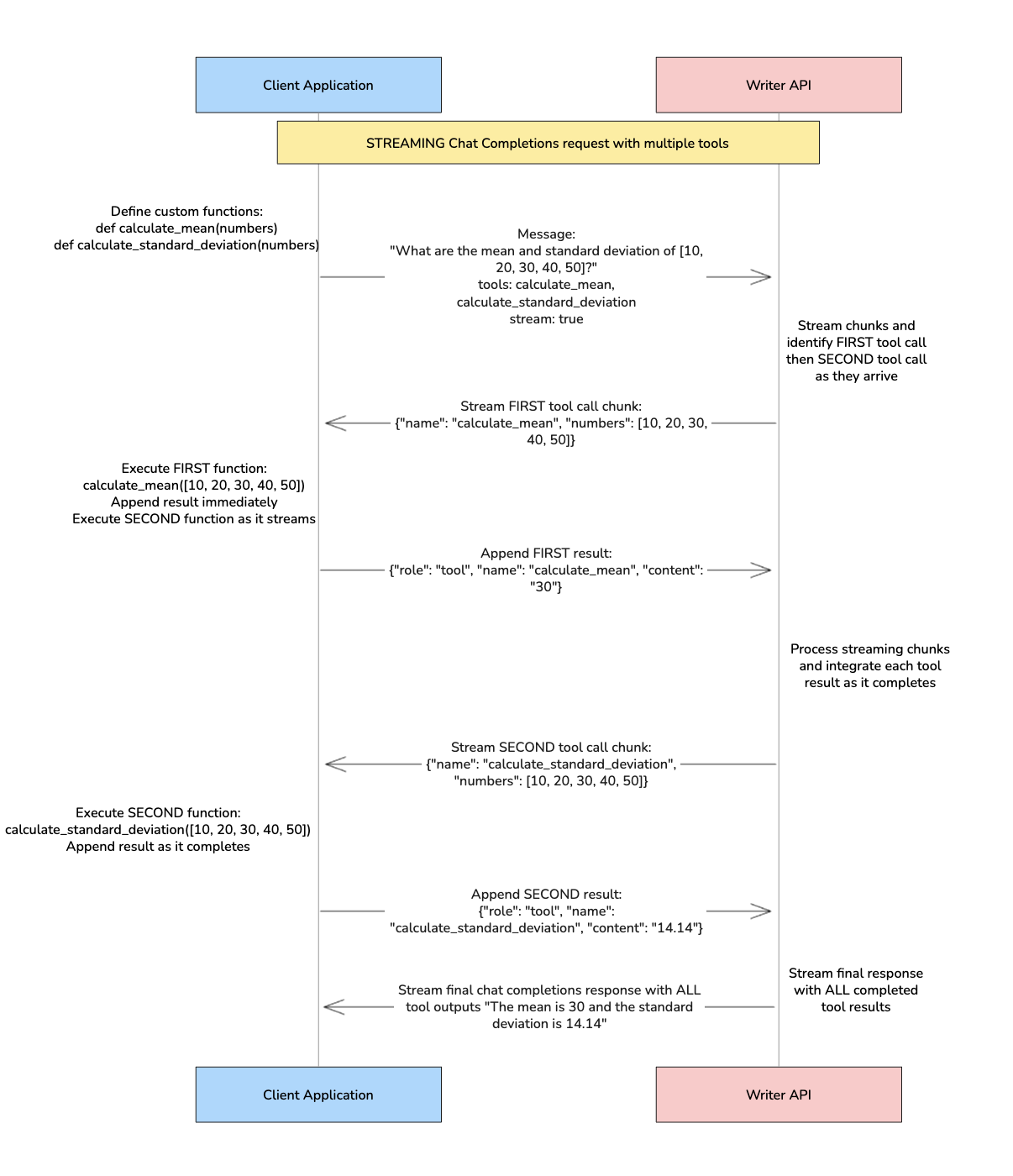
When the model uses multiple tools in a single request, you'll receive multiple tool calls in the response. This section shows you how to handle multiple tool calls for both streaming and non-streaming approaches.
**Non-streaming**: The processing logic for multiple tool calls is identical to single tool calls - the same code handles both scenarios. The only difference is that the loop for checking the response for tool calling processes multiple tool calls instead of one.
**Streaming**: Multiple tool calls require different logic because tool calls stream in chunks. You need to collect and reconstruct multiple tool calls from streaming chunks before processing them.
### Define multiple functions
First, define the functions in your code.
```python Python theme={null}
import math
def calculate_mean(numbers: list) -> float:
if not numbers:
raise ValueError("Cannot calculate mean of an empty list")
return sum(numbers) / len(numbers)
def calculate_standard_deviation(numbers: list) -> float:
if len(numbers) < 2:
raise ValueError("Cannot calculate standard deviation with fewer than 2 numbers")
mean = calculate_mean(numbers)
variance = sum((x - mean) ** 2 for x in numbers) / len(numbers)
return math.sqrt(variance)
```
```js JavaScript theme={null}
function calculateMean(numbers) {
if (numbers.length === 0) {
throw new Error("Cannot calculate mean of an empty array");
}
return numbers.reduce((sum, num) => sum + num, 0) / numbers.length;
}
function calculateStandardDeviation(numbers) {
if (numbers.length < 2) {
throw new Error("Cannot calculate standard deviation with fewer than 2 numbers");
}
const mean = calculateMean(numbers);
const variance = numbers.reduce((sum, num) => sum + Math.pow(num - mean, 2), 0) / numbers.length;
return Math.sqrt(variance);
}
```
### Define tools array with multiple functions
Create a tools array that includes both functions:
For more information about describing functions as tools, see [describe functions as tools section](#describe-functions-as-tools)
```python Python theme={null}
tools = [
{
"type": "function",
"function": {
"name": "calculate_mean",
"description": "Calculate the mean (average) of a list of numbers. Use this when asked for the average or mean of numbers.",
"parameters": {
"type": "object",
"properties": {
"numbers": {
"type": "array",
"items": {"type": "number"},
"description": "List of numbers to calculate the mean for"
}
},
"required": ["numbers"]
}
}
},
{
"type": "function",
"function": {
"name": "calculate_standard_deviation",
"description": "Calculate the population standard deviation (N) of a list of numbers. Use this when asked for standard deviation, variance, or statistical spread of numbers.",
"parameters": {
"type": "object",
"properties": {
"numbers": {
"type": "array",
"items": {"type": "number"},
"description": "List of numbers to calculate the standard deviation for"
}
},
"required": ["numbers"]
}
}
}
]
```
```js JavaScript theme={null}
const tools = [
{
type: "function",
function: {
name: "calculate_mean",
description: "Calculate the mean (average) of a list of numbers. Use this when asked for the average or mean of numbers.",
parameters: {
type: "object",
properties: {
numbers: {
type: "array",
items: { type: "number" },
description: "List of numbers to calculate the mean for"
}
},
required: ["numbers"]
}
}
},
{
type: "function",
function: {
name: "calculate_standard_deviation",
description: "Calculate the population standard deviation (N) of a list of numbers. Use this when asked for standard deviation, variance, or statistical spread of numbers.",
parameters: {
type: "object",
properties: {
numbers: {
type: "array",
items: { type: "number" },
description: "List of numbers to calculate the standard deviation for"
}
},
required: ["numbers"]
}
}
}
];
```
## Process multiple tool calls
When the model identifies a need to call multiple tools based on the user’s input, you'll receive multiple tool calls in the response. The processing differs between streaming and non-streaming approaches.
### Streaming
When using streaming with multiple tool calls, the tool calls come back in chunks inside of the delta object of the choices array. To process multiple tool calls:
1. Stream and collect multiple tool calls from the response chunks
2. Reconstruct the assistant's response with all tool calls and append it to the message history
3. Execute all functions and append tool results to the message history
4. Get the final response from the model and append it to the message history
This requires different logic from single tool calls because you need to collect and reconstruct multiple tool calls from streaming chunks.
#### Step 1: Stream and collect multiple tool calls from the response chunks
First, stream and collect multiple tool calls from the response chunks. This is where multiple tool calls differ from single tool calls:
```python Python theme={null}
streaming_content = ""
function_calls = []
for chunk in response:
choice = chunk.choices[0]
if choice.delta:
# Collect tool calls as they stream in
if choice.delta.tool_calls:
for tool_call in choice.delta.tool_calls:
if tool_call.id:
# Start a new function call
function_calls.append({
"name": "",
"arguments": "",
"call_id": tool_call.id
})
if tool_call.function:
# Append to the most recent function call
if function_calls:
function_calls[-1]["name"] += tool_call.function.name or ""
function_calls[-1]["arguments"] += tool_call.function.arguments or ""
# Collect regular content (for cases where no tools are called)
elif choice.delta.content:
streaming_content += choice.delta.content
# Check if streaming is complete
if choice.finish_reason:
if choice.finish_reason == "stop":
# No tools were called, just regular response
messages.append({"role": "assistant", "content": streaming_content})
break
elif choice.finish_reason == "tool_calls":
print(f"Tool calls collected: {len(function_calls)}")
break
```
```js JavaScript theme={null}
let streamingContent = "";
const functionCalls = [];
for await (const chunk of response) {
const choice = chunk.choices[0];
if (choice.delta) {
// Collect tool calls as they stream in
if (choice.delta.tool_calls) {
for (const toolCall of choice.delta.tool_calls) {
if (toolCall.id) {
// Start a new function call
functionCalls.push({
name: "",
arguments: "",
call_id: toolCall.id
});
}
if (toolCall.function) {
// Append to the most recent function call
if (functionCalls.length > 0) {
functionCalls[functionCalls.length - 1].name += toolCall.function.name || "";
functionCalls[functionCalls.length - 1].arguments += toolCall.function.arguments || "";
}
}
}
}
// Collect regular content (for cases where no tools are called)
else if (choice.delta.content) {
streamingContent += choice.delta.content;
}
}
// Check if streaming is complete
if (choice.finish_reason) {
if (choice.finish_reason === "stop") {
// No tools were called, just regular response
messages.push({ role: "assistant", content: streamingContent });
break;
} else if (choice.finish_reason === "tool_calls") {
console.log(`Tool calls collected: ${functionCalls.length}`);
break;
}
}
}
```
#### Step 2: Reconstruct and append assistant message with multiple tool calls
Reconstruct the assistant message with all collected tool calls:
```python Python theme={null}
# Step 3: Reconstruct and append assistant message with multiple tool calls
tool_calls_for_message = []
for func_call in function_calls:
tool_calls_for_message.append({
"id": func_call["call_id"],
"type": "function",
"function": {
"name": func_call["name"],
"arguments": func_call["arguments"]
}
})
assistant_message = {
"role": "assistant",
"content": None,
"tool_calls": tool_calls_for_message
}
messages.append(assistant_message)
```
```js JavaScript theme={null}
// Step 3: Reconstruct and append assistant message with multiple tool calls
const toolCallsForMessage = [];
for (const funcCall of functionCalls) {
toolCallsForMessage.push({
id: funcCall.call_id,
type: "function",
function: {
name: funcCall.name,
arguments: funcCall.arguments
}
});
}
const assistantMessage = {
role: "assistant",
content: null,
tool_calls: toolCallsForMessage
};
messages.push(assistantMessage);
```
#### Step 3: Execute all functions and append results
Execute each function and append the results to the conversation history:
```python Python theme={null}
# Step 4: Execute all functions and append results
for function_call in function_calls:
function_name = function_call["name"]
print(f"Processing tool call: {function_name}")
if function_name == "calculate_mean":
try:
arguments_dict = json.loads(function_call["arguments"])
function_response = calculate_mean(arguments_dict["numbers"])
except Exception as e:
function_response = f"Error: {str(e)}"
elif function_name == "calculate_standard_deviation":
try:
arguments_dict = json.loads(function_call["arguments"])
function_response = calculate_standard_deviation(arguments_dict["numbers"])
except Exception as e:
function_response = f"Error: {str(e)}"
else:
function_response = f"Unknown function: {function_name}"
print(f"Function response: {function_response}")
# Append tool result to conversation history
messages.append({
"role": "tool",
"content": str(function_response),
"tool_call_id": function_call["call_id"],
"name": function_name,
})
```
```js JavaScript theme={null}
// Step 4: Execute all functions and append results
for (const functionCall of functionCalls) {
const functionName = functionCall.name;
let functionResponse;
console.log(`Processing tool call: ${functionName}`);
if (functionName === "calculate_mean") {
try {
const argumentsDict = JSON.parse(functionCall.arguments);
functionResponse = calculateMean(argumentsDict.numbers);
} catch (error) {
functionResponse = `Error: ${error.message}`;
}
} else if (functionName === "calculate_standard_deviation") {
try {
const argumentsDict = JSON.parse(functionCall.arguments);
functionResponse = calculateStandardDeviation(argumentsDict.numbers);
} catch (error) {
functionResponse = `Error: ${error.message}`;
}
} else {
functionResponse = `Unknown function: ${functionName}`;
}
console.log(`Function response: ${functionResponse}`);
// Append tool result to conversation history
messages.push({
role: "tool",
content: functionResponse.toString(),
tool_call_id: functionCall.call_id,
name: functionName,
});
}
```
#### Step 4: Get the final response
Get the final response from the model after all tool calls are processed:
```python Python theme={null}
# Step 5: Get the final response
final_response = client.chat.chat(
model="palmyra-x5",
messages=messages,
stream=True
)
final_content = ""
for chunk in final_response:
choice = chunk.choices[0]
if choice.delta and choice.delta.content:
final_content += choice.delta.content
print(f"Final response: {final_content}")
```
```js JavaScript theme={null}
// Step 5: Get the final response
const finalResponse = await client.chat.chat({
model: "palmyra-x5",
messages: messages,
stream: true
});
let finalContent = "";
for await (const chunk of finalResponse) {
const choice = chunk.choices[0];
if (choice.delta && choice.delta.content) {
finalContent += choice.delta.content;
}
}
console.log(`Final response: ${finalContent}`);
```
#### Step 5: Append final response to conversation history
Append the final response to maintain complete conversation history:
```python Python theme={null}
# Step 5: Append final response to conversation history
messages.append({
"role": "assistant",
"content": final_content
})
```
```js JavaScript theme={null}
// Step 5: Append final response to conversation history
messages.push({
role: "assistant",
content: finalContent
});
```
#### Complete streaming code example
```python Python [expandable] theme={null}
import json
import math
from writerai import Writer
# Initialize the Writer client. If you don't pass the `apiKey` parameter,
# the client looks for the `WRITER_API_KEY` environment variable.
client = Writer()
def calculate_mean(numbers: list) -> float:
if not numbers:
raise ValueError("Cannot calculate mean of an empty list")
return sum(numbers) / len(numbers)
def calculate_standard_deviation(numbers: list) -> float:
if len(numbers) < 2:
raise ValueError("Cannot calculate standard deviation with fewer than 2 numbers")
mean = calculate_mean(numbers)
variance = sum((x - mean) ** 2 for x in numbers) / len(numbers)
return math.sqrt(variance)
tools = [
{
"type": "function",
"function": {
"name": "calculate_mean",
"description": "Calculate the mean (average) of a list of numbers. Use this when asked for the average or mean of numbers.",
"parameters": {
"type": "object",
"properties": {
"numbers": {
"type": "array",
"items": {"type": "number"},
"description": "List of numbers to calculate the mean for"
}
},
"required": ["numbers"]
}
}
},
{
"type": "function",
"function": {
"name": "calculate_standard_deviation",
"description": "Calculate the standard deviation of a list of numbers. Use this when asked for standard deviation, variance, or statistical spread of numbers.",
"parameters": {
"type": "object",
"properties": {
"numbers": {
"type": "array",
"items": {"type": "number"},
"description": "List of numbers to calculate the standard deviation for"
}
},
"required": ["numbers"]
}
}
}
]
messages = [{"role": "user", "content": "What are the mean and standard deviation of [10, 20, 30, 40, 50]?"}]
# Step 1: Initial request with tools
response = client.chat.chat(
model="palmyra-x5",
messages=messages,
tools=tools,
tool_choice="auto",
stream=True
)
# Step 2: Process streaming response to collect multiple tool calls
streaming_content = ""
function_calls = []
for chunk in response:
choice = chunk.choices[0]
if choice.delta:
# Collect tool calls as they stream in
if choice.delta.tool_calls:
for tool_call in choice.delta.tool_calls:
if tool_call.id:
# Start a new function call
function_calls.append({
"name": "",
"arguments": "",
"call_id": tool_call.id
})
if tool_call.function:
# Append to the most recent function call
if function_calls:
function_calls[-1]["name"] += tool_call.function.name or ""
function_calls[-1]["arguments"] += tool_call.function.arguments or ""
# Collect regular content (for cases where no tools are called)
elif choice.delta.content:
streaming_content += choice.delta.content
# Check if streaming is complete
if choice.finish_reason:
if choice.finish_reason == "stop":
# No tools were called, just regular response
print(f"Response: {streaming_content}")
messages.append({"role": "assistant", "content": streaming_content})
break
elif choice.finish_reason == "tool_calls":
print(f"Tool calls collected: {len(function_calls)}")
break
# Step 3: Reconstruct and append assistant message with multiple tool calls
tool_calls_for_message = []
for func_call in function_calls:
tool_calls_for_message.append({
"id": func_call["call_id"],
"type": "function",
"function": {
"name": func_call["name"],
"arguments": func_call["arguments"]
}
})
assistant_message = {
"role": "assistant",
"content": None,
"tool_calls": tool_calls_for_message
}
messages.append(assistant_message)
# Step 4: Execute all functions and append results
for function_call in function_calls:
function_name = function_call["name"]
print(f"Processing tool call: {function_name}")
if function_name == "calculate_mean":
try:
arguments_dict = json.loads(function_call["arguments"])
function_response = calculate_mean(arguments_dict["numbers"])
except Exception as e:
function_response = f"Error: {str(e)}"
elif function_name == "calculate_standard_deviation":
try:
arguments_dict = json.loads(function_call["arguments"])
function_response = calculate_standard_deviation(arguments_dict["numbers"])
except Exception as e:
function_response = f"Error: {str(e)}"
else:
function_response = f"Unknown function: {function_name}"
print(f"Function response: {function_response}")
# Append tool result to conversation history
messages.append({
"role": "tool",
"content": str(function_response),
"tool_call_id": function_call["call_id"],
"name": function_name,
})
# Step 5: Get the final response
final_response = client.chat.chat(
model="palmyra-x5",
messages=messages,
stream=True
)
final_content = ""
for chunk in final_response:
choice = chunk.choices[0]
if choice.delta and choice.delta.content:
final_content += choice.delta.content
print(choice.delta.content, end="", flush=True)
print(f"\nFinal response: {final_content}")
# Step 6: Append final response to conversation history
messages.append({
"role": "assistant",
"content": final_content
})
```
```js JavaScript [expandable] theme={null}
import { Writer } from "writer-sdk";
// Initialize the Writer client. If you don't pass the `apiKey` parameter,
// the client looks for the `WRITER_API_KEY` environment variable.
const client = new Writer();
function calculateMean(numbers) {
if (numbers.length === 0) {
throw new Error("Cannot calculate mean of an empty array");
}
return numbers.reduce((sum, num) => sum + num, 0) / numbers.length;
}
function calculateStandardDeviation(numbers) {
if (numbers.length < 2) {
throw new Error("Cannot calculate standard deviation with fewer than 2 numbers");
}
const mean = calculateMean(numbers);
const variance = numbers.reduce((sum, num) => sum + Math.pow(num - mean, 2), 0) / numbers.length;
return Math.sqrt(variance);
}
const tools = [
{
type: "function",
function: {
name: "calculate_mean",
description: "Calculate the mean (average) of a list of numbers. Use this when asked for the average or mean of numbers.",
parameters: {
type: "object",
properties: {
numbers: {
type: "array",
items: { type: "number" },
description: "List of numbers to calculate the mean for"
}
},
required: ["numbers"]
}
}
},
{
type: "function",
function: {
name: "calculate_standard_deviation",
description: "Calculate the standard deviation of a list of numbers. Use this when asked for standard deviation, variance, or statistical spread of numbers.",
parameters: {
type: "object",
properties: {
numbers: {
type: "array",
items: { type: "number" },
description: "List of numbers to calculate the standard deviation for"
}
},
required: ["numbers"]
}
}
}
];
async function main() {
let messages = [{ role: "user", content: "What are the mean and standard deviation of [10, 20, 30, 40, 50]?" }];
// Step 1: Initial request with tools
const response = await client.chat.chat({
model: "palmyra-x5",
messages: messages,
tools: tools,
tool_choice: "auto",
stream: true
});
// Step 2: Process streaming response to collect multiple tool calls
let streamingContent = "";
const functionCalls = [];
for await (const chunk of response) {
const choice = chunk.choices[0];
if (choice.delta) {
// Collect tool calls as they stream in
if (choice.delta.tool_calls) {
for (const toolCall of choice.delta.tool_calls) {
if (toolCall.id) {
// Start a new function call
functionCalls.push({
name: "",
arguments: "",
call_id: toolCall.id
});
}
if (toolCall.function) {
// Append to the most recent function call
if (functionCalls.length > 0) {
functionCalls[functionCalls.length - 1].name += toolCall.function.name || "";
functionCalls[functionCalls.length - 1].arguments += toolCall.function.arguments || "";
}
}
}
}
// Collect regular content (for cases where no tools are called)
else if (choice.delta.content) {
streamingContent += choice.delta.content;
}
}
// Check if streaming is complete
if (choice.finish_reason) {
if (choice.finish_reason === "stop") {
// No tools were called, just regular response
console.log(`Response: ${streamingContent}`);
messages.push({ role: "assistant", content: streamingContent });
break;
} else if (choice.finish_reason === "tool_calls") {
console.log(`Tool calls collected: ${functionCalls.length}`);
break;
}
}
}
// Step 3: Reconstruct and append assistant message with multiple tool calls
const toolCallsForMessage = [];
for (const funcCall of functionCalls) {
toolCallsForMessage.push({
id: funcCall.call_id,
type: "function",
function: {
name: funcCall.name,
arguments: funcCall.arguments
}
});
}
const assistantMessage = {
role: "assistant",
content: null,
tool_calls: toolCallsForMessage
};
messages.push(assistantMessage);
// Step 4: Execute all functions and append results
for (const functionCall of functionCalls) {
const functionName = functionCall.name;
console.log(`Processing tool call: ${functionName}`);
let functionResponse;
if (functionName === "calculate_mean") {
try {
const argumentsDict = JSON.parse(functionCall.arguments);
functionResponse = calculateMean(argumentsDict.numbers);
} catch (error) {
functionResponse = `Error: ${error.message}`;
}
} else if (functionName === "calculate_standard_deviation") {
try {
const argumentsDict = JSON.parse(functionCall.arguments);
functionResponse = calculateStandardDeviation(argumentsDict.numbers);
} catch (error) {
functionResponse = `Error: ${error.message}`;
}
} else {
functionResponse = `Unknown function: ${functionName}`;
}
console.log(`Function response: ${functionResponse}`);
// Append tool result to conversation history
messages.push({
role: "tool",
content: functionResponse.toString(),
tool_call_id: functionCall.call_id,
name: functionName,
});
}
// Step 5: Get the final response
const finalResponse = await client.chat.chat({
model: "palmyra-x5",
messages: messages,
stream: true
});
let finalContent = "";
for await (const chunk of finalResponse) {
const choice = chunk.choices[0];
if (choice.delta && choice.delta.content) {
finalContent += choice.delta.content;
process.stdout.write(choice.delta.content);
}
}
console.log(`\nFinal response: ${finalContent}`);
// Step 6: Append final response to conversation history
messages.push({
role: "assistant",
content: finalContent
});
}
main();
```
### Non-streaming
The processing logic for multiple tool calls is identical to single tool calls - the same code handles both scenarios. The only difference is that the loop for checking the response for tool calling processes multiple tool calls instead of one.
#### Step 1: Get and append the assistant's response
First, get the assistant's response message and append it to your conversation history. This is crucial for maintaining context.
```python Python theme={null}
response_message = response.choices[0].message
messages.append(response_message) # Always append the assistant's response
tool_calls = response_message.tool_calls
```
```js JavaScript theme={null}
const responseMessage = response.choices[0].message;
messages.push(responseMessage); // Always append the assistant's response
const toolCalls = responseMessage.tool_calls;
```
#### Step 2: Execute functions and append tool results
Next, check for tool calls and execute the corresponding functions with the arguments provided by the model. Then, append the tool results to the conversation history.
```python Python theme={null}
tool_calls = response_message.tool_calls
if tool_calls:
for tool_call in tool_calls:
tool_call_id = tool_call.id
function_name = tool_call.function.name
function_args = json.loads(tool_call.function.arguments)
# Execute the appropriate function based on the tool call
if function_name == "calculate_mean":
function_response = calculate_mean(function_args["numbers"])
elif function_name == "calculate_standard_deviation":
function_response = calculate_standard_deviation(function_args["numbers"])
else:
function_response = f"Unknown function: {function_name}"
# Append tool result to conversation history
messages.append({
"role": "tool",
"tool_call_id": tool_call_id,
"name": function_name,
"content": str(function_response),
})
else:
# No tool calls, just use the original response
print(f"Response: {response_message.content}")
```
```js JavaScript theme={null}
const toolCalls = responseMessage.tool_calls;
if (toolCalls && toolCalls.length > 0) {
for (const toolCall of toolCalls) {
const toolCallId = toolCall.id;
const functionName = toolCall.function.name;
const functionArgs = JSON.parse(toolCall.function.arguments);
// Execute the appropriate function based on the tool call
let functionResponse;
if (functionName === "calculate_mean") {
functionResponse = calculateMean(functionArgs.numbers);
} else if (functionName === "calculate_standard_deviation") {
functionResponse = calculateStandardDeviation(functionArgs.numbers);
} else {
functionResponse = `Unknown function: ${functionName}`;
}
// Append tool result to conversation history
messages.push({
role: "tool",
tool_call_id: toolCallId,
name: functionName,
content: functionResponse.toString(),
});
}
} else {
// No tool calls, just use the original response
console.log(`Response: ${responseMessage.content}`);
}
```
#### Step 3: Get and append the final response
After appending tool results, get the final response from the model and append it to maintain complete conversation history:
```python Python theme={null}
final_response = client.chat.chat(
model="palmyra-x5",
messages=messages,
stream=False
)
final_content = final_response.choices[0].message.content
print(f"Final response: {final_content}")
```
```js JavaScript theme={null}
const finalResponse = await client.chat.chat({
model: "palmyra-x5",
messages: messages,
stream: false
});
const finalContent = finalResponse.choices[0].message.content;
console.log(`Final response: ${finalContent}`);
```
#### Step 4: Append final response to conversation history
Append the final response to maintain complete conversation history:
```python Python theme={null}
# Append final response to conversation history
messages.append({
"role": "assistant",
"content": final_content
})
```
```js JavaScript theme={null}
// Append final response to conversation history
messages.push({
role: "assistant",
content: finalContent
});
```
#### Complete non-streaming code example
```python Python [expandable] theme={null}
import json
import math
from writerai import Writer
# Initialize the Writer client. If you don't pass the `apiKey` parameter,
# the client looks for the `WRITER_API_KEY` environment variable.
client = Writer()
def calculate_mean(numbers: list) -> float:
if not numbers:
raise ValueError("Cannot calculate mean of an empty list")
return sum(numbers) / len(numbers)
def calculate_standard_deviation(numbers: list) -> float:
if len(numbers) < 2:
raise ValueError("Cannot calculate standard deviation with fewer than 2 numbers")
mean = calculate_mean(numbers)
variance = sum((x - mean) ** 2 for x in numbers) / len(numbers)
return math.sqrt(variance)
tools = [
{
"type": "function",
"function": {
"name": "calculate_mean",
"description": "Calculate the mean (average) of a list of numbers. Use this when asked for the average or mean of numbers.",
"parameters": {
"type": "object",
"properties": {
"numbers": {
"type": "array",
"items": {"type": "number"},
"description": "List of numbers to calculate the mean for"
}
},
"required": ["numbers"]
}
}
},
{
"type": "function",
"function": {
"name": "calculate_standard_deviation",
"description": "Calculate the standard deviation of a list of numbers. Use this when asked for standard deviation, variance, or statistical spread of numbers.",
"parameters": {
"type": "object",
"properties": {
"numbers": {
"type": "array",
"items": {"type": "number"},
"description": "List of numbers to calculate the standard deviation for"
}
},
"required": ["numbers"]
}
}
}
]
messages = [{"role": "user", "content": "What are the mean and standard deviation of [10, 20, 30, 40, 50]?"}]
# Step 1: Initial request with tools
response = client.chat.chat(
model="palmyra-x5",
messages=messages,
tools=tools,
tool_choice="auto",
stream=False
)
# Step 2: Get and append assistant response
response_message = response.choices[0].message
messages.append(response_message)
tool_calls = response_message.tool_calls
# Step 3: Process tool calls if any
if tool_calls:
for tool_call in tool_calls:
tool_call_id = tool_call.id
function_name = tool_call.function.name
function_args = json.loads(tool_call.function.arguments)
# Execute the appropriate function based on the tool call
if function_name == "calculate_mean":
function_response = calculate_mean(function_args["numbers"])
elif function_name == "calculate_standard_deviation":
function_response = calculate_standard_deviation(function_args["numbers"])
else:
function_response = f"Unknown function: {function_name}"
# Append tool result to conversation history
messages.append({
"role": "tool",
"tool_call_id": tool_call_id,
"name": function_name,
"content": str(function_response),
})
# Step 4: Get final response
final_response = client.chat.chat(
model="palmyra-x5",
messages=messages,
stream=False
)
final_content = final_response.choices[0].message.content
print(f"Final response: {final_content}")
# Step 5: Append final response to conversation history
messages.append({
"role": "assistant",
"content": final_content
})
else:
# No tool calls, just use the original response
print(f"Response: {response_message.content}")
```
```js JavaScript [expandable] theme={null}
import { Writer } from "writer-sdk";
// Initialize the Writer client. If you don't pass the `apiKey` parameter,
// the client looks for the `WRITER_API_KEY` environment variable.
const client = new Writer();
function calculateMean(numbers) {
if (numbers.length === 0) {
throw new Error("Cannot calculate mean of an empty array");
}
return numbers.reduce((sum, num) => sum + num, 0) / numbers.length;
}
function calculateStandardDeviation(numbers) {
if (numbers.length < 2) {
throw new Error("Cannot calculate standard deviation with fewer than 2 numbers");
}
const mean = calculateMean(numbers);
const variance = numbers.reduce((sum, num) => sum + Math.pow(num - mean, 2), 0) / numbers.length;
return Math.sqrt(variance);
}
const tools = [
{
type: "function",
function: {
name: "calculate_mean",
description: "Calculate the mean (average) of a list of numbers. Use this when asked for the average or mean of numbers.",
parameters: {
type: "object",
properties: {
numbers: {
type: "array",
items: { type: "number" },
description: "List of numbers to calculate the mean for"
}
},
required: ["numbers"]
}
}
},
{
type: "function",
function: {
name: "calculate_standard_deviation",
description: "Calculate the standard deviation of a list of numbers. Use this when asked for standard deviation, variance, or statistical spread of numbers.",
parameters: {
type: "object",
properties: {
numbers: {
type: "array",
items: { type: "number" },
description: "List of numbers to calculate the standard deviation for"
}
},
required: ["numbers"]
}
}
}
];
async function main() {
let messages = [{ role: "user", content: "What are the mean and standard deviation of [10, 20, 30, 40, 50]?" }];
// Step 1: Initial request with tools
const response = await client.chat.chat({
model: "palmyra-x5",
messages: messages,
tools: tools,
tool_choice: "auto",
stream: false
});
// Step 2: Get and append assistant response
const responseMessage = response.choices[0].message;
messages.push(responseMessage);
const toolCalls = responseMessage.tool_calls;
// Step 3: Process tool calls if any
if (toolCalls && toolCalls.length > 0) {
for (const toolCall of toolCalls) {
const toolCallId = toolCall.id;
const functionName = toolCall.function.name;
const functionArgs = JSON.parse(toolCall.function.arguments);
// Execute the appropriate function based on the tool call
let functionResponse;
if (functionName === "calculate_mean") {
functionResponse = calculateMean(functionArgs.numbers);
} else if (functionName === "calculate_standard_deviation") {
functionResponse = calculateStandardDeviation(functionArgs.numbers);
} else {
functionResponse = `Unknown function: ${functionName}`;
}
// Append tool result to conversation history
messages.push({
role: "tool",
tool_call_id: toolCallId,
name: functionName,
content: functionResponse.toString(),
});
}
// Step 4: Get final response
const finalResponse = await client.chat.chat({
model: "palmyra-x5",
messages: messages,
stream: false
});
const finalContent = finalResponse.choices[0].message.content;
console.log(`Final response: ${finalContent}`);
// Step 5: Append final response to conversation history
messages.push({
role: "assistant",
content: finalContent
});
} else {
// No tool calls, just use the original response
console.log(`Response: ${responseMessage.content}`);
}
}
main();
```
When processing multiple tool calls, ensure that:
* All tool calls are executed before getting the final response
* Each tool result is properly appended to the conversation history
* Error handling is implemented for each tool call
* The final response includes all tool results for context
## Example: External API call
The following example covers a common use case for tool calling: calling an external API.
The code uses a publicly available [dictionary API](https://dictionaryapi.dev/) to return information about an English word's phonetic pronunciation.
This example is using non-streaming; for streaming, refer to the [multiple tool calls streaming example](#process-multiple-tool-calls) to adjust the code.
### Define function calling an API
First, define the function in your code. The examples below take in a word, call the dictionary API, and return the phonetic pronunciation of the word as a JSON-formatted string.
```python Python theme={null}
import requests
import json
def get_word_pronunciation(word):
url = f"https://api.dictionaryapi.dev/api/v2/entries/en/{word}"
response = requests.get(url)
if response.status_code == 200:
return json.dumps(response.json()[0]['phonetics'])
else:
return f"Failed to retrieve word pronunciation. Status code: {response.status_code}"
```
```js JavaScript theme={null}
async function getWordPronunciation(word) {
const url = `https://api.dictionaryapi.dev/api/v2/entries/en/${word}`;
try {
const response = await fetch(url);
if (response.ok) {
const data = await response.json();
return JSON.stringify(data[0]['phonetics']);
} else {
return `Failed to retrieve word pronunciation. Status code: ${response.status}`;
}
} catch (error) {
return `Error fetching word pronunciation: ${error.message}`;
}
}
```
### Define tools array
Next, define a tools array that describes the tool with a JSON schema.
```python Python theme={null}
tools = [
{
"type": "function",
"function": {
"name": "get_word_pronunciation",
"description": "A function that will return JSON containing the phonetic pronunciation of an English word",
"parameters": {
"type": "object",
"properties": {
"word": {
"type": "string",
"description": "The word to get the phonetic pronunciation for",
}
},
"required": ["word"],
},
},
}
]
```
```js JavaScript theme={null}
const tools = [
{
type: "function",
function: {
name: "get_word_pronunciation",
description: "A function that will return JSON containing the phonetic pronunciation of an English word",
parameters: {
type: "object",
properties: {
word: {
type: "string",
description: "The word to get the phonetic pronunciation for"
}
},
required: ["word"]
}
}
}
];
```
### Pass the tools to the model
Call the `chat.chat` method with the `tools` parameter set to the `tools` array and `tool_choice` set to `auto`.
```python Python theme={null}
from writerai import Writer
# Initialize the Writer client. If you don't pass the `apiKey` parameter,
# the client looks for the `WRITER_API_KEY` environment variable.
client = Writer()
messages = [{"role": "user", "content": "what is the phonetic pronunciation of the word 'epitome' in English?"}]
response = client.chat.chat(
model="palmyra-x5",
messages=messages,
tools=tools,
tool_choice="auto",
stream=False
)
```
```js JavaScript theme={null}
import { Writer } from "writer-sdk";
// Initialize the Writer client. If you don't pass the `apiKey` parameter,
// the client looks for the `WRITER_API_KEY` environment variable.
const client = new Writer();
let messages = [{role: "user", content: "what is the phonetic pronunciation of the word 'epitome' in English?"}];
const response = await client.chat.chat({
model: "palmyra-x5",
messages: messages,
tools: tools,
tool_choice: "auto",
stream: false
});
```
### Check response for tool calling
Loop through the `tool_calls` array to check for the invocation of the tool. Then, call the tool's function with the arguments the model provided.
```python Python theme={null}
response_message = response.choices[0].message
messages.append(response_message)
tool_calls = response_message.tool_calls
if tool_calls:
tool_call = tool_calls[0]
tool_call_id = tool_call.id
function_name = tool_call.function.name
function_args = json.loads(tool_call.function.arguments)
if function_name == "get_word_pronunciation":
function_response = get_word_pronunciation(function_args["word"])
```
```js JavaScript theme={null}
const responseMessage = response.choices[0].message;
messages.push(responseMessage); // Append assistant response
const toolCalls = responseMessage.tool_calls;
if (toolCalls && toolCalls.length > 0) {
const toolCall = toolCalls[0];
const toolCallId = toolCall.id;
const functionName = toolCall.function.name;
const functionArgs = JSON.parse(toolCall.function.arguments);
if (functionName === "get_word_pronunciation") {
const functionResponse = await getWordPronunciation(functionArgs.word);
}
}
```
### Append the tool result to the conversation history
Finally, pass the result back to the model by appending it to the messages array, and get the final response.
```python Python theme={null}
messages.append({
"role": "tool",
"tool_call_id": tool_call_id,
"name": function_name,
"content": function_response,
})
final_response = client.chat.chat(
model="palmyra-x5",
messages=messages,
stream=False
)
final_content = final_response.choices[0].message.content
# Append final response to conversation history
messages.append({
"role": "assistant",
"content": final_content
})
print(f"Final response: {final_content}")
# Final response: The phonetic pronunciation of the word "epitome" in English is /əˈpɪt.ə.mi/...
```
```js JavaScript theme={null}
messages.push({
role: "tool",
tool_call_id: toolCallId,
name: functionName,
content: functionResponse,
});
const finalResponse = await client.chat.chat({
model: "palmyra-x5",
messages: messages,
stream: false
});
const finalContent = finalResponse.choices[0].message.content;
// Append final response to conversation history
messages.push({
role: "assistant",
content: finalContent
});
console.log(`Final response: ${finalContent}`);
// Final response: The phonetic pronunciation of the word "epitome" in English is /əˈpɪt.ə.mi/...
```
### Complete external API call example
```python Python [expandable] theme={null}
import requests
import json
from writerai import Writer
# Initialize the Writer client. If you don't pass the `apiKey` parameter,
# the client looks for the `WRITER_API_KEY` environment variable.
client = Writer()
def get_word_pronunciation(word):
url = f"https://api.dictionaryapi.dev/api/v2/entries/en/{word}"
try:
response = requests.get(url)
if response.status_code == 200:
return json.dumps(response.json()[0]['phonetics'])
else:
return f"Failed to retrieve word pronunciation. Status code: {response.status_code}"
except Exception as e:
return f"Error fetching word pronunciation: {str(e)}"
tools = [
{
"type": "function",
"function": {
"name": "get_word_pronunciation",
"description": "A function that will return JSON containing the phonetic pronunciation of an English word",
"parameters": {
"type": "object",
"properties": {
"word": {
"type": "string",
"description": "The word to get the phonetic pronunciation for",
}
},
"required": ["word"],
},
},
}
]
messages = [{"role": "user", "content": "what is the phonetic pronunciation of the word 'epitome' in English?"}]
# Step 1: Initial request
response = client.chat.chat(
model="palmyra-x5",
messages=messages,
tools=tools,
tool_choice="auto",
stream=False
)
# Step 2: Append assistant response
response_message = response.choices[0].message
messages.append(response_message)
tool_calls = response_message.tool_calls
# Step 3: Process tool calls
if tool_calls:
for tool_call in tool_calls:
tool_call_id = tool_call.id
function_name = tool_call.function.name
function_args = json.loads(tool_call.function.arguments)
if function_name == "get_word_pronunciation":
function_response = get_word_pronunciation(function_args["word"])
# Append tool result
messages.append({
"role": "tool",
"tool_call_id": tool_call_id,
"name": function_name,
"content": function_response,
})
# Step 4: Get final response
final_response = client.chat.chat(
model="palmyra-x5",
messages=messages,
stream=False
)
final_content = final_response.choices[0].message.content
# Step 5: Append final response
messages.append({
"role": "assistant",
"content": final_content
})
print(f"Final response: {final_content}")
# The conversation history is now complete and ready for additional turns
```
```javascript JavaScript [expandable] theme={null}
import { Writer } from "writer-sdk";
// Initialize the Writer client. If you don't pass the `apiKey` parameter,
// the client looks for the `WRITER_API_KEY` environment variable.
const client = new Writer();
async function getWordPronunciation(word) {
const url = `https://api.dictionaryapi.dev/api/v2/entries/en/${word}`;
try {
const response = await fetch(url);
if (response.ok) {
const data = await response.json();
return JSON.stringify(data[0]['phonetics']);
} else {
return `Failed to retrieve word pronunciation. Status code: ${response.status}`;
}
} catch (error) {
return `Error fetching word pronunciation: ${error.message}`;
}
}
const tools = [
{
type: "function",
function: {
name: "get_word_pronunciation",
description: "A function that will return JSON containing the phonetic pronunciation of an English word",
parameters: {
type: "object",
properties: {
word: {
type: "string",
description: "The word to get the phonetic pronunciation for"
}
},
required: ["word"]
}
}
}
];
async function main() {
let messages = [{
role: "user",
content: "what is the phonetic pronunciation of the word 'epitome' in English?"
}];
// Step 1: Initial request
const response = await client.chat.chat({
model: "palmyra-x5",
messages: messages,
tools: tools,
tool_choice: "auto",
stream: false
});
// Step 2: Append assistant response
const responseMessage = response.choices[0].message;
messages.push(responseMessage);
const toolCalls = responseMessage.tool_calls;
// Step 3: Process tool calls
if (toolCalls && toolCalls.length > 0) {
for (const toolCall of toolCalls) {
const toolCallId = toolCall.id;
const functionName = toolCall.function.name;
const functionArgs = JSON.parse(toolCall.function.arguments);
if (functionName === "get_word_pronunciation") {
const functionResponse = await getWordPronunciation(functionArgs.word);
// Append tool result
messages.push({
role: "tool",
tool_call_id: toolCallId,
name: functionName,
content: functionResponse,
});
}
}
// Step 4: Get final response
const finalResponse = await client.chat.chat({
model: "palmyra-x5",
messages: messages,
stream: false
});
const finalContent = finalResponse.choices[0].message.content;
// Step 5: Append final response
messages.push({
role: "assistant",
content: finalContent
});
console.log(`Final response: ${finalContent}`);
}
}
main();
```
## Next steps
By following this guide, you can incorporate tool calling into your application and augment the capabilities of a model with real-time data, math operations, business logic, and much more. For more examples, check out the [tool calling cookbooks](https://github.com/writer/cookbooks/tree/main/tool_calling) available on GitHub.
Next, learn how to invoke [no-code agents with tool calling](/home/applications-tool-calling). Or, explore prebuilt tools that Writer models can execute remotely:
* [Ask questions to a Knowledge Graph in a chat](/home/kg-chat)
* [Delegate questions to domain-specific LLMs](/home/model-delegation)
* [Analyze or interpret images](/home/vision-tool)
* [Translate text](/home/translation-tool)
Continue reading to learn more about each step.
## Define your custom functions
First, define the custom functions in your code. Typical use cases for tool calling include calling an API, performing mathematical calculations, or running complex business logic. You can define these functions in your code as you would any other function.
Here's an example of a function to calculate the mean of a list of numbers.
```python Python theme={null}
def calculate_mean(numbers: list) -> float:
return sum(numbers) / len(numbers)
```
```js JavaScript theme={null}
function calculateMean(numbers) {
if (numbers.length === 0) {
throw new Error("Cannot calculate mean of an empty array");
}
return numbers.reduce((sum, num) => sum + num, 0) / numbers.length;
}
```
## Describe functions as tools
After you've defined your functions, create a `tools` array to pass to the model.
The `tools` array describes your functions as tools available to the model. You describe tools in the form of a [JSON schema](https://json-schema.org/). Each tool should include a `type` of `function` and a `function` object that includes a `name`, `description`, and a dictionary of `parameters`.
### Tool structure
The `tools` array contains an object with the following parameters:
| Parameter | Type | Description |
| -------------------------------- | ------ | -------------------------------------------------------------------------------------------------------------------------------- |
| `type` | string | The type of tool, which is `function` for a custom function |
| `function` | object | An object containing the tool's description and parameter definitions |
| `function.name` | string | The name of the tool |
| `function.description` | string | A description of what the tool does and when the model should use it |
| `function.parameters` | object | An object containing the tool's input parameters |
| `function.parameters.type` | string | The type of the parameter, which is `object` for a JSON schema |
| `function.parameters.properties` | object | An object containing the tool's parameters in the form of a [JSON schema](https://json-schema.org/). See below for more details. |
| `function.parameters.required` | array | An array of the tool's required parameters |
See the full [tools object schema](/api-reference/completion-api/chat-completion#body-tools) for more details.
The `function.parameters.properties` object contains the tool's parameter definitions as a [JSON schema](https://json-schema.org/). The object's keys should be the names of the parameters, and the values should be objects containing the parameter's type and description.
When the model decides you should use the tool to answer the user's question, it returns the parameters that you should use when calling the function you've defined.
### Example tool array
Here's an example of a `tools` array for the `calculate_mean` function:
```python Python theme={null}
tools = [
{
"type": "function",
"function": {
"name": "calculate_mean",
"description": "A function that calculates the mean (average) of a list of numbers. Any user request asking for the mean of a list of numbers should use this tool.",
"parameters": {
"type": "object",
"properties": {
"numbers": {
"type": "array",
"items": {"type": "number"},
"description": "List of numbers"
}
},
"required": ["numbers"]
}
}
}
]
```
```js JavaScript theme={null}
const tools = [
{
type: "function",
function: {
name: "calculate_mean",
description: "A function that calculates the mean (average) of a list of numbers. Any user request asking for the mean of a list of numbers should use this tool.",
parameters: {
type: "object",
properties: {
numbers: {
type: "array",
items: { type: "number" },
description: "List of numbers",
},
},
required: ["numbers"],
},
},
},
];
```
To help the model understand when to use the tool, follow these best practices for the `function.description` parameter:
* Indicate that the tool is a function that invokes a no-code agent
* Specify the function's purpose and capabilities
* Describe when the tool should be used
An example description for a tool that invokes a function to calculate the mean of a list of numbers:
> "A function that calculates the mean of a list of numbers. Any user request asking for the mean of a list of numbers should use this tool."
## Pass tools to the model
Once the tools array is complete, pass it to the [chat completions endpoint](/home/chat-completion) along with the chat messages.
### Tool choice control
The chat completion endpoint has a [`tool_choice parameter`](/api-reference/completion-api/chat-completion#body-tool-choice) that controls how the model decides when to use the tools you've defined.
| Value | Description |
| ---------- | ------------------------------------------------------------------ |
| `auto` | The model decides which tools to use, if any. |
| `none` | The model doesn't use tools and only returns a generated response. |
| `required` | The model must use at least one of the tools you've defined. |
You can also use a JSON object to force the model to use a specific tool. For example, if you want the model to use the `calculate_mean` tool, you can set `tool_choice` to `{"type": "function", "function": {"name": "calculate_mean"}}`.
In this example, `tool_choice` is `auto`, which means the model decides which tools to use, if any, based on the message and tool descriptions.
```python Python theme={null}
import json
from writerai import Writer
# Initialize the Writer client. If you don't pass the `apiKey` parameter,
# the client looks for the `WRITER_API_KEY` environment variable.
client = Writer()
messages = [{"role": "user", "content": "what is the mean of [1,3,5,7,9]?"}]
response = client.chat.chat(
model="palmyra-x5",
messages=messages,
tools=tools,
tool_choice="auto"
)
```
```js JavaScript theme={null}
import { Writer } from "writer-sdk";
// Initialize the Writer client. If you don't pass the `apiKey` parameter,
// the client looks for the `WRITER_API_KEY` environment variable.
const client = new Writer();
let messages = [{"role": "user", "content": "what is the mean of [1,3,5,7,9]?"}];
const response = await client.chat.chat({
model: "palmyra-x5",
messages: messages,
tools: tools,
tool_choice: "auto"
});
```
## Process tool calls
When the model identifies a need to call a tool based on the user's input, it indicates it in the response and includes the necessary parameters to pass when calling the tool. You then execute the tool's function and return the result to the model.
Proper conversation history management requires appending the assistant's response, tool results, and final response to the message history.
The method for checking for tool calls and executing the tool's function differs depending on whether you're streaming the response or not. Each method is described below.
The examples below demonstrate processing a single tool call. For handling multiple tool calls in one request, see the [multiple tool calls](#multiple-tool-calls) section.
### Streaming
When using streaming, the tool calls come back in chunks inside of the delta object of the choices array. To process the tool calls:
1. Stream and collect tool calls from the response chunks
2. Reconstruct the assistant's response and append it to the message history
3. Execute functions and append tool results to the message history
4. Get the final response from the model and append it to the message history
#### Step 1: Stream and collect tool calls from the response chunks
First, stream and collect tool calls from the response chunks.
```python Python theme={null}
streaming_content = ""
function_calls = []
for chunk in response:
choice = chunk.choices[0]
if choice.delta:
# Collect tool calls as they stream in
if choice.delta.tool_calls:
for tool_call in choice.delta.tool_calls:
if tool_call.id:
# Start a new function call
function_calls.append({
"name": "",
"arguments": "",
"call_id": tool_call.id
})
if tool_call.function:
# Append to the most recent function call
if function_calls:
function_calls[-1]["name"] += tool_call.function.name or ""
function_calls[-1]["arguments"] += tool_call.function.arguments or ""
# Collect regular content (for cases where no tools are called)
elif choice.delta.content:
streaming_content += choice.delta.content
```
```js JavaScript theme={null}
let streamingContent = "";
const functionCalls = [];
for await (const chunk of response) {
const choice = chunk.choices[0];
if (choice.delta) {
if (choice.delta.tool_calls) {
for (const toolCall of choice.delta.tool_calls) {
if (toolCall.id) {
functionCalls.push({
name: "",
arguments: "",
call_id: toolCall.id
});
}
if (toolCall.function) {
if (functionCalls.length > 0) {
functionCalls[functionCalls.length - 1].name += toolCall.function.name || "";
functionCalls[functionCalls.length - 1].arguments += toolCall.function.arguments || "";
}
}
}
} else if (choice.delta.content) {
streamingContent += choice.delta.content;
}
}
}
```
#### Step 2: Check finish reason and reconstruct the assistant's response
Check the `finish_reason` to determine if tools were called, then reconstruct and append the assistant's response to the conversation history.
```python Python theme={null}
# Inside the streaming loop, check for finish_reason
if choice.finish_reason:
if choice.finish_reason == "stop":
# No tools were called, just regular response
messages.append({"role": "assistant", "content": streaming_content})
break
elif choice.finish_reason == "tool_calls":
# Reconstruct and append assistant message with tool calls
tool_calls_for_message = []
for func_call in function_calls:
tool_calls_for_message.append({
"id": func_call["call_id"],
"type": "function",
"function": {
"name": func_call["name"],
"arguments": func_call["arguments"]
}
})
assistant_message = {
"role": "assistant",
"content": None,
"tool_calls": tool_calls_for_message
}
messages.append(assistant_message)
```
```js JavaScript theme={null}
// Inside the streaming loop, check for finish_reason
if (choice.finish_reason) {
if (choice.finish_reason === "stop") {
// No tools were called, just regular response
messages.push({ role: "assistant", content: streamingContent });
break;
} else if (choice.finish_reason === "tool_calls") {
// Reconstruct and append assistant message with tool calls
const toolCallsForMessage = [];
for (const funcCall of functionCalls) {
toolCallsForMessage.push({
id: funcCall.call_id,
type: "function",
function: {
name: funcCall.name,
arguments: funcCall.arguments
}
});
}
const assistantMessage = {
role: "assistant",
content: null,
tool_calls: toolCallsForMessage
};
messages.push(assistantMessage); // Append assistant response
}
}
```
#### Step 3: Execute functions and append tool results
Execute each function in the `function_calls` list and append the results to the messages array.
```python Python theme={null}
# Inside the tool_calls finish_reason block
for function_call in function_calls:
function_name = function_call["name"]
if function_name == "calculate_mean":
try:
arguments_dict = json.loads(function_call["arguments"])
function_response = calculate_mean(arguments_dict["numbers"])
# Append tool result to conversation history
messages.append({
"role": "tool",
"content": str(function_response),
"tool_call_id": function_call["call_id"],
"name": function_name,
})
except Exception as e:
# Handle errors gracefully
messages.append({
"role": "tool",
"content": f"Error: {str(e)}",
"tool_call_id": function_call["call_id"],
"name": function_name,
})
```
```js JavaScript theme={null}
// Inside the tool_calls finish_reason block
for (const functionCall of functionCalls) {
const functionName = functionCall.name;
if (functionName === "calculate_mean") {
try {
const argumentsDict = JSON.parse(functionCall.arguments);
const functionResponse = calculateMean(argumentsDict.numbers);
// Append tool result to conversation history
messages.push({
role: "tool",
content: functionResponse.toString(),
tool_call_id: functionCall.call_id,
name: functionName,
});
} catch (error) {
// Handle errors gracefully
messages.push({
role: "tool",
content: `Error: ${error.message}`,
tool_call_id: functionCall.call_id,
name: functionName,
});
}
}
}
```
#### Step 4: Get and append the final response
After appending tool results, get the final response from the model and append it to maintain complete conversation history.
```python Python theme={null}
# Inside the tool_calls finish_reason block, after processing all functions
final_response = client.chat.chat(
model="palmyra-x5",
messages=messages,
stream=True
)
final_content = ""
for chunk in final_response:
choice = chunk.choices[0]
if choice.delta and choice.delta.content:
final_content += choice.delta.content
# Append final response to conversation history
messages.append({
"role": "assistant",
"content": final_content
})
```
```js JavaScript theme={null}
// Inside the tool_calls finish_reason block, after processing all functions
const finalResponse = await client.chat.chat({
model: "palmyra-x5",
messages: messages,
stream: true
});
let finalContent = "";
for await (const chunk of finalResponse) {
const choice = chunk.choices[0];
if (choice.delta && choice.delta.content) {
finalContent += choice.delta.content;
process.stdout.write(choice.delta.content);
}
}
// Append final response to conversation history
messages.push({
role: "assistant",
content: finalContent
});
```
#### Complete streaming code example
```python Python [expandable] theme={null}
import json
from writerai import Writer
# Initialize the Writer client. If you don't pass the `apiKey` parameter,
# the client looks for the `WRITER_API_KEY` environment variable.
client = Writer()
def calculate_mean(numbers: list) -> float:
return sum(numbers) / len(numbers)
tools = [
{
"type": "function",
"function": {
"name": "calculate_mean",
"description": "Calculate the mean (average) of a list of numbers.",
"parameters": {
"type": "object",
"properties": {
"numbers": {
"type": "array",
"items": {"type": "number"},
"description": "List of numbers"
}
},
"required": ["numbers"]
}
}
}
]
messages = [{"role": "user", "content": "what is the mean of [1,3,5,7,9]?"}]
# Step 1: Initial request with tools
response = client.chat.chat(
model="palmyra-x5",
messages=messages,
tools=tools,
tool_choice="auto",
stream=True
)
# Step 2: Process streaming response to collect tool calls
streaming_content = ""
function_calls = []
for chunk in response:
choice = chunk.choices[0]
if choice.delta:
# Collect tool calls as they stream in
if choice.delta.tool_calls:
for tool_call in choice.delta.tool_calls:
if tool_call.id:
# Start a new function call
function_calls.append({
"name": "",
"arguments": "",
"call_id": tool_call.id
})
if tool_call.function:
# Append to the most recent function call
if function_calls:
function_calls[-1]["name"] += tool_call.function.name or ""
function_calls[-1]["arguments"] += tool_call.function.arguments or ""
# Collect regular content (for cases where no tools are called)
elif choice.delta.content:
streaming_content += choice.delta.content
# Check if streaming is complete
if choice.finish_reason:
if choice.finish_reason == "stop":
# No tools were called, just regular response
print(f"Response: {streaming_content}")
messages.append({"role": "assistant", "content": streaming_content})
break
elif choice.finish_reason == "tool_calls":
# Step 3: Reconstruct and append assistant message with tool calls
tool_calls_for_message = []
for func_call in function_calls:
tool_calls_for_message.append({
"id": func_call["call_id"],
"type": "function",
"function": {
"name": func_call["name"],
"arguments": func_call["arguments"]
}
})
assistant_message = {
"role": "assistant",
"content": None,
"tool_calls": tool_calls_for_message
}
messages.append(assistant_message) # Append assistant response
# Step 4: Execute each function and add results to messages
for function_call in function_calls:
function_name = function_call["name"]
if function_name == "calculate_mean":
try:
arguments_dict = json.loads(function_call["arguments"])
function_response = calculate_mean(arguments_dict["numbers"])
# Add tool response to messages
messages.append({
"role": "tool",
"content": str(function_response),
"tool_call_id": function_call["call_id"],
"name": function_name,
})
except Exception as e:
# Handle errors gracefully
messages.append({
"role": "tool",
"content": f"Error: {str(e)}",
"tool_call_id": function_call["call_id"],
"name": function_name,
})
# Step 5: Get the final response from the model
final_response = client.chat.chat(
model="palmyra-x5",
messages=messages,
stream=True
)
final_content = ""
for chunk in final_response:
choice = chunk.choices[0]
if choice.delta and choice.delta.content:
final_content += choice.delta.content
print(choice.delta.content, end="", flush=True)
# Step 6: Add final response to message history
messages.append({
"role": "assistant",
"content": final_content
})
break
```
```js JavaScript [expandable] theme={null}
import { Writer } from "writer-sdk";
// Initialize the Writer client. If you don't pass the `apiKey` parameter,
// the client looks for the `WRITER_API_KEY` environment variable.
const client = new Writer();
function calculateMean(numbers) {
if (numbers.length === 0) {
throw new Error("Cannot calculate mean of an empty array");
}
return numbers.reduce((sum, num) => sum + num, 0) / numbers.length;
}
const tools = [
{
type: "function",
function: {
name: "calculate_mean",
description: "Calculate the mean (average) of a list of numbers.",
parameters: {
type: "object",
properties: {
numbers: {
type: "array",
items: { type: "number" },
description: "List of numbers",
},
},
required: ["numbers"],
},
},
},
];
async function main() {
let messages = [
{ role: "user", content: "what is the mean of [1,3,5,7,9]?" },
];
// Step 1: Initial request with tools
const response = await client.chat.chat({
model: "palmyra-x5",
messages: messages,
tools: tools,
tool_choice: "auto",
stream: true
});
// Step 2: Process streaming response to collect tool calls
let streamingContent = "";
const functionCalls = [];
for await (const chunk of response) {
const choice = chunk.choices[0];
if (choice.delta) {
// Collect tool calls as they stream in
if (choice.delta.tool_calls) {
for (const toolCall of choice.delta.tool_calls) {
if (toolCall.id) {
// Start a new function call
functionCalls.push({
name: "",
arguments: "",
call_id: toolCall.id,
});
}
if (toolCall.function) {
// Append to the most recent function call
if (functionCalls.length > 0) {
functionCalls[functionCalls.length - 1].name += toolCall.function.name || "";
functionCalls[functionCalls.length - 1].arguments += toolCall.function.arguments || "";
}
}
}
}
// Collect regular content (for cases where no tools are called)
else if (choice.delta.content) {
streamingContent += choice.delta.content;
}
}
// Check if streaming is complete
if (choice.finish_reason) {
if (choice.finish_reason === "stop") {
// No tools were called, just regular response
console.log(`Response: ${streamingContent}`);
messages.push({ role: "assistant", content: streamingContent });
break;
} else if (choice.finish_reason === "tool_calls") {
// Step 3: Reconstruct and append assistant message with tool calls
const toolCallsForMessage = [];
for (const funcCall of functionCalls) {
toolCallsForMessage.push({
id: funcCall.call_id,
type: "function",
function: {
name: funcCall.name,
arguments: funcCall.arguments,
},
});
}
const assistantMessage = {
role: "assistant",
content: null,
tool_calls: toolCallsForMessage,
};
messages.push(assistantMessage); // Append assistant response
// Step 4: Execute each function and add results to messages
for (const functionCall of functionCalls) {
const functionName = functionCall.name;
if (functionName === "calculate_mean") {
try {
const argumentsDict = JSON.parse(functionCall.arguments);
const functionResponse = calculateMean(argumentsDict.numbers);
// Add tool response to messages
messages.push({
role: "tool",
content: functionResponse.toString(),
tool_call_id: functionCall.call_id,
name: functionName,
});
} catch (error) {
// Handle errors gracefully
messages.push({
role: "tool",
content: `Error: ${error.message}`,
tool_call_id: functionCall.call_id,
name: functionName,
});
}
}
}
// Step 5: Get the final response from the model
const finalResponse = await client.chat.chat({
model: "palmyra-x5",
messages: messages,
stream: true
});
let finalContent = "";
for await (const chunk of finalResponse) {
const choice = chunk.choices[0];
if (choice.delta && choice.delta.content) {
finalContent += choice.delta.content;
process.stdout.write(choice.delta.content);
}
}
// Step 6: Add final response to message history
messages.push({
role: "assistant",
content: finalContent,
});
break;
}
}
}
}
main();
```
### Non-streaming
If you set `stream` to `false`, the tool calls come back in one object inside of the `message` object in the `choices` array. To process the tool calls:
1. Get the assistant's response and append it to the message history
2. Check for tool calls and execute the corresponding functions, appending tool results to the message history
3. Get the final response from the model and append it to the message history
#### Step 1: Get and append the assistant's response
First, get the assistant's response message and append it to your conversation history. This is crucial for maintaining context.
```python Python theme={null}
response_message = response.choices[0].message
messages.append(response_message) # Always append the assistant's response
```
```js JavaScript theme={null}
const responseMessage = response.choices[0].message;
messages.push(responseMessage); // Always append the assistant's response
```
#### Step 2: Execute functions and append tool results
Next, check for tool calls and execute the corresponding functions with the arguments provided by the model. Then, append the tool results to the conversation history.
```python Python theme={null}
tool_calls = response_message.tool_calls
if tool_calls:
for tool_call in tool_calls:
tool_call_id = tool_call.id
function_name = tool_call.function.name
function_args = json.loads(tool_call.function.arguments)
if function_name == "calculate_mean":
function_response = calculate_mean(function_args["numbers"])
# Append tool result to conversation history
messages.append({
"role": "tool",
"tool_call_id": tool_call_id,
"name": function_name,
"content": str(function_response),
})
```
```js JavaScript theme={null}
const toolCalls = responseMessage.tool_calls;
if (toolCalls && toolCalls.length > 0) {
for (const toolCall of toolCalls) {
const toolCallId = toolCall.id;
const functionName = toolCall.function.name;
const functionArgs = JSON.parse(toolCall.function.arguments);
if (functionName === "calculate_mean") {
const functionResponse = calculateMean(functionArgs.numbers);
// Append tool result to conversation history
messages.push({
role: "tool",
tool_call_id: toolCallId,
name: functionName,
content: functionResponse.toString(),
});
}
}
}
```
#### Step 3: Get and append the final response
After appending tool results, get the final response from the model and append it to maintain complete conversation history:
```python Python theme={null}
final_response = client.chat.chat(
model="palmyra-x5",
messages=messages,
stream=False
)
final_content = final_response.choices[0].message.content
print(f"Final response: {final_content}")
# Append final response to conversation history
messages.append({
"role": "assistant",
"content": final_content
})
```
```js JavaScript theme={null}
const finalResponse = await client.chat.chat({
model: "palmyra-x5",
messages: messages,
stream: false
});
const finalContent = finalResponse.choices[0].message.content;
console.log(`Final response: ${finalContent}`);
// Append final response to conversation history
messages.push({
role: "assistant",
content: finalContent
});
```
#### Complete non-streaming code example
```python Python [expandable] theme={null}
import json
from writerai import Writer
# Initialize the Writer client. If you don't pass the `apiKey` parameter,
# the client looks for the `WRITER_API_KEY` environment variable.
client = Writer()
def calculate_mean(numbers: list) -> float:
return sum(numbers) / len(numbers)
tools = [
{
"type": "function",
"function": {
"name": "calculate_mean",
"description": "Calculate the mean (average) of a list of numbers.",
"parameters": {
"type": "object",
"properties": {
"numbers": {
"type": "array",
"items": {"type": "number"},
"description": "List of numbers"
}
},
"required": ["numbers"]
}
}
}
]
messages = [{"role": "user", "content": "what is the mean of [1,3,5,7,9]?"}]
# Step 1: Initial request with tools
response = client.chat.chat(
model="palmyra-x5",
messages=messages,
tools=tools,
tool_choice="auto",
stream=False
)
# Step 2: Get and append assistant response
response_message = response.choices[0].message
messages.append(response_message)
tool_calls = response_message.tool_calls
# Step 3: Process tool calls if any
if tool_calls:
for tool_call in tool_calls:
tool_call_id = tool_call.id
function_name = tool_call.function.name
function_args = json.loads(tool_call.function.arguments)
if function_name == "calculate_mean":
function_response = calculate_mean(function_args["numbers"])
# Append tool result to conversation history
messages.append({
"role": "tool",
"tool_call_id": tool_call_id,
"name": function_name,
"content": str(function_response),
})
# Step 4: Get final response
final_response = client.chat.chat(
model="palmyra-x5",
messages=messages,
stream=False
)
final_content = final_response.choices[0].message.content
print(f"Final response: {final_content}")
# Step 5: Append final response to conversation history
messages.append({
"role": "assistant",
"content": final_content
})
else:
# No tool calls, just use the original response
print(f"Response: {response_message.content}")
```
```js JavaScript [expandable] theme={null}
import { Writer } from "writer-sdk";
// Initialize the Writer client. If you don't pass the `apiKey` parameter,
// the client looks for the `WRITER_API_KEY` environment variable.
const client = new Writer();
function calculateMean(numbers) {
if (numbers.length === 0) {
throw new Error("Cannot calculate mean of an empty array");
}
return numbers.reduce((sum, num) => sum + num, 0) / numbers.length;
}
const tools = [
{
type: "function",
function: {
name: "calculate_mean",
description: "Calculate the mean (average) of a list of numbers.",
parameters: {
type: "object",
properties: {
numbers: {
type: "array",
items: { type: "number" },
description: "List of numbers",
},
},
required: ["numbers"],
},
},
},
];
async function main() {
let messages = [
{ role: "user", content: "what is the mean of [1,3,5,7,9]?" },
];
// Step 1: Initial request with tools
const response = await client.chat.chat({
model: "palmyra-x5",
messages: messages,
tools: tools,
tool_choice: "auto",
stream: false,
});
// Step 2: Get and append assistant response
const responseMessage = response.choices[0].message;
messages.push(responseMessage); // Append assistant response
const toolCalls = responseMessage.tool_calls;
// Step 3: Process tool calls if any
if (toolCalls && toolCalls.length > 0) {
for (const toolCall of toolCalls) {
const toolCallId = toolCall.id;
const functionName = toolCall.function.name;
const functionArgs = JSON.parse(toolCall.function.arguments);
if (functionName === "calculate_mean") {
const functionResponse = calculateMean(functionArgs.numbers);
// Append tool result to conversation history
messages.push({
role: "tool",
tool_call_id: toolCallId,
name: functionName,
content: functionResponse.toString(),
});
}
}
// Step 4: Get final response
const finalResponse = await client.chat.chat({
model: "palmyra-x5",
messages: messages,
stream: false
});
const finalContent = finalResponse.choices[0].message.content;
console.log(`Final response: ${finalContent}`);
// Step 5: Append final response to conversation history
messages.push({
role: "assistant",
content: finalContent
});
} else {
// No tool calls, just use the original response
console.log(`Response: ${responseMessage.content}`);
}
}
main();
```
## Multiple tool calls
When the model uses multiple tools in a single request, you'll receive multiple tool calls in the response. This section shows you how to handle multiple tool calls for both streaming and non-streaming approaches.
**Non-streaming**: The processing logic for multiple tool calls is identical to single tool calls - the same code handles both scenarios. The only difference is that the loop for checking the response for tool calling processes multiple tool calls instead of one.
**Streaming**: Multiple tool calls require different logic because tool calls stream in chunks. You need to collect and reconstruct multiple tool calls from streaming chunks before processing them.
### Define multiple functions
First, define the functions in your code.
```python Python theme={null}
import math
def calculate_mean(numbers: list) -> float:
if not numbers:
raise ValueError("Cannot calculate mean of an empty list")
return sum(numbers) / len(numbers)
def calculate_standard_deviation(numbers: list) -> float:
if len(numbers) < 2:
raise ValueError("Cannot calculate standard deviation with fewer than 2 numbers")
mean = calculate_mean(numbers)
variance = sum((x - mean) ** 2 for x in numbers) / len(numbers)
return math.sqrt(variance)
```
```js JavaScript theme={null}
function calculateMean(numbers) {
if (numbers.length === 0) {
throw new Error("Cannot calculate mean of an empty array");
}
return numbers.reduce((sum, num) => sum + num, 0) / numbers.length;
}
function calculateStandardDeviation(numbers) {
if (numbers.length < 2) {
throw new Error("Cannot calculate standard deviation with fewer than 2 numbers");
}
const mean = calculateMean(numbers);
const variance = numbers.reduce((sum, num) => sum + Math.pow(num - mean, 2), 0) / numbers.length;
return Math.sqrt(variance);
}
```
### Define tools array with multiple functions
Create a tools array that includes both functions:
For more information about describing functions as tools, see [describe functions as tools section](#describe-functions-as-tools)
```python Python theme={null}
tools = [
{
"type": "function",
"function": {
"name": "calculate_mean",
"description": "Calculate the mean (average) of a list of numbers. Use this when asked for the average or mean of numbers.",
"parameters": {
"type": "object",
"properties": {
"numbers": {
"type": "array",
"items": {"type": "number"},
"description": "List of numbers to calculate the mean for"
}
},
"required": ["numbers"]
}
}
},
{
"type": "function",
"function": {
"name": "calculate_standard_deviation",
"description": "Calculate the population standard deviation (N) of a list of numbers. Use this when asked for standard deviation, variance, or statistical spread of numbers.",
"parameters": {
"type": "object",
"properties": {
"numbers": {
"type": "array",
"items": {"type": "number"},
"description": "List of numbers to calculate the standard deviation for"
}
},
"required": ["numbers"]
}
}
}
]
```
```js JavaScript theme={null}
const tools = [
{
type: "function",
function: {
name: "calculate_mean",
description: "Calculate the mean (average) of a list of numbers. Use this when asked for the average or mean of numbers.",
parameters: {
type: "object",
properties: {
numbers: {
type: "array",
items: { type: "number" },
description: "List of numbers to calculate the mean for"
}
},
required: ["numbers"]
}
}
},
{
type: "function",
function: {
name: "calculate_standard_deviation",
description: "Calculate the population standard deviation (N) of a list of numbers. Use this when asked for standard deviation, variance, or statistical spread of numbers.",
parameters: {
type: "object",
properties: {
numbers: {
type: "array",
items: { type: "number" },
description: "List of numbers to calculate the standard deviation for"
}
},
required: ["numbers"]
}
}
}
];
```
## Process multiple tool calls
When the model identifies a need to call multiple tools based on the user’s input, you'll receive multiple tool calls in the response. The processing differs between streaming and non-streaming approaches.
### Streaming
When using streaming with multiple tool calls, the tool calls come back in chunks inside of the delta object of the choices array. To process multiple tool calls:
1. Stream and collect multiple tool calls from the response chunks
2. Reconstruct the assistant's response with all tool calls and append it to the message history
3. Execute all functions and append tool results to the message history
4. Get the final response from the model and append it to the message history
This requires different logic from single tool calls because you need to collect and reconstruct multiple tool calls from streaming chunks.
#### Step 1: Stream and collect multiple tool calls from the response chunks
First, stream and collect multiple tool calls from the response chunks. This is where multiple tool calls differ from single tool calls:
```python Python theme={null}
streaming_content = ""
function_calls = []
for chunk in response:
choice = chunk.choices[0]
if choice.delta:
# Collect tool calls as they stream in
if choice.delta.tool_calls:
for tool_call in choice.delta.tool_calls:
if tool_call.id:
# Start a new function call
function_calls.append({
"name": "",
"arguments": "",
"call_id": tool_call.id
})
if tool_call.function:
# Append to the most recent function call
if function_calls:
function_calls[-1]["name"] += tool_call.function.name or ""
function_calls[-1]["arguments"] += tool_call.function.arguments or ""
# Collect regular content (for cases where no tools are called)
elif choice.delta.content:
streaming_content += choice.delta.content
# Check if streaming is complete
if choice.finish_reason:
if choice.finish_reason == "stop":
# No tools were called, just regular response
messages.append({"role": "assistant", "content": streaming_content})
break
elif choice.finish_reason == "tool_calls":
print(f"Tool calls collected: {len(function_calls)}")
break
```
```js JavaScript theme={null}
let streamingContent = "";
const functionCalls = [];
for await (const chunk of response) {
const choice = chunk.choices[0];
if (choice.delta) {
// Collect tool calls as they stream in
if (choice.delta.tool_calls) {
for (const toolCall of choice.delta.tool_calls) {
if (toolCall.id) {
// Start a new function call
functionCalls.push({
name: "",
arguments: "",
call_id: toolCall.id
});
}
if (toolCall.function) {
// Append to the most recent function call
if (functionCalls.length > 0) {
functionCalls[functionCalls.length - 1].name += toolCall.function.name || "";
functionCalls[functionCalls.length - 1].arguments += toolCall.function.arguments || "";
}
}
}
}
// Collect regular content (for cases where no tools are called)
else if (choice.delta.content) {
streamingContent += choice.delta.content;
}
}
// Check if streaming is complete
if (choice.finish_reason) {
if (choice.finish_reason === "stop") {
// No tools were called, just regular response
messages.push({ role: "assistant", content: streamingContent });
break;
} else if (choice.finish_reason === "tool_calls") {
console.log(`Tool calls collected: ${functionCalls.length}`);
break;
}
}
}
```
#### Step 2: Reconstruct and append assistant message with multiple tool calls
Reconstruct the assistant message with all collected tool calls:
```python Python theme={null}
# Step 3: Reconstruct and append assistant message with multiple tool calls
tool_calls_for_message = []
for func_call in function_calls:
tool_calls_for_message.append({
"id": func_call["call_id"],
"type": "function",
"function": {
"name": func_call["name"],
"arguments": func_call["arguments"]
}
})
assistant_message = {
"role": "assistant",
"content": None,
"tool_calls": tool_calls_for_message
}
messages.append(assistant_message)
```
```js JavaScript theme={null}
// Step 3: Reconstruct and append assistant message with multiple tool calls
const toolCallsForMessage = [];
for (const funcCall of functionCalls) {
toolCallsForMessage.push({
id: funcCall.call_id,
type: "function",
function: {
name: funcCall.name,
arguments: funcCall.arguments
}
});
}
const assistantMessage = {
role: "assistant",
content: null,
tool_calls: toolCallsForMessage
};
messages.push(assistantMessage);
```
#### Step 3: Execute all functions and append results
Execute each function and append the results to the conversation history:
```python Python theme={null}
# Step 4: Execute all functions and append results
for function_call in function_calls:
function_name = function_call["name"]
print(f"Processing tool call: {function_name}")
if function_name == "calculate_mean":
try:
arguments_dict = json.loads(function_call["arguments"])
function_response = calculate_mean(arguments_dict["numbers"])
except Exception as e:
function_response = f"Error: {str(e)}"
elif function_name == "calculate_standard_deviation":
try:
arguments_dict = json.loads(function_call["arguments"])
function_response = calculate_standard_deviation(arguments_dict["numbers"])
except Exception as e:
function_response = f"Error: {str(e)}"
else:
function_response = f"Unknown function: {function_name}"
print(f"Function response: {function_response}")
# Append tool result to conversation history
messages.append({
"role": "tool",
"content": str(function_response),
"tool_call_id": function_call["call_id"],
"name": function_name,
})
```
```js JavaScript theme={null}
// Step 4: Execute all functions and append results
for (const functionCall of functionCalls) {
const functionName = functionCall.name;
let functionResponse;
console.log(`Processing tool call: ${functionName}`);
if (functionName === "calculate_mean") {
try {
const argumentsDict = JSON.parse(functionCall.arguments);
functionResponse = calculateMean(argumentsDict.numbers);
} catch (error) {
functionResponse = `Error: ${error.message}`;
}
} else if (functionName === "calculate_standard_deviation") {
try {
const argumentsDict = JSON.parse(functionCall.arguments);
functionResponse = calculateStandardDeviation(argumentsDict.numbers);
} catch (error) {
functionResponse = `Error: ${error.message}`;
}
} else {
functionResponse = `Unknown function: ${functionName}`;
}
console.log(`Function response: ${functionResponse}`);
// Append tool result to conversation history
messages.push({
role: "tool",
content: functionResponse.toString(),
tool_call_id: functionCall.call_id,
name: functionName,
});
}
```
#### Step 4: Get the final response
Get the final response from the model after all tool calls are processed:
```python Python theme={null}
# Step 5: Get the final response
final_response = client.chat.chat(
model="palmyra-x5",
messages=messages,
stream=True
)
final_content = ""
for chunk in final_response:
choice = chunk.choices[0]
if choice.delta and choice.delta.content:
final_content += choice.delta.content
print(f"Final response: {final_content}")
```
```js JavaScript theme={null}
// Step 5: Get the final response
const finalResponse = await client.chat.chat({
model: "palmyra-x5",
messages: messages,
stream: true
});
let finalContent = "";
for await (const chunk of finalResponse) {
const choice = chunk.choices[0];
if (choice.delta && choice.delta.content) {
finalContent += choice.delta.content;
}
}
console.log(`Final response: ${finalContent}`);
```
#### Step 5: Append final response to conversation history
Append the final response to maintain complete conversation history:
```python Python theme={null}
# Step 5: Append final response to conversation history
messages.append({
"role": "assistant",
"content": final_content
})
```
```js JavaScript theme={null}
// Step 5: Append final response to conversation history
messages.push({
role: "assistant",
content: finalContent
});
```
#### Complete streaming code example
```python Python [expandable] theme={null}
import json
import math
from writerai import Writer
# Initialize the Writer client. If you don't pass the `apiKey` parameter,
# the client looks for the `WRITER_API_KEY` environment variable.
client = Writer()
def calculate_mean(numbers: list) -> float:
if not numbers:
raise ValueError("Cannot calculate mean of an empty list")
return sum(numbers) / len(numbers)
def calculate_standard_deviation(numbers: list) -> float:
if len(numbers) < 2:
raise ValueError("Cannot calculate standard deviation with fewer than 2 numbers")
mean = calculate_mean(numbers)
variance = sum((x - mean) ** 2 for x in numbers) / len(numbers)
return math.sqrt(variance)
tools = [
{
"type": "function",
"function": {
"name": "calculate_mean",
"description": "Calculate the mean (average) of a list of numbers. Use this when asked for the average or mean of numbers.",
"parameters": {
"type": "object",
"properties": {
"numbers": {
"type": "array",
"items": {"type": "number"},
"description": "List of numbers to calculate the mean for"
}
},
"required": ["numbers"]
}
}
},
{
"type": "function",
"function": {
"name": "calculate_standard_deviation",
"description": "Calculate the standard deviation of a list of numbers. Use this when asked for standard deviation, variance, or statistical spread of numbers.",
"parameters": {
"type": "object",
"properties": {
"numbers": {
"type": "array",
"items": {"type": "number"},
"description": "List of numbers to calculate the standard deviation for"
}
},
"required": ["numbers"]
}
}
}
]
messages = [{"role": "user", "content": "What are the mean and standard deviation of [10, 20, 30, 40, 50]?"}]
# Step 1: Initial request with tools
response = client.chat.chat(
model="palmyra-x5",
messages=messages,
tools=tools,
tool_choice="auto",
stream=True
)
# Step 2: Process streaming response to collect multiple tool calls
streaming_content = ""
function_calls = []
for chunk in response:
choice = chunk.choices[0]
if choice.delta:
# Collect tool calls as they stream in
if choice.delta.tool_calls:
for tool_call in choice.delta.tool_calls:
if tool_call.id:
# Start a new function call
function_calls.append({
"name": "",
"arguments": "",
"call_id": tool_call.id
})
if tool_call.function:
# Append to the most recent function call
if function_calls:
function_calls[-1]["name"] += tool_call.function.name or ""
function_calls[-1]["arguments"] += tool_call.function.arguments or ""
# Collect regular content (for cases where no tools are called)
elif choice.delta.content:
streaming_content += choice.delta.content
# Check if streaming is complete
if choice.finish_reason:
if choice.finish_reason == "stop":
# No tools were called, just regular response
print(f"Response: {streaming_content}")
messages.append({"role": "assistant", "content": streaming_content})
break
elif choice.finish_reason == "tool_calls":
print(f"Tool calls collected: {len(function_calls)}")
break
# Step 3: Reconstruct and append assistant message with multiple tool calls
tool_calls_for_message = []
for func_call in function_calls:
tool_calls_for_message.append({
"id": func_call["call_id"],
"type": "function",
"function": {
"name": func_call["name"],
"arguments": func_call["arguments"]
}
})
assistant_message = {
"role": "assistant",
"content": None,
"tool_calls": tool_calls_for_message
}
messages.append(assistant_message)
# Step 4: Execute all functions and append results
for function_call in function_calls:
function_name = function_call["name"]
print(f"Processing tool call: {function_name}")
if function_name == "calculate_mean":
try:
arguments_dict = json.loads(function_call["arguments"])
function_response = calculate_mean(arguments_dict["numbers"])
except Exception as e:
function_response = f"Error: {str(e)}"
elif function_name == "calculate_standard_deviation":
try:
arguments_dict = json.loads(function_call["arguments"])
function_response = calculate_standard_deviation(arguments_dict["numbers"])
except Exception as e:
function_response = f"Error: {str(e)}"
else:
function_response = f"Unknown function: {function_name}"
print(f"Function response: {function_response}")
# Append tool result to conversation history
messages.append({
"role": "tool",
"content": str(function_response),
"tool_call_id": function_call["call_id"],
"name": function_name,
})
# Step 5: Get the final response
final_response = client.chat.chat(
model="palmyra-x5",
messages=messages,
stream=True
)
final_content = ""
for chunk in final_response:
choice = chunk.choices[0]
if choice.delta and choice.delta.content:
final_content += choice.delta.content
print(choice.delta.content, end="", flush=True)
print(f"\nFinal response: {final_content}")
# Step 6: Append final response to conversation history
messages.append({
"role": "assistant",
"content": final_content
})
```
```js JavaScript [expandable] theme={null}
import { Writer } from "writer-sdk";
// Initialize the Writer client. If you don't pass the `apiKey` parameter,
// the client looks for the `WRITER_API_KEY` environment variable.
const client = new Writer();
function calculateMean(numbers) {
if (numbers.length === 0) {
throw new Error("Cannot calculate mean of an empty array");
}
return numbers.reduce((sum, num) => sum + num, 0) / numbers.length;
}
function calculateStandardDeviation(numbers) {
if (numbers.length < 2) {
throw new Error("Cannot calculate standard deviation with fewer than 2 numbers");
}
const mean = calculateMean(numbers);
const variance = numbers.reduce((sum, num) => sum + Math.pow(num - mean, 2), 0) / numbers.length;
return Math.sqrt(variance);
}
const tools = [
{
type: "function",
function: {
name: "calculate_mean",
description: "Calculate the mean (average) of a list of numbers. Use this when asked for the average or mean of numbers.",
parameters: {
type: "object",
properties: {
numbers: {
type: "array",
items: { type: "number" },
description: "List of numbers to calculate the mean for"
}
},
required: ["numbers"]
}
}
},
{
type: "function",
function: {
name: "calculate_standard_deviation",
description: "Calculate the standard deviation of a list of numbers. Use this when asked for standard deviation, variance, or statistical spread of numbers.",
parameters: {
type: "object",
properties: {
numbers: {
type: "array",
items: { type: "number" },
description: "List of numbers to calculate the standard deviation for"
}
},
required: ["numbers"]
}
}
}
];
async function main() {
let messages = [{ role: "user", content: "What are the mean and standard deviation of [10, 20, 30, 40, 50]?" }];
// Step 1: Initial request with tools
const response = await client.chat.chat({
model: "palmyra-x5",
messages: messages,
tools: tools,
tool_choice: "auto",
stream: true
});
// Step 2: Process streaming response to collect multiple tool calls
let streamingContent = "";
const functionCalls = [];
for await (const chunk of response) {
const choice = chunk.choices[0];
if (choice.delta) {
// Collect tool calls as they stream in
if (choice.delta.tool_calls) {
for (const toolCall of choice.delta.tool_calls) {
if (toolCall.id) {
// Start a new function call
functionCalls.push({
name: "",
arguments: "",
call_id: toolCall.id
});
}
if (toolCall.function) {
// Append to the most recent function call
if (functionCalls.length > 0) {
functionCalls[functionCalls.length - 1].name += toolCall.function.name || "";
functionCalls[functionCalls.length - 1].arguments += toolCall.function.arguments || "";
}
}
}
}
// Collect regular content (for cases where no tools are called)
else if (choice.delta.content) {
streamingContent += choice.delta.content;
}
}
// Check if streaming is complete
if (choice.finish_reason) {
if (choice.finish_reason === "stop") {
// No tools were called, just regular response
console.log(`Response: ${streamingContent}`);
messages.push({ role: "assistant", content: streamingContent });
break;
} else if (choice.finish_reason === "tool_calls") {
console.log(`Tool calls collected: ${functionCalls.length}`);
break;
}
}
}
// Step 3: Reconstruct and append assistant message with multiple tool calls
const toolCallsForMessage = [];
for (const funcCall of functionCalls) {
toolCallsForMessage.push({
id: funcCall.call_id,
type: "function",
function: {
name: funcCall.name,
arguments: funcCall.arguments
}
});
}
const assistantMessage = {
role: "assistant",
content: null,
tool_calls: toolCallsForMessage
};
messages.push(assistantMessage);
// Step 4: Execute all functions and append results
for (const functionCall of functionCalls) {
const functionName = functionCall.name;
console.log(`Processing tool call: ${functionName}`);
let functionResponse;
if (functionName === "calculate_mean") {
try {
const argumentsDict = JSON.parse(functionCall.arguments);
functionResponse = calculateMean(argumentsDict.numbers);
} catch (error) {
functionResponse = `Error: ${error.message}`;
}
} else if (functionName === "calculate_standard_deviation") {
try {
const argumentsDict = JSON.parse(functionCall.arguments);
functionResponse = calculateStandardDeviation(argumentsDict.numbers);
} catch (error) {
functionResponse = `Error: ${error.message}`;
}
} else {
functionResponse = `Unknown function: ${functionName}`;
}
console.log(`Function response: ${functionResponse}`);
// Append tool result to conversation history
messages.push({
role: "tool",
content: functionResponse.toString(),
tool_call_id: functionCall.call_id,
name: functionName,
});
}
// Step 5: Get the final response
const finalResponse = await client.chat.chat({
model: "palmyra-x5",
messages: messages,
stream: true
});
let finalContent = "";
for await (const chunk of finalResponse) {
const choice = chunk.choices[0];
if (choice.delta && choice.delta.content) {
finalContent += choice.delta.content;
process.stdout.write(choice.delta.content);
}
}
console.log(`\nFinal response: ${finalContent}`);
// Step 6: Append final response to conversation history
messages.push({
role: "assistant",
content: finalContent
});
}
main();
```
### Non-streaming
The processing logic for multiple tool calls is identical to single tool calls - the same code handles both scenarios. The only difference is that the loop for checking the response for tool calling processes multiple tool calls instead of one.
#### Step 1: Get and append the assistant's response
First, get the assistant's response message and append it to your conversation history. This is crucial for maintaining context.
```python Python theme={null}
response_message = response.choices[0].message
messages.append(response_message) # Always append the assistant's response
tool_calls = response_message.tool_calls
```
```js JavaScript theme={null}
const responseMessage = response.choices[0].message;
messages.push(responseMessage); // Always append the assistant's response
const toolCalls = responseMessage.tool_calls;
```
#### Step 2: Execute functions and append tool results
Next, check for tool calls and execute the corresponding functions with the arguments provided by the model. Then, append the tool results to the conversation history.
```python Python theme={null}
tool_calls = response_message.tool_calls
if tool_calls:
for tool_call in tool_calls:
tool_call_id = tool_call.id
function_name = tool_call.function.name
function_args = json.loads(tool_call.function.arguments)
# Execute the appropriate function based on the tool call
if function_name == "calculate_mean":
function_response = calculate_mean(function_args["numbers"])
elif function_name == "calculate_standard_deviation":
function_response = calculate_standard_deviation(function_args["numbers"])
else:
function_response = f"Unknown function: {function_name}"
# Append tool result to conversation history
messages.append({
"role": "tool",
"tool_call_id": tool_call_id,
"name": function_name,
"content": str(function_response),
})
else:
# No tool calls, just use the original response
print(f"Response: {response_message.content}")
```
```js JavaScript theme={null}
const toolCalls = responseMessage.tool_calls;
if (toolCalls && toolCalls.length > 0) {
for (const toolCall of toolCalls) {
const toolCallId = toolCall.id;
const functionName = toolCall.function.name;
const functionArgs = JSON.parse(toolCall.function.arguments);
// Execute the appropriate function based on the tool call
let functionResponse;
if (functionName === "calculate_mean") {
functionResponse = calculateMean(functionArgs.numbers);
} else if (functionName === "calculate_standard_deviation") {
functionResponse = calculateStandardDeviation(functionArgs.numbers);
} else {
functionResponse = `Unknown function: ${functionName}`;
}
// Append tool result to conversation history
messages.push({
role: "tool",
tool_call_id: toolCallId,
name: functionName,
content: functionResponse.toString(),
});
}
} else {
// No tool calls, just use the original response
console.log(`Response: ${responseMessage.content}`);
}
```
#### Step 3: Get and append the final response
After appending tool results, get the final response from the model and append it to maintain complete conversation history:
```python Python theme={null}
final_response = client.chat.chat(
model="palmyra-x5",
messages=messages,
stream=False
)
final_content = final_response.choices[0].message.content
print(f"Final response: {final_content}")
```
```js JavaScript theme={null}
const finalResponse = await client.chat.chat({
model: "palmyra-x5",
messages: messages,
stream: false
});
const finalContent = finalResponse.choices[0].message.content;
console.log(`Final response: ${finalContent}`);
```
#### Step 4: Append final response to conversation history
Append the final response to maintain complete conversation history:
```python Python theme={null}
# Append final response to conversation history
messages.append({
"role": "assistant",
"content": final_content
})
```
```js JavaScript theme={null}
// Append final response to conversation history
messages.push({
role: "assistant",
content: finalContent
});
```
#### Complete non-streaming code example
```python Python [expandable] theme={null}
import json
import math
from writerai import Writer
# Initialize the Writer client. If you don't pass the `apiKey` parameter,
# the client looks for the `WRITER_API_KEY` environment variable.
client = Writer()
def calculate_mean(numbers: list) -> float:
if not numbers:
raise ValueError("Cannot calculate mean of an empty list")
return sum(numbers) / len(numbers)
def calculate_standard_deviation(numbers: list) -> float:
if len(numbers) < 2:
raise ValueError("Cannot calculate standard deviation with fewer than 2 numbers")
mean = calculate_mean(numbers)
variance = sum((x - mean) ** 2 for x in numbers) / len(numbers)
return math.sqrt(variance)
tools = [
{
"type": "function",
"function": {
"name": "calculate_mean",
"description": "Calculate the mean (average) of a list of numbers. Use this when asked for the average or mean of numbers.",
"parameters": {
"type": "object",
"properties": {
"numbers": {
"type": "array",
"items": {"type": "number"},
"description": "List of numbers to calculate the mean for"
}
},
"required": ["numbers"]
}
}
},
{
"type": "function",
"function": {
"name": "calculate_standard_deviation",
"description": "Calculate the standard deviation of a list of numbers. Use this when asked for standard deviation, variance, or statistical spread of numbers.",
"parameters": {
"type": "object",
"properties": {
"numbers": {
"type": "array",
"items": {"type": "number"},
"description": "List of numbers to calculate the standard deviation for"
}
},
"required": ["numbers"]
}
}
}
]
messages = [{"role": "user", "content": "What are the mean and standard deviation of [10, 20, 30, 40, 50]?"}]
# Step 1: Initial request with tools
response = client.chat.chat(
model="palmyra-x5",
messages=messages,
tools=tools,
tool_choice="auto",
stream=False
)
# Step 2: Get and append assistant response
response_message = response.choices[0].message
messages.append(response_message)
tool_calls = response_message.tool_calls
# Step 3: Process tool calls if any
if tool_calls:
for tool_call in tool_calls:
tool_call_id = tool_call.id
function_name = tool_call.function.name
function_args = json.loads(tool_call.function.arguments)
# Execute the appropriate function based on the tool call
if function_name == "calculate_mean":
function_response = calculate_mean(function_args["numbers"])
elif function_name == "calculate_standard_deviation":
function_response = calculate_standard_deviation(function_args["numbers"])
else:
function_response = f"Unknown function: {function_name}"
# Append tool result to conversation history
messages.append({
"role": "tool",
"tool_call_id": tool_call_id,
"name": function_name,
"content": str(function_response),
})
# Step 4: Get final response
final_response = client.chat.chat(
model="palmyra-x5",
messages=messages,
stream=False
)
final_content = final_response.choices[0].message.content
print(f"Final response: {final_content}")
# Step 5: Append final response to conversation history
messages.append({
"role": "assistant",
"content": final_content
})
else:
# No tool calls, just use the original response
print(f"Response: {response_message.content}")
```
```js JavaScript [expandable] theme={null}
import { Writer } from "writer-sdk";
// Initialize the Writer client. If you don't pass the `apiKey` parameter,
// the client looks for the `WRITER_API_KEY` environment variable.
const client = new Writer();
function calculateMean(numbers) {
if (numbers.length === 0) {
throw new Error("Cannot calculate mean of an empty array");
}
return numbers.reduce((sum, num) => sum + num, 0) / numbers.length;
}
function calculateStandardDeviation(numbers) {
if (numbers.length < 2) {
throw new Error("Cannot calculate standard deviation with fewer than 2 numbers");
}
const mean = calculateMean(numbers);
const variance = numbers.reduce((sum, num) => sum + Math.pow(num - mean, 2), 0) / numbers.length;
return Math.sqrt(variance);
}
const tools = [
{
type: "function",
function: {
name: "calculate_mean",
description: "Calculate the mean (average) of a list of numbers. Use this when asked for the average or mean of numbers.",
parameters: {
type: "object",
properties: {
numbers: {
type: "array",
items: { type: "number" },
description: "List of numbers to calculate the mean for"
}
},
required: ["numbers"]
}
}
},
{
type: "function",
function: {
name: "calculate_standard_deviation",
description: "Calculate the standard deviation of a list of numbers. Use this when asked for standard deviation, variance, or statistical spread of numbers.",
parameters: {
type: "object",
properties: {
numbers: {
type: "array",
items: { type: "number" },
description: "List of numbers to calculate the standard deviation for"
}
},
required: ["numbers"]
}
}
}
];
async function main() {
let messages = [{ role: "user", content: "What are the mean and standard deviation of [10, 20, 30, 40, 50]?" }];
// Step 1: Initial request with tools
const response = await client.chat.chat({
model: "palmyra-x5",
messages: messages,
tools: tools,
tool_choice: "auto",
stream: false
});
// Step 2: Get and append assistant response
const responseMessage = response.choices[0].message;
messages.push(responseMessage);
const toolCalls = responseMessage.tool_calls;
// Step 3: Process tool calls if any
if (toolCalls && toolCalls.length > 0) {
for (const toolCall of toolCalls) {
const toolCallId = toolCall.id;
const functionName = toolCall.function.name;
const functionArgs = JSON.parse(toolCall.function.arguments);
// Execute the appropriate function based on the tool call
let functionResponse;
if (functionName === "calculate_mean") {
functionResponse = calculateMean(functionArgs.numbers);
} else if (functionName === "calculate_standard_deviation") {
functionResponse = calculateStandardDeviation(functionArgs.numbers);
} else {
functionResponse = `Unknown function: ${functionName}`;
}
// Append tool result to conversation history
messages.push({
role: "tool",
tool_call_id: toolCallId,
name: functionName,
content: functionResponse.toString(),
});
}
// Step 4: Get final response
const finalResponse = await client.chat.chat({
model: "palmyra-x5",
messages: messages,
stream: false
});
const finalContent = finalResponse.choices[0].message.content;
console.log(`Final response: ${finalContent}`);
// Step 5: Append final response to conversation history
messages.push({
role: "assistant",
content: finalContent
});
} else {
// No tool calls, just use the original response
console.log(`Response: ${responseMessage.content}`);
}
}
main();
```
When processing multiple tool calls, ensure that:
* All tool calls are executed before getting the final response
* Each tool result is properly appended to the conversation history
* Error handling is implemented for each tool call
* The final response includes all tool results for context
## Example: External API call
The following example covers a common use case for tool calling: calling an external API.
The code uses a publicly available [dictionary API](https://dictionaryapi.dev/) to return information about an English word's phonetic pronunciation.
This example is using non-streaming; for streaming, refer to the [multiple tool calls streaming example](#process-multiple-tool-calls) to adjust the code.
### Define function calling an API
First, define the function in your code. The examples below take in a word, call the dictionary API, and return the phonetic pronunciation of the word as a JSON-formatted string.
```python Python theme={null}
import requests
import json
def get_word_pronunciation(word):
url = f"https://api.dictionaryapi.dev/api/v2/entries/en/{word}"
response = requests.get(url)
if response.status_code == 200:
return json.dumps(response.json()[0]['phonetics'])
else:
return f"Failed to retrieve word pronunciation. Status code: {response.status_code}"
```
```js JavaScript theme={null}
async function getWordPronunciation(word) {
const url = `https://api.dictionaryapi.dev/api/v2/entries/en/${word}`;
try {
const response = await fetch(url);
if (response.ok) {
const data = await response.json();
return JSON.stringify(data[0]['phonetics']);
} else {
return `Failed to retrieve word pronunciation. Status code: ${response.status}`;
}
} catch (error) {
return `Error fetching word pronunciation: ${error.message}`;
}
}
```
### Define tools array
Next, define a tools array that describes the tool with a JSON schema.
```python Python theme={null}
tools = [
{
"type": "function",
"function": {
"name": "get_word_pronunciation",
"description": "A function that will return JSON containing the phonetic pronunciation of an English word",
"parameters": {
"type": "object",
"properties": {
"word": {
"type": "string",
"description": "The word to get the phonetic pronunciation for",
}
},
"required": ["word"],
},
},
}
]
```
```js JavaScript theme={null}
const tools = [
{
type: "function",
function: {
name: "get_word_pronunciation",
description: "A function that will return JSON containing the phonetic pronunciation of an English word",
parameters: {
type: "object",
properties: {
word: {
type: "string",
description: "The word to get the phonetic pronunciation for"
}
},
required: ["word"]
}
}
}
];
```
### Pass the tools to the model
Call the `chat.chat` method with the `tools` parameter set to the `tools` array and `tool_choice` set to `auto`.
```python Python theme={null}
from writerai import Writer
# Initialize the Writer client. If you don't pass the `apiKey` parameter,
# the client looks for the `WRITER_API_KEY` environment variable.
client = Writer()
messages = [{"role": "user", "content": "what is the phonetic pronunciation of the word 'epitome' in English?"}]
response = client.chat.chat(
model="palmyra-x5",
messages=messages,
tools=tools,
tool_choice="auto",
stream=False
)
```
```js JavaScript theme={null}
import { Writer } from "writer-sdk";
// Initialize the Writer client. If you don't pass the `apiKey` parameter,
// the client looks for the `WRITER_API_KEY` environment variable.
const client = new Writer();
let messages = [{role: "user", content: "what is the phonetic pronunciation of the word 'epitome' in English?"}];
const response = await client.chat.chat({
model: "palmyra-x5",
messages: messages,
tools: tools,
tool_choice: "auto",
stream: false
});
```
### Check response for tool calling
Loop through the `tool_calls` array to check for the invocation of the tool. Then, call the tool's function with the arguments the model provided.
```python Python theme={null}
response_message = response.choices[0].message
messages.append(response_message)
tool_calls = response_message.tool_calls
if tool_calls:
tool_call = tool_calls[0]
tool_call_id = tool_call.id
function_name = tool_call.function.name
function_args = json.loads(tool_call.function.arguments)
if function_name == "get_word_pronunciation":
function_response = get_word_pronunciation(function_args["word"])
```
```js JavaScript theme={null}
const responseMessage = response.choices[0].message;
messages.push(responseMessage); // Append assistant response
const toolCalls = responseMessage.tool_calls;
if (toolCalls && toolCalls.length > 0) {
const toolCall = toolCalls[0];
const toolCallId = toolCall.id;
const functionName = toolCall.function.name;
const functionArgs = JSON.parse(toolCall.function.arguments);
if (functionName === "get_word_pronunciation") {
const functionResponse = await getWordPronunciation(functionArgs.word);
}
}
```
### Append the tool result to the conversation history
Finally, pass the result back to the model by appending it to the messages array, and get the final response.
```python Python theme={null}
messages.append({
"role": "tool",
"tool_call_id": tool_call_id,
"name": function_name,
"content": function_response,
})
final_response = client.chat.chat(
model="palmyra-x5",
messages=messages,
stream=False
)
final_content = final_response.choices[0].message.content
# Append final response to conversation history
messages.append({
"role": "assistant",
"content": final_content
})
print(f"Final response: {final_content}")
# Final response: The phonetic pronunciation of the word "epitome" in English is /əˈpɪt.ə.mi/...
```
```js JavaScript theme={null}
messages.push({
role: "tool",
tool_call_id: toolCallId,
name: functionName,
content: functionResponse,
});
const finalResponse = await client.chat.chat({
model: "palmyra-x5",
messages: messages,
stream: false
});
const finalContent = finalResponse.choices[0].message.content;
// Append final response to conversation history
messages.push({
role: "assistant",
content: finalContent
});
console.log(`Final response: ${finalContent}`);
// Final response: The phonetic pronunciation of the word "epitome" in English is /əˈpɪt.ə.mi/...
```
### Complete external API call example
```python Python [expandable] theme={null}
import requests
import json
from writerai import Writer
# Initialize the Writer client. If you don't pass the `apiKey` parameter,
# the client looks for the `WRITER_API_KEY` environment variable.
client = Writer()
def get_word_pronunciation(word):
url = f"https://api.dictionaryapi.dev/api/v2/entries/en/{word}"
try:
response = requests.get(url)
if response.status_code == 200:
return json.dumps(response.json()[0]['phonetics'])
else:
return f"Failed to retrieve word pronunciation. Status code: {response.status_code}"
except Exception as e:
return f"Error fetching word pronunciation: {str(e)}"
tools = [
{
"type": "function",
"function": {
"name": "get_word_pronunciation",
"description": "A function that will return JSON containing the phonetic pronunciation of an English word",
"parameters": {
"type": "object",
"properties": {
"word": {
"type": "string",
"description": "The word to get the phonetic pronunciation for",
}
},
"required": ["word"],
},
},
}
]
messages = [{"role": "user", "content": "what is the phonetic pronunciation of the word 'epitome' in English?"}]
# Step 1: Initial request
response = client.chat.chat(
model="palmyra-x5",
messages=messages,
tools=tools,
tool_choice="auto",
stream=False
)
# Step 2: Append assistant response
response_message = response.choices[0].message
messages.append(response_message)
tool_calls = response_message.tool_calls
# Step 3: Process tool calls
if tool_calls:
for tool_call in tool_calls:
tool_call_id = tool_call.id
function_name = tool_call.function.name
function_args = json.loads(tool_call.function.arguments)
if function_name == "get_word_pronunciation":
function_response = get_word_pronunciation(function_args["word"])
# Append tool result
messages.append({
"role": "tool",
"tool_call_id": tool_call_id,
"name": function_name,
"content": function_response,
})
# Step 4: Get final response
final_response = client.chat.chat(
model="palmyra-x5",
messages=messages,
stream=False
)
final_content = final_response.choices[0].message.content
# Step 5: Append final response
messages.append({
"role": "assistant",
"content": final_content
})
print(f"Final response: {final_content}")
# The conversation history is now complete and ready for additional turns
```
```javascript JavaScript [expandable] theme={null}
import { Writer } from "writer-sdk";
// Initialize the Writer client. If you don't pass the `apiKey` parameter,
// the client looks for the `WRITER_API_KEY` environment variable.
const client = new Writer();
async function getWordPronunciation(word) {
const url = `https://api.dictionaryapi.dev/api/v2/entries/en/${word}`;
try {
const response = await fetch(url);
if (response.ok) {
const data = await response.json();
return JSON.stringify(data[0]['phonetics']);
} else {
return `Failed to retrieve word pronunciation. Status code: ${response.status}`;
}
} catch (error) {
return `Error fetching word pronunciation: ${error.message}`;
}
}
const tools = [
{
type: "function",
function: {
name: "get_word_pronunciation",
description: "A function that will return JSON containing the phonetic pronunciation of an English word",
parameters: {
type: "object",
properties: {
word: {
type: "string",
description: "The word to get the phonetic pronunciation for"
}
},
required: ["word"]
}
}
}
];
async function main() {
let messages = [{
role: "user",
content: "what is the phonetic pronunciation of the word 'epitome' in English?"
}];
// Step 1: Initial request
const response = await client.chat.chat({
model: "palmyra-x5",
messages: messages,
tools: tools,
tool_choice: "auto",
stream: false
});
// Step 2: Append assistant response
const responseMessage = response.choices[0].message;
messages.push(responseMessage);
const toolCalls = responseMessage.tool_calls;
// Step 3: Process tool calls
if (toolCalls && toolCalls.length > 0) {
for (const toolCall of toolCalls) {
const toolCallId = toolCall.id;
const functionName = toolCall.function.name;
const functionArgs = JSON.parse(toolCall.function.arguments);
if (functionName === "get_word_pronunciation") {
const functionResponse = await getWordPronunciation(functionArgs.word);
// Append tool result
messages.push({
role: "tool",
tool_call_id: toolCallId,
name: functionName,
content: functionResponse,
});
}
}
// Step 4: Get final response
const finalResponse = await client.chat.chat({
model: "palmyra-x5",
messages: messages,
stream: false
});
const finalContent = finalResponse.choices[0].message.content;
// Step 5: Append final response
messages.push({
role: "assistant",
content: finalContent
});
console.log(`Final response: ${finalContent}`);
}
}
main();
```
## Next steps
By following this guide, you can incorporate tool calling into your application and augment the capabilities of a model with real-time data, math operations, business logic, and much more. For more examples, check out the [tool calling cookbooks](https://github.com/writer/cookbooks/tree/main/tool_calling) available on GitHub.
Next, learn how to invoke [no-code agents with tool calling](/home/applications-tool-calling). Or, explore prebuilt tools that Writer models can execute remotely:
* [Ask questions to a Knowledge Graph in a chat](/home/kg-chat)
* [Delegate questions to domain-specific LLMs](/home/model-delegation)
* [Analyze or interpret images](/home/vision-tool)
* [Translate text](/home/translation-tool)