> ## Documentation Index
> Fetch the complete documentation index at: https://dev.writer.com/llms.txt
> Use this file to discover all available pages before exploring further.
# Using Writer with OpenLLMetry
> Monitor and debug Writer API calls with OpenLLMetry. Export traces to Jaeger, Datadog, New Relic, or Traceloop for LLM observability.
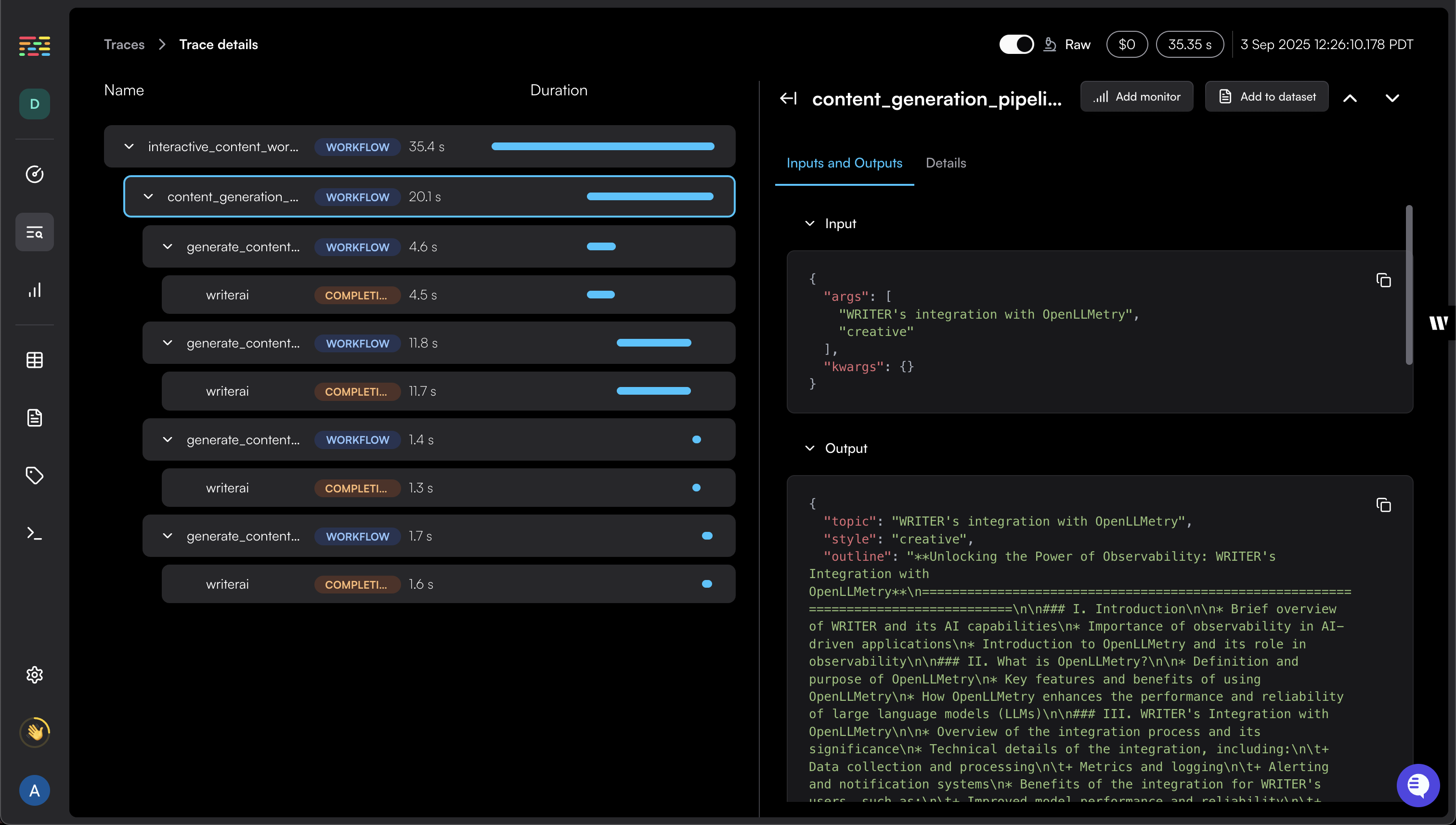
This guide shows you how to integrate Writer with [OpenLLMetry](https://www.traceloop.com/openllmetry) for monitoring and debugging your LLM applications. After completing these steps, you can trace and observe your Writer API calls alongside other LLM operations in your observability stack.
 ## What is OpenLLMetry?
OpenLLMetry is an open source project that enables monitoring and debugging of LLM application execution. It provides non-intrusive tracing built on top of OpenTelemetry, allowing you to export traces to your existing observability stack.
Since it's built on [OpenTelemetry](https://opentelemetry.io/), you can use any OpenTelemetry compatible backend (Jaeger, Zipkin, Datadog, New Relic, etc.) or the hosted Traceloop platform.
## What you get with the Writer integration
The Writer integration with OpenLLMetry provides enhanced observability beyond standard OpenTelemetry traces. You'll see detailed information about your Writer API calls as additional span attributes:
* **`gen_ai.request.model`**: the model requested (for example, `palmyra-x5`)
* **`gen_ai.prompt`**: array of prompts sent to the Writer model
* **`gen_ai.completion`**: array of completions returned from Writer
* **`gen_ai.usage.total_tokens`**: total tokens used
* **`gen_ai.usage.prompt_tokens`**: number of tokens used for prompts
* **`gen_ai.usage.completion_tokens`**: number of tokens used for completions
This gives you comprehensive visibility into your Writer API usage, including prompt engineering insights, token consumption patterns, and performance characteristics that aren't available in standard OpenTelemetry traces.
For a complete list of supported attributes, see the full [GenAI Semantic Conventions](https://www.traceloop.com/docs/openllmetry/contributing/semantic-conventions).
## Prerequisites
Before you begin, make sure you have:
* Python 3.11 or higher installed
* A [Writer AI Studio](https://app.writer.com/register) account
* A [Traceloop](https://auth.traceloop.com/en/login) account
* A Writer API key. See instructions in the [API Quickstart](/home/quickstart)
* Basic familiarity with Python and [OpenLLMetry concepts](https://www.traceloop.com/docs/openllmetry/introduction)
The example below uses **Traceloop** as the observability provider. See the [connect to an external provider](#connect-to-external-providers) section to learn how to connect to other providers.
## Configuration details
| Environment Variable | Required | Default | Description |
| ------------------------- | --------------- | --------------------------- | ------------------------------------------------------------------------------------------------------------------------------------------------------------------------------------------------------------------------------------------------------------------------------------------------------------------------------------------- |
| `WRITER_API_KEY` | **Required** | None | Writer API key for authenticating API calls. Must be set for the application to function. |
| `TRACELOOP_API_KEY` | **Conditional** | None | **Required for Traceloop Cloud**: Create an API key in your [Traceloop dashboard](https://app.traceloop.com/settings/api-keys) and set this environment variable. **Optional for external providers**: When connecting to other observability platforms (Datadog, New Relic, etc.), omit this variable and use `TRACELOOP_HEADERS` instead. |
| `TRACELOOP_BASE_URL` | Optional | `https://api.traceloop.com` | OpenTelemetry endpoint to connect to. If prefixed with `http`/`https`, uses [OTLP/HTTP protocol; otherwise uses OTLP/GRPC](https://opentelemetry.io/docs/specs/otel/protocol/exporter/). The SDK appends `/v1/traces`. |
| `TRACELOOP_HEADERS` | Optional | None | [Custom HTTP headers for authentication](https://www.traceloop.com/docs/openllmetry/configuration#headers). If set, API key is ignored. |
| `TRACELOOP_TRACE_CONTENT` | Optional | `true` | [Enable/disable logging of prompts, completions, and embeddings to span attributes](https://www.traceloop.com/docs/openllmetry/privacy/traces#disabling-logging-globally). |
| `TRACELOOP_TELEMETRY` | Optional | `true` | [Enable/disable anonymous telemetry data collection](https://www.traceloop.com/docs/openllmetry/configuration#control-telemetry). |
For additional configuration option details, see the [SDK initialization docs](https://www.traceloop.com/docs/openllmetry/configuration).
## Integrate Writer with OpenLLMetry
### 1. Install the SDK
Install OpenLLMetry in your Python environment:
```bash theme={null}
pip install traceloop-sdk
```
### 2. Initialize and configure
In your Writer application, initialize the Traceloop tracer. For local development, you may want to disable batch sending to see traces immediately.
```python theme={null}
import os
from traceloop.sdk import Traceloop
from writerai import Writer
# Initialize Traceloop for Writer monitoring
Traceloop.init(
app_name="YOUR_APP_NAME",
api_key=os.environ.get("TRACELOOP_API_KEY"),
# disable_batch=True # For local development, this disables batch sending so you can see Writer API traces immediately
)
# Initialize Writer client
client = Writer(api_key=os.environ.get("WRITER_API_KEY"))
```
### 3. (Optional) annotate your workflows
[Workflow annotations](https://www.traceloop.com/docs/openllmetry/tracing/annotations) help organize and group related operations for better trace visualization and debugging.
**When to use decorators:**
* **Complex processes**: Group related API calls and business logic into logical workflows
* **Custom naming**: Override automatic span naming with business-context names
* **Hierarchical tracing**: Create parent-child relationships between workflows and tasks
**Available decorators:**
| Decorator | Purpose | Use case |
| ----------- | -------------------------------------- | --------------------------------------------------------------- |
| `@workflow` | Multi-step processes or "chains" | Complete business workflows that can be traced as a single unit |
| `@task` | Individual operations within workflows | Specific actions or computations within a workflow |
| `@agent` | Autonomous agents | AI agents that can make decisions and use tools |
| `@tool` | Agent tools | Functions that agents can call to perform specific actions |
Workflow annotations are **optional**. OpenLLMetry traces Writer API calls automatically without needing any decorators or additional code.
```python theme={null}
from traceloop.sdk.decorators import workflow, task, agent, tool
# Workflow and task example
@workflow(name="content_creation")
def content_creation_pipeline(topic: str):
research = research_topic(topic)
content = generate_content(research)
return content
@task(name="research_topic")
def research_topic(topic: str):
completion = client.chat.completions.create(
model="palmyra-x5",
messages=[{"role": "user", "content": f"Provide a comprehensive overview of {topic}, including key concepts, benefits, and current trends."}],
max_tokens=300
)
return completion.choices[0].message.content
@task(name="generate_content")
def generate_content(research: str):
completion = client.chat.completions.create(
model="palmyra-x5",
messages=[{"role": "user", "content": f"Write an engaging article based on this research: {research}"}],
max_tokens=500
)
return completion.choices[0].message.content
# Agent and tool example
@agent(name="content_agent")
def content_agent(request: str):
return research_tool(request)
@tool(name="research_tool")
def research_tool(query: str):
completion = client.chat.completions.create(
model="palmyra-x5",
messages=[{"role": "user", "content": f"Find detailed information about {query} and provide key insights and data points."}],
max_tokens=300
)
return completion.choices[0].message.content
```
## Connect to external providers
Because the Traceloop SDK is built on OpenTelemetry, the data it generates can be used in any observability platform that supports the OpenTelemetry standard. OpenLLMetry extends this by using the OTLP protocol to connect with external observability providers, letting you send traces directly to your existing stack without relying on Traceloop’s hosted platform.
### Configure external provider connection
To connect to an external provider, configure the following environment variables:
| Environment Variable | Description |
| -------------------- | ----------------------------------------------------- |
| `TRACELOOP_BASE_URL` | The OTLP endpoint URL for your observability provider |
| `TRACELOOP_HEADERS` | Authentication headers (if required by your provider) |
### Example configurations
#### [Grafana Cloud](https://www.traceloop.com/docs/openllmetry/integrations/grafana#without-grafana-agent)
```bash theme={null}
# Generate base64 encoded credentials
echo -n ":" | base64
# Set environment variables
export TRACELOOP_BASE_URL=https://otlp-gateway-.grafana.net/otlp
export TRACELOOP_HEADERS="Authorization=Basic%20"
```
#### [Datadog](https://www.traceloop.com/docs/openllmetry/integrations/datadog)
```bash theme={null}
# Connect to your Datadog Agent (requires OTLP HTTP collector enabled)
export TRACELOOP_BASE_URL="http://:4318"
```
#### [New Relic](https://www.traceloop.com/docs/openllmetry/integrations/newrelic)
```bash theme={null}
export TRACELOOP_BASE_URL=https://otlp.nr-data.net:443
export TRACELOOP_HEADERS="api-key="
```
For a complete list of supported integrations, see the full [OpenLLMetry integrations catalog](https://www.traceloop.com/docs/openllmetry/integrations/introduction#the-integrations-catalog).
## Next steps
Now that you've set up Writer with OpenLLMetry, you can start monitoring your LLM applications. See the following resources to help you get the most out of your integration:
* Explore [OpenLLMetry's advanced features](https://docs.traceloop.com/docs/openllmetry/tracing) for more detailed tracing capabilities
* Learn about [workflow annotations](https://docs.traceloop.com/docs/openllmetry/tracing/workflow-annotations) to better organize your traces
* Set up [custom integrations](https://docs.traceloop.com/docs/openllmetry/integrations) with your existing observability stack
* Review the [Writer OpenLLMetry integration](https://github.com/traceloop/openllmetry/tree/main/packages/opentelemetry-instrumentation-writer) for additional details and examples
## What is OpenLLMetry?
OpenLLMetry is an open source project that enables monitoring and debugging of LLM application execution. It provides non-intrusive tracing built on top of OpenTelemetry, allowing you to export traces to your existing observability stack.
Since it's built on [OpenTelemetry](https://opentelemetry.io/), you can use any OpenTelemetry compatible backend (Jaeger, Zipkin, Datadog, New Relic, etc.) or the hosted Traceloop platform.
## What you get with the Writer integration
The Writer integration with OpenLLMetry provides enhanced observability beyond standard OpenTelemetry traces. You'll see detailed information about your Writer API calls as additional span attributes:
* **`gen_ai.request.model`**: the model requested (for example, `palmyra-x5`)
* **`gen_ai.prompt`**: array of prompts sent to the Writer model
* **`gen_ai.completion`**: array of completions returned from Writer
* **`gen_ai.usage.total_tokens`**: total tokens used
* **`gen_ai.usage.prompt_tokens`**: number of tokens used for prompts
* **`gen_ai.usage.completion_tokens`**: number of tokens used for completions
This gives you comprehensive visibility into your Writer API usage, including prompt engineering insights, token consumption patterns, and performance characteristics that aren't available in standard OpenTelemetry traces.
For a complete list of supported attributes, see the full [GenAI Semantic Conventions](https://www.traceloop.com/docs/openllmetry/contributing/semantic-conventions).
## Prerequisites
Before you begin, make sure you have:
* Python 3.11 or higher installed
* A [Writer AI Studio](https://app.writer.com/register) account
* A [Traceloop](https://auth.traceloop.com/en/login) account
* A Writer API key. See instructions in the [API Quickstart](/home/quickstart)
* Basic familiarity with Python and [OpenLLMetry concepts](https://www.traceloop.com/docs/openllmetry/introduction)
The example below uses **Traceloop** as the observability provider. See the [connect to an external provider](#connect-to-external-providers) section to learn how to connect to other providers.
## Configuration details
| Environment Variable | Required | Default | Description |
| ------------------------- | --------------- | --------------------------- | ------------------------------------------------------------------------------------------------------------------------------------------------------------------------------------------------------------------------------------------------------------------------------------------------------------------------------------------- |
| `WRITER_API_KEY` | **Required** | None | Writer API key for authenticating API calls. Must be set for the application to function. |
| `TRACELOOP_API_KEY` | **Conditional** | None | **Required for Traceloop Cloud**: Create an API key in your [Traceloop dashboard](https://app.traceloop.com/settings/api-keys) and set this environment variable. **Optional for external providers**: When connecting to other observability platforms (Datadog, New Relic, etc.), omit this variable and use `TRACELOOP_HEADERS` instead. |
| `TRACELOOP_BASE_URL` | Optional | `https://api.traceloop.com` | OpenTelemetry endpoint to connect to. If prefixed with `http`/`https`, uses [OTLP/HTTP protocol; otherwise uses OTLP/GRPC](https://opentelemetry.io/docs/specs/otel/protocol/exporter/). The SDK appends `/v1/traces`. |
| `TRACELOOP_HEADERS` | Optional | None | [Custom HTTP headers for authentication](https://www.traceloop.com/docs/openllmetry/configuration#headers). If set, API key is ignored. |
| `TRACELOOP_TRACE_CONTENT` | Optional | `true` | [Enable/disable logging of prompts, completions, and embeddings to span attributes](https://www.traceloop.com/docs/openllmetry/privacy/traces#disabling-logging-globally). |
| `TRACELOOP_TELEMETRY` | Optional | `true` | [Enable/disable anonymous telemetry data collection](https://www.traceloop.com/docs/openllmetry/configuration#control-telemetry). |
For additional configuration option details, see the [SDK initialization docs](https://www.traceloop.com/docs/openllmetry/configuration).
## Integrate Writer with OpenLLMetry
### 1. Install the SDK
Install OpenLLMetry in your Python environment:
```bash theme={null}
pip install traceloop-sdk
```
### 2. Initialize and configure
In your Writer application, initialize the Traceloop tracer. For local development, you may want to disable batch sending to see traces immediately.
```python theme={null}
import os
from traceloop.sdk import Traceloop
from writerai import Writer
# Initialize Traceloop for Writer monitoring
Traceloop.init(
app_name="YOUR_APP_NAME",
api_key=os.environ.get("TRACELOOP_API_KEY"),
# disable_batch=True # For local development, this disables batch sending so you can see Writer API traces immediately
)
# Initialize Writer client
client = Writer(api_key=os.environ.get("WRITER_API_KEY"))
```
### 3. (Optional) annotate your workflows
[Workflow annotations](https://www.traceloop.com/docs/openllmetry/tracing/annotations) help organize and group related operations for better trace visualization and debugging.
**When to use decorators:**
* **Complex processes**: Group related API calls and business logic into logical workflows
* **Custom naming**: Override automatic span naming with business-context names
* **Hierarchical tracing**: Create parent-child relationships between workflows and tasks
**Available decorators:**
| Decorator | Purpose | Use case |
| ----------- | -------------------------------------- | --------------------------------------------------------------- |
| `@workflow` | Multi-step processes or "chains" | Complete business workflows that can be traced as a single unit |
| `@task` | Individual operations within workflows | Specific actions or computations within a workflow |
| `@agent` | Autonomous agents | AI agents that can make decisions and use tools |
| `@tool` | Agent tools | Functions that agents can call to perform specific actions |
Workflow annotations are **optional**. OpenLLMetry traces Writer API calls automatically without needing any decorators or additional code.
```python theme={null}
from traceloop.sdk.decorators import workflow, task, agent, tool
# Workflow and task example
@workflow(name="content_creation")
def content_creation_pipeline(topic: str):
research = research_topic(topic)
content = generate_content(research)
return content
@task(name="research_topic")
def research_topic(topic: str):
completion = client.chat.completions.create(
model="palmyra-x5",
messages=[{"role": "user", "content": f"Provide a comprehensive overview of {topic}, including key concepts, benefits, and current trends."}],
max_tokens=300
)
return completion.choices[0].message.content
@task(name="generate_content")
def generate_content(research: str):
completion = client.chat.completions.create(
model="palmyra-x5",
messages=[{"role": "user", "content": f"Write an engaging article based on this research: {research}"}],
max_tokens=500
)
return completion.choices[0].message.content
# Agent and tool example
@agent(name="content_agent")
def content_agent(request: str):
return research_tool(request)
@tool(name="research_tool")
def research_tool(query: str):
completion = client.chat.completions.create(
model="palmyra-x5",
messages=[{"role": "user", "content": f"Find detailed information about {query} and provide key insights and data points."}],
max_tokens=300
)
return completion.choices[0].message.content
```
## Connect to external providers
Because the Traceloop SDK is built on OpenTelemetry, the data it generates can be used in any observability platform that supports the OpenTelemetry standard. OpenLLMetry extends this by using the OTLP protocol to connect with external observability providers, letting you send traces directly to your existing stack without relying on Traceloop’s hosted platform.
### Configure external provider connection
To connect to an external provider, configure the following environment variables:
| Environment Variable | Description |
| -------------------- | ----------------------------------------------------- |
| `TRACELOOP_BASE_URL` | The OTLP endpoint URL for your observability provider |
| `TRACELOOP_HEADERS` | Authentication headers (if required by your provider) |
### Example configurations
#### [Grafana Cloud](https://www.traceloop.com/docs/openllmetry/integrations/grafana#without-grafana-agent)
```bash theme={null}
# Generate base64 encoded credentials
echo -n ":" | base64
# Set environment variables
export TRACELOOP_BASE_URL=https://otlp-gateway-.grafana.net/otlp
export TRACELOOP_HEADERS="Authorization=Basic%20"
```
#### [Datadog](https://www.traceloop.com/docs/openllmetry/integrations/datadog)
```bash theme={null}
# Connect to your Datadog Agent (requires OTLP HTTP collector enabled)
export TRACELOOP_BASE_URL="http://:4318"
```
#### [New Relic](https://www.traceloop.com/docs/openllmetry/integrations/newrelic)
```bash theme={null}
export TRACELOOP_BASE_URL=https://otlp.nr-data.net:443
export TRACELOOP_HEADERS="api-key="
```
For a complete list of supported integrations, see the full [OpenLLMetry integrations catalog](https://www.traceloop.com/docs/openllmetry/integrations/introduction#the-integrations-catalog).
## Next steps
Now that you've set up Writer with OpenLLMetry, you can start monitoring your LLM applications. See the following resources to help you get the most out of your integration:
* Explore [OpenLLMetry's advanced features](https://docs.traceloop.com/docs/openllmetry/tracing) for more detailed tracing capabilities
* Learn about [workflow annotations](https://docs.traceloop.com/docs/openllmetry/tracing/workflow-annotations) to better organize your traces
* Set up [custom integrations](https://docs.traceloop.com/docs/openllmetry/integrations) with your existing observability stack
* Review the [Writer OpenLLMetry integration](https://github.com/traceloop/openllmetry/tree/main/packages/opentelemetry-instrumentation-writer) for additional details and examples