> ## Documentation Index
> Fetch the complete documentation index at: https://dev.writer.com/llms.txt
> Use this file to discover all available pages before exploring further.
# Choose your development path
> Choose your development path for AI agents. Compare no-code builder, Agent Builder, and Writer API/SDKs for customization and technical requirements.
Need help building? Writer has an in-house solutions team that can build custom
AI agents for you. **[Contact our sales team](https://go.writer.com/contact-sales)**
Writer offers multiple development paths to build AI agents and applications, each designed for different technical backgrounds and use cases. Whether you're a business user who wants to build agents without coding, a Python developer looking for a visual editor with backend flexibility, or an engineer who needs full API control, Writer provides the right tools for your project. Each option is powered by the same Writer generative AI platform but differs in code requirements, customization scope, and development approach.
## Development options comparison
Determine which path is right for you by thinking about what you want to achieve and your technical background:
| Platform | Best for | Coding required | Customization scope |
| --------------- | ------------------------------------------------------------------------------- | ---------------------------------------------------------------------- | ------------------------------------------------------------------------------------- |
| No-code builder | Simple AI agents for content generation, chat, and research | None. Build with prompts and visual configuration only | Moderate. Chain prompts, configure outputs, and adjust settings through UI |
| Agent Builder | Complex workflows with UI components, data processing, and multi-step logic | Optional. Use visual blocks or add custom Python for advanced features | Extensive. Drag-and-drop UI builder, workflow automation, and custom code integration |
| Writer API/SDKs | Integrating AI capabilities into existing applications or building from scratch | Advanced. Full programming knowledge required | Unlimited. Complete control over implementation and user experience |
## Choose your development path
Agent Builder is ideal for anyone who wants to build complex AI agents using visual tools with optional coding.
**With Agent Builder, you can:**
* Build AI agents using a drag-and-drop visual editor
* Add Python code to your agent to build custom logic
* Use external data, like APIs, to bring in information from other sources
* Easily integrate Writer platform capabilities like Knowledge Graphs and tool calling using prebuilt blocks
* Quickly analyze and visualize data using an LLM
### Getting started resources
* [Agent Builder overview](/agent-builder/overview)
* [Demo agent walkthrough](/agent-builder/demo-agent)
* [Agent Builder quickstart](/agent-builder/quickstart)
### Guides
* [Chatbot tutorial](/agent-builder/chatbot-tutorial)
* [Process invoices and send to Slack](/agent-builder/invoice-processing)
* [Upload, parse, and summarize PDFs](/agent-builder/summarize-pdfs)
* [Tool calling](/agent-builder/tool-calling)
### Example use cases
Build a chatbot to answer frequently asked questions and help customers with their inquiries.
Use Palmyra-Med to generate SOAP notes and extract ICD codes from patient-doctor chat.
Guide new hires through personalized onboarding checklists, automatically provision accounts and access, and track completion progress across departments.
Analyze legal documents for key terms, potential risks, and compliance issues, then generate summary reports for legal teams.
Automatically classify incoming support tickets by urgency and topic, then route them to the appropriate team with suggested responses.
No-code tools are ideal for business users who want to quickly build an AI agent without writing any lines of code.
**With the No-code builder, you can:**
* Build AI agents using a visual editor
* Build agents with content generation or editing capabilities
* Create internal tools for content teams
* Create agents with chat capabilities that can also connect to a Knowledge Graph of your data
* Create agents that can research, search the web, and prepare reports
* Use any available model, including Palmyra and external models
### Quickstart guides
To start building, follow a quickstart for your specific use case:
* [Text generation](/no-code/text-generation)
* [Chat](/no-code/chat)
* [Research](/no-code/research)
### Example use cases
Using [Knowledge Graph](https://writer.com/product/graph-based-rag/), our graph-based RAG solution, you can build chat assistants to quickly ask questions using your data sources.
Automate an entire campaign workflow and generate all launch assets from a single messaging document or GTM presentation.
Writer API and SDKs are ideal for engineers who want to embed generative AI into their own stack or access the Writer platform via an API, regardless of the programming language.
**With the Writer APIs, you can:**
* Use chat and completion APIs to build custom apps, or build custom integrations with your existing tech stack.
* Create knowledge graphs using your own files and documents, allowing you to build intelligent Q\&A systems, content recommendation engines, and document retrieval systems that understand context.
* Extend the LLM's functionality by enabling it to call your custom functions with tool calling. The model can use these functions to fetch real-time data or perform calculations when generating responses.
* Use the RESTful API with any language you prefer, or use our Python SDK or Node SDK.
* **Note:** You will need an API key to use Writer APIs/SDKs. [Follow the instructions here to get your API key](/api-reference/api-keys).
### Getting started resources
* [API Quickstart](/home/quickstart)
* [Getting started with Writer SDKs](/home/sdks)
* [Python SDK](https://pypi.org/project/writer-sdk/) (`pip install writer-sdk`)
* We also have several [Python cookbooks](https://github.com/writer/cookbooks) available to help you get started with common tasks.
* [Node SDK](https://www.npmjs.com/package/writer-sdk) (`npm install writer-sdk`)
### Guides
* [Text generation](/home/text-generation)
* [Chat completion](/home/chat-completion)
* [Knowledge Graph](/home/knowledge-graph)
* [Applications API](/home/applications)
* [Tool calling](/home/tool-calling)
* [Knowledge Graph chat](/home/kg-chat)
### Example use cases
Embed a chat app into an existing tool or service.
Add text completion capabilities to an existing tool or service your company already uses.
## Start from a template
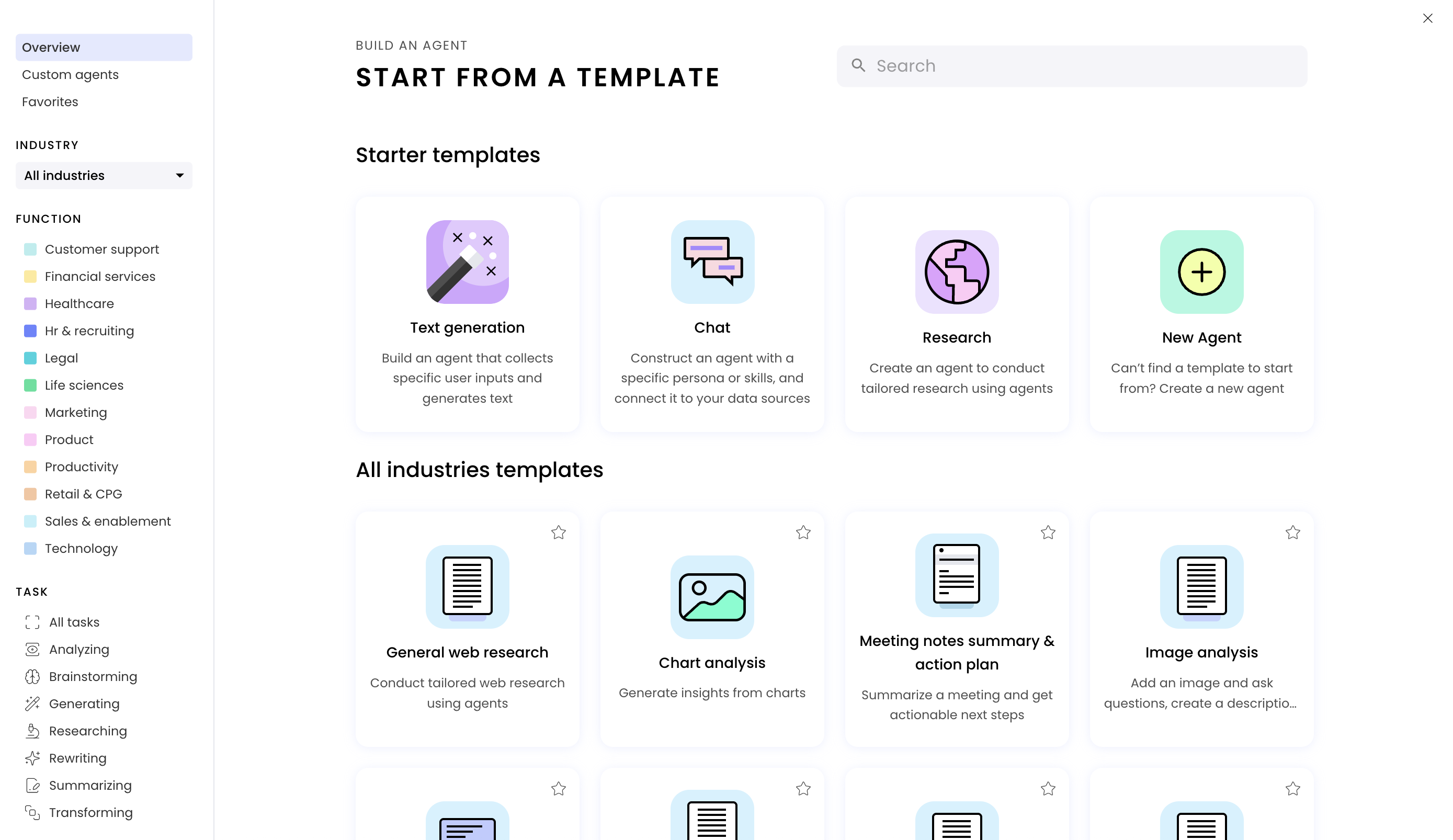
When building a new agent, you can choose to start from scratch or accelerate your development with a prebuilt template. These templates provide ready-to-use prompts, configurations, and workflows tailored to specific business needs and use cases. There are templates for no-code agents and Agent Builder agents.
 ### Template categories
**Starter templates** are core building blocks for common agent types:
* **Text Generation**: Build [no-code agents](/no-code/text-generation) that collect user inputs and generate customized text
* **Chat**: Construct [conversational no-code agents](/no-code/chat) with specific personas connected to your data sources
* **Research**: Create [no-code agents](/no-code/research) for conducting tailored research and analysis
* **New Agent**: Start completely from scratch with [Agent Builder](/agent-builder/overview) when no template fits your needs
**Industry-specific templates** are specialized agents designed for particular sectors:
* **Financial Services**: From broker research Q\&A and 10-K summaries to fund compliance and market research
* **Healthcare**: Medical article summaries, FDA guidance assistants, and regulatory document analysis
* **Legal**: Contract review, compliance checking, and regulatory document processing
* **Retail and e-commerce**: Product descriptions, competitive analysis, and SEO optimization
**Function-based templates** are templates organized by business function:
* **Marketing**: Campaign briefs, content creation, social media posts, and brand messaging
* **Sales**: Outbound emails, prospect research, lead follow-ups, and client relationship management
* **Customer Support**: Help center Q\&A, review responses, and sentiment analysis
* **Content Creation**: Blog outlines, thought leadership articles, case studies, and presentation slides
* **Operations**: Meeting summaries, document processing, and workflow automation
**Custom Agents** are organization-specific templates from your Agent Library. These are specialized agents that other users within your organization have created and published, offering tailored solutions and workflows that align with your company's specific needs and processes.
### Filtering and discovery
You can filter templates by industry, function, and task.
* **Industry**: Browse sector-specific templates across Finance, Healthcare, Legal, Marketing, Retail, and more
* **Function**: Filter by business area such as Customer Support, Sales, Content Creation, or Operations
* **Task**: Find templates by specific capabilities like Analyzing, Brainstorming, Researching, Summarizing, or Generating
Each template includes a detailed preview and description of its capabilities so that you can select the best starting point for your agent development project.
### Agent Builder templates
The majority of prebuilt agent templates are [no-code agent](/no-code/introduction) templates.
The following prebuilt templates use [Agent Builder](/agent-builder/overview):
* **Content lifecycle**: Transform a single campaign brief into a fully built, ready-to-launch campaign. This agent extracts goals and summaries, generates project tasks, creates copy and visuals, and runs the final content through customizable legal checks, streamlining every step of the marketing content supply chain.
* **SDR outreach**: Generate personalized outreach emails tailored to a target account. This agent combines prospect research with product positioning to craft a multi-email sequence that aligns with the prospect's business priorities and challenges.
### Template categories
**Starter templates** are core building blocks for common agent types:
* **Text Generation**: Build [no-code agents](/no-code/text-generation) that collect user inputs and generate customized text
* **Chat**: Construct [conversational no-code agents](/no-code/chat) with specific personas connected to your data sources
* **Research**: Create [no-code agents](/no-code/research) for conducting tailored research and analysis
* **New Agent**: Start completely from scratch with [Agent Builder](/agent-builder/overview) when no template fits your needs
**Industry-specific templates** are specialized agents designed for particular sectors:
* **Financial Services**: From broker research Q\&A and 10-K summaries to fund compliance and market research
* **Healthcare**: Medical article summaries, FDA guidance assistants, and regulatory document analysis
* **Legal**: Contract review, compliance checking, and regulatory document processing
* **Retail and e-commerce**: Product descriptions, competitive analysis, and SEO optimization
**Function-based templates** are templates organized by business function:
* **Marketing**: Campaign briefs, content creation, social media posts, and brand messaging
* **Sales**: Outbound emails, prospect research, lead follow-ups, and client relationship management
* **Customer Support**: Help center Q\&A, review responses, and sentiment analysis
* **Content Creation**: Blog outlines, thought leadership articles, case studies, and presentation slides
* **Operations**: Meeting summaries, document processing, and workflow automation
**Custom Agents** are organization-specific templates from your Agent Library. These are specialized agents that other users within your organization have created and published, offering tailored solutions and workflows that align with your company's specific needs and processes.
### Filtering and discovery
You can filter templates by industry, function, and task.
* **Industry**: Browse sector-specific templates across Finance, Healthcare, Legal, Marketing, Retail, and more
* **Function**: Filter by business area such as Customer Support, Sales, Content Creation, or Operations
* **Task**: Find templates by specific capabilities like Analyzing, Brainstorming, Researching, Summarizing, or Generating
Each template includes a detailed preview and description of its capabilities so that you can select the best starting point for your agent development project.
### Agent Builder templates
The majority of prebuilt agent templates are [no-code agent](/no-code/introduction) templates.
The following prebuilt templates use [Agent Builder](/agent-builder/overview):
* **Content lifecycle**: Transform a single campaign brief into a fully built, ready-to-launch campaign. This agent extracts goals and summaries, generates project tasks, creates copy and visuals, and runs the final content through customizable legal checks, streamlining every step of the marketing content supply chain.
* **SDR outreach**: Generate personalized outreach emails tailored to a target account. This agent combines prospect research with product positioning to craft a multi-email sequence that aligns with the prospect's business priorities and challenges.