 ## Overview
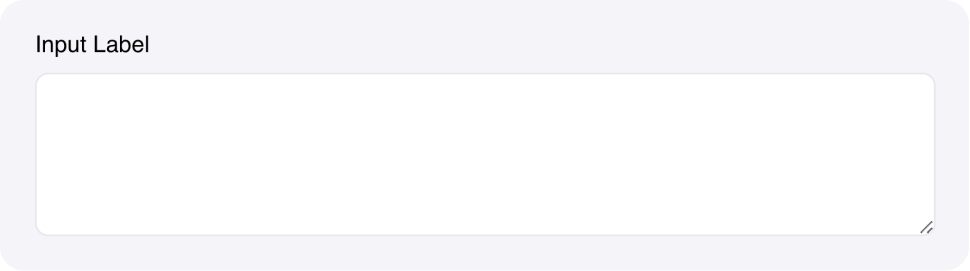
The **Text area Input** component allows users to enter multi-line text values. It's designed for longer text content like descriptions, comments, reviews, or any content that requires multiple lines.
## Common use cases
* **Long-form content**: Collect essays, articles, or detailed descriptions
* **User feedback**: Gather reviews, comments, or support requests
* **Data entry**: Allow users to paste large amounts of text or data
* **Configuration**: Collect complex configuration settings or parameters
## How it works
1. **Multi-line input**: Users can enter text across multiple lines
2. **Manual resizing**: Users can resize the text area by dragging the bottom corner
3. **State binding**: Content automatically saves to the specified state variable
4. **Real-time events**: Triggers events as users type or finish editing
5. **Configurable rows**: Set the initial number of rows to display
The component provides a familiar text editing experience with manual resizing for longer content entry.
## Configuration options
### Basic settings
* **Label**: Text label displayed above the input field
* **Placeholder**: Hint text shown when the field is empty
* **Rows**: Number of rows to display (default: `5`)
* **Link variable**: The name of the state variable that stores the input value
### Styling options
* **Custom CSS classes**: Apply additional styling
### Events
* **wf-change**: Triggered as users type (real-time) - payload contains the text area content
* **wf-change-finish**: Triggered when users finish editing (on blur) - payload contains the text area content
## Example
### Customer feedback form
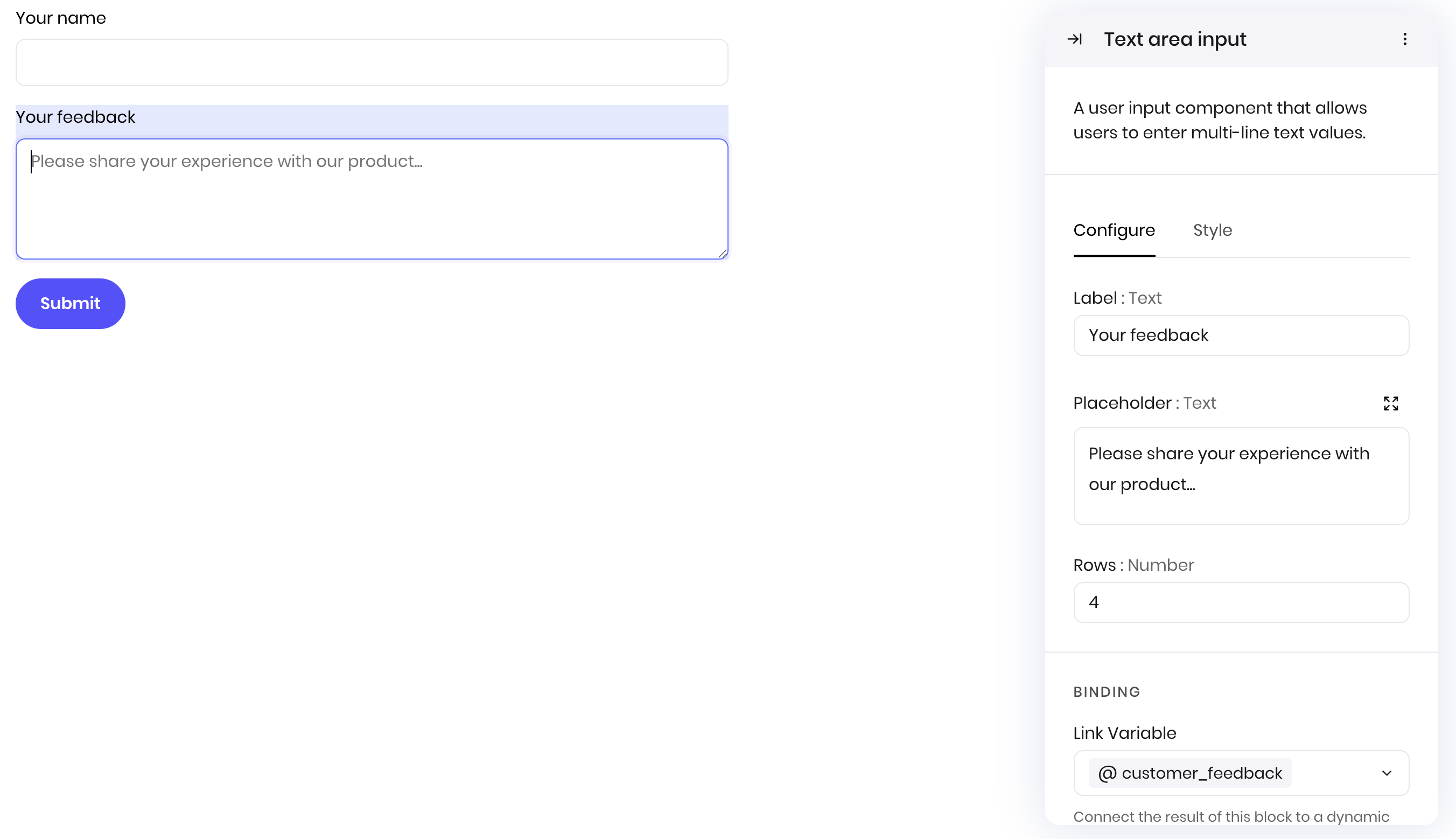
This example shows how to create a customer feedback form with a text area for detailed comments.
**Interface:**
* Text Input for customer name
* Text area Input for feedback details
* Button to submit the form
**Text area Input configuration:**
* Label: "Your feedback"
* Placeholder: "Please share your experience with our product..."
* State element: `customer_feedback`
* Rows: 4
## Overview
The **Text area Input** component allows users to enter multi-line text values. It's designed for longer text content like descriptions, comments, reviews, or any content that requires multiple lines.
## Common use cases
* **Long-form content**: Collect essays, articles, or detailed descriptions
* **User feedback**: Gather reviews, comments, or support requests
* **Data entry**: Allow users to paste large amounts of text or data
* **Configuration**: Collect complex configuration settings or parameters
## How it works
1. **Multi-line input**: Users can enter text across multiple lines
2. **Manual resizing**: Users can resize the text area by dragging the bottom corner
3. **State binding**: Content automatically saves to the specified state variable
4. **Real-time events**: Triggers events as users type or finish editing
5. **Configurable rows**: Set the initial number of rows to display
The component provides a familiar text editing experience with manual resizing for longer content entry.
## Configuration options
### Basic settings
* **Label**: Text label displayed above the input field
* **Placeholder**: Hint text shown when the field is empty
* **Rows**: Number of rows to display (default: `5`)
* **Link variable**: The name of the state variable that stores the input value
### Styling options
* **Custom CSS classes**: Apply additional styling
### Events
* **wf-change**: Triggered as users type (real-time) - payload contains the text area content
* **wf-change-finish**: Triggered when users finish editing (on blur) - payload contains the text area content
## Example
### Customer feedback form
This example shows how to create a customer feedback form with a text area for detailed comments.
**Interface:**
* Text Input for customer name
* Text area Input for feedback details
* Button to submit the form
**Text area Input configuration:**
* Label: "Your feedback"
* Placeholder: "Please share your experience with our product..."
* State element: `customer_feedback`
* Rows: 4
 ## Fields
| Name | Type | Description | Options |
|---|---|---|---|
| Label | Text | - | - |
| Placeholder | Text | - | - |
| Rows | Number | - | - |
| Custom CSS classes | Text | CSS classes, separated by spaces. You can define classes in custom stylesheets. | - |