 ## Overview
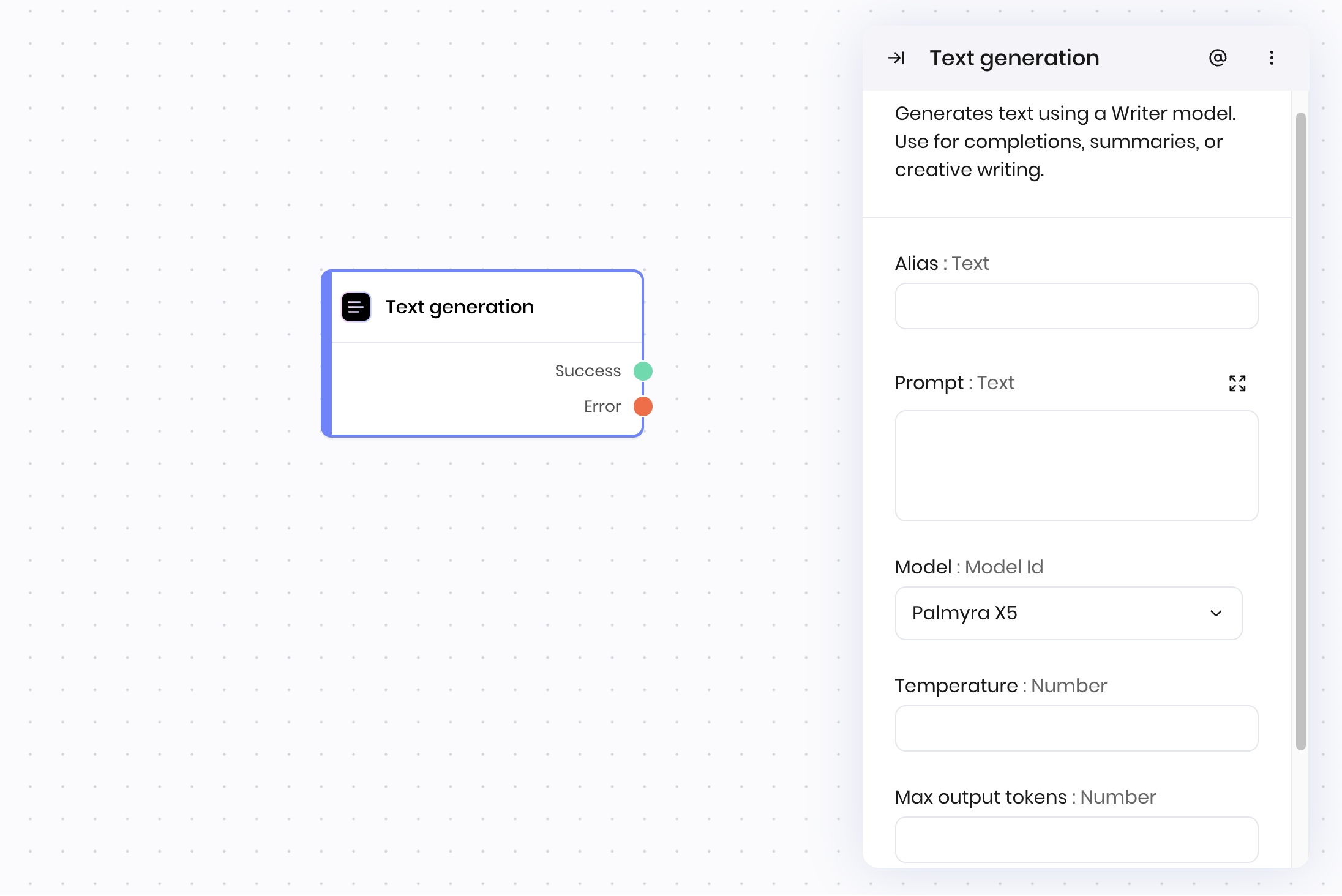
The **Text generation** block generates text using a Palmyra model. Use it for text completions, summaries, creative writing, and more. You provide a prompt, and the model generates a response based on your instructions.
You can control the creativity of the output using the temperature setting, and limit the length with the max output tokens field.
## Common use cases
* Generating summaries or explanations
* Creative writing such as stories, marketing copy, and abstracts
* Expanding or rewriting text
* Answering questions based on a prompt
## How it works
1. **Prompt**: Enter the text or instructions for the model.
2. **Model**: Select the model to use for generation. Learn more about [the suite of Palmyra models](/home/models).
3. **Temperature**: Adjusts randomness and creativity. A higher temperature value like 0.7-1.0 makes the output more creative, while a lower temperature value like 0.0-0.3 makes it more deterministic.
4. **Max output tokens**: Sets the maximum length of the generated text.
The block sends the prompt and settings to the model, which returns the generated text as output.
## Examples
### Content creation workflow
This example shows a marketing workflow where user input is transformed into professional marketing copy.
**Blueprint Flow:**
1. **UI Trigger** → Marketing team submits product details through form
2. **Text generation** → Creates product description based on input
3. **Set state** → Stores generated content for review and approval in the interface
**Block Configuration:**
* **Prompt:** "Create a compelling product description for a @{product_name} that highlights its @{key_features}. Target audience: @{target_audience}. Tone: professional but approachable."
* **Model:** `palmyra-x5`
* **Temperature:** `0.7`
## Overview
The **Text generation** block generates text using a Palmyra model. Use it for text completions, summaries, creative writing, and more. You provide a prompt, and the model generates a response based on your instructions.
You can control the creativity of the output using the temperature setting, and limit the length with the max output tokens field.
## Common use cases
* Generating summaries or explanations
* Creative writing such as stories, marketing copy, and abstracts
* Expanding or rewriting text
* Answering questions based on a prompt
## How it works
1. **Prompt**: Enter the text or instructions for the model.
2. **Model**: Select the model to use for generation. Learn more about [the suite of Palmyra models](/home/models).
3. **Temperature**: Adjusts randomness and creativity. A higher temperature value like 0.7-1.0 makes the output more creative, while a lower temperature value like 0.0-0.3 makes it more deterministic.
4. **Max output tokens**: Sets the maximum length of the generated text.
The block sends the prompt and settings to the model, which returns the generated text as output.
## Examples
### Content creation workflow
This example shows a marketing workflow where user input is transformed into professional marketing copy.
**Blueprint Flow:**
1. **UI Trigger** → Marketing team submits product details through form
2. **Text generation** → Creates product description based on input
3. **Set state** → Stores generated content for review and approval in the interface
**Block Configuration:**
* **Prompt:** "Create a compelling product description for a @{product_name} that highlights its @{key_features}. Target audience: @{target_audience}. Tone: professional but approachable."
* **Model:** `palmyra-x5`
* **Temperature:** `0.7`
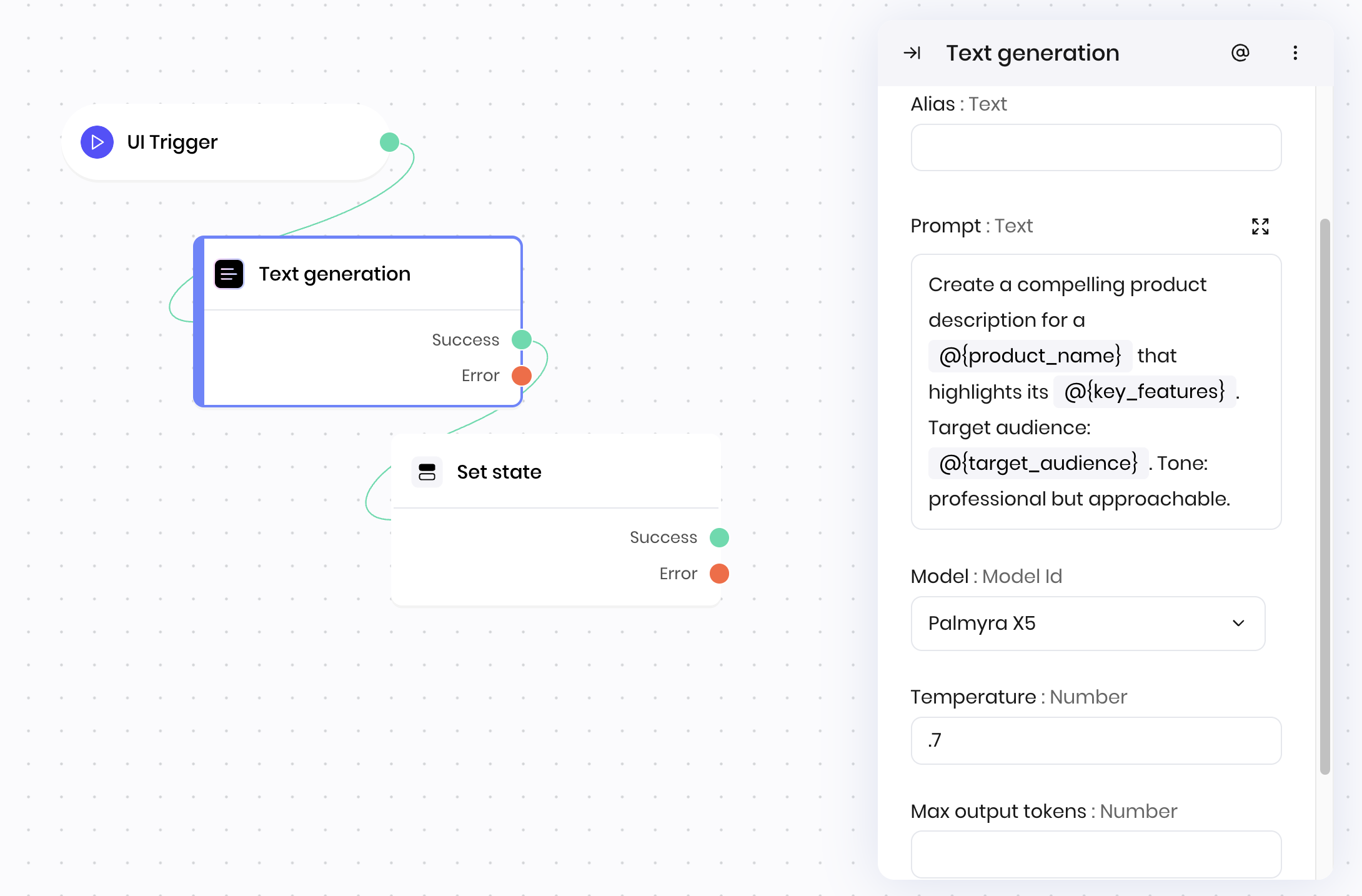 This workflow automates content creation while ensuring appropriate tone and messaging for different marketing channels.
### Customer support response system
This example demonstrates an automated support system that generates personalized responses based on customer inquiries.
**Blueprint Flow:**
1. **UI Trigger** → Customer submits support ticket
2. **Classification** → Categorizes the issue type
3. **Text generation** → Creates personalized response based on category
4. **Set state** → Stores response for customer to display in the interface
**Block Configuration:**
* **Prompt:** "Generate a helpful and empathetic response for a customer unable to log into their @{product}. Address common login troubleshooting steps like password reset, browser cache clearing, and two-factor authentication issues. Include links to our password reset tool and support documentation. If these steps don't resolve the issue, provide instructions for escalating to our technical support team."
* **Model:** `palmyra-x5`
* **Temperature:** `0.4`
This workflow automates content creation while ensuring appropriate tone and messaging for different marketing channels.
### Customer support response system
This example demonstrates an automated support system that generates personalized responses based on customer inquiries.
**Blueprint Flow:**
1. **UI Trigger** → Customer submits support ticket
2. **Classification** → Categorizes the issue type
3. **Text generation** → Creates personalized response based on category
4. **Set state** → Stores response for customer to display in the interface
**Block Configuration:**
* **Prompt:** "Generate a helpful and empathetic response for a customer unable to log into their @{product}. Address common login troubleshooting steps like password reset, browser cache clearing, and two-factor authentication issues. Include links to our password reset tool and support documentation. If these steps don't resolve the issue, provide instructions for escalating to our technical support team."
* **Model:** `palmyra-x5`
* **Temperature:** `0.4`
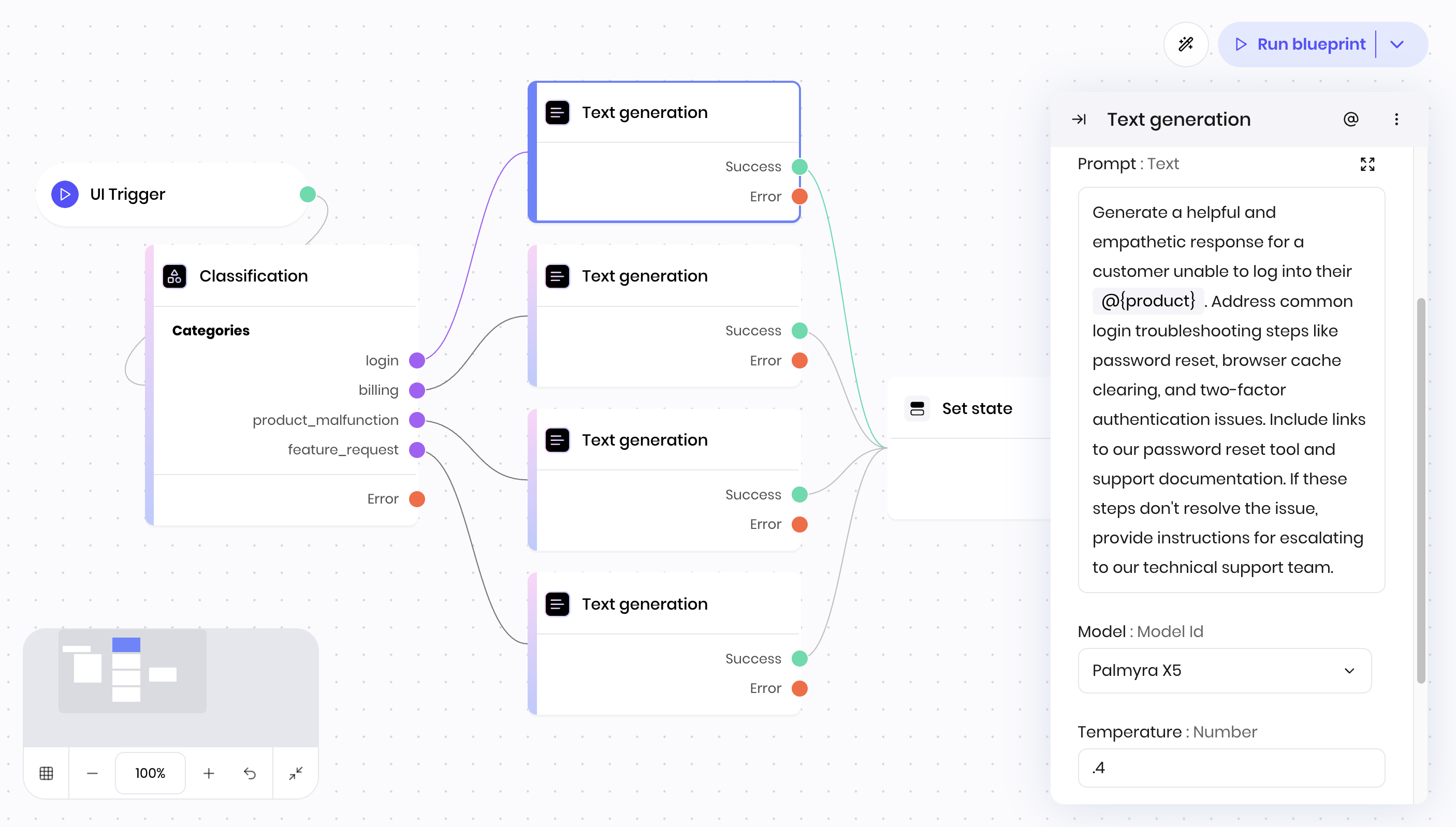 This workflow provides automated, personalized customer support responses while maintaining human-like empathy and helpfulness.
## Fields
This workflow provides automated, personalized customer support responses while maintaining human-like empathy and helpfulness.
## Fields
| Name | Type | Control | Default | Description | Options | Validation |
|---|---|---|---|---|---|---|
| Prompt | Text | Textarea | - | - | - | - |
| Model | Model Id | - |
palmyra-x5
|
- | - | - |
| Temperature | Number | - |
0.7
|
- | - | Range: 0 to 1 |
| Max output tokens | Number | - |
1024
|
- | - | Range: 1 to 16384 |
| Name | Field | Type | Description |
|---|---|---|---|
| Success | - | success | Text was generated successfully. |
| Error | - | error | There was an error generating text. |