> ## Documentation Index
> Fetch the complete documentation index at: https://dev.writer.com/llms.txt
> Use this file to discover all available pages before exploring further.
# Using data from previous blocks
> Pass data between blocks in Agent Builder blueprints. Access state variables, secrets, and results from preceding blocks with execution environment.
Agents can pass data between blocks in the blueprint and the UI to create dynamic workflows. Each block operates with a set of variables in its execution environment.
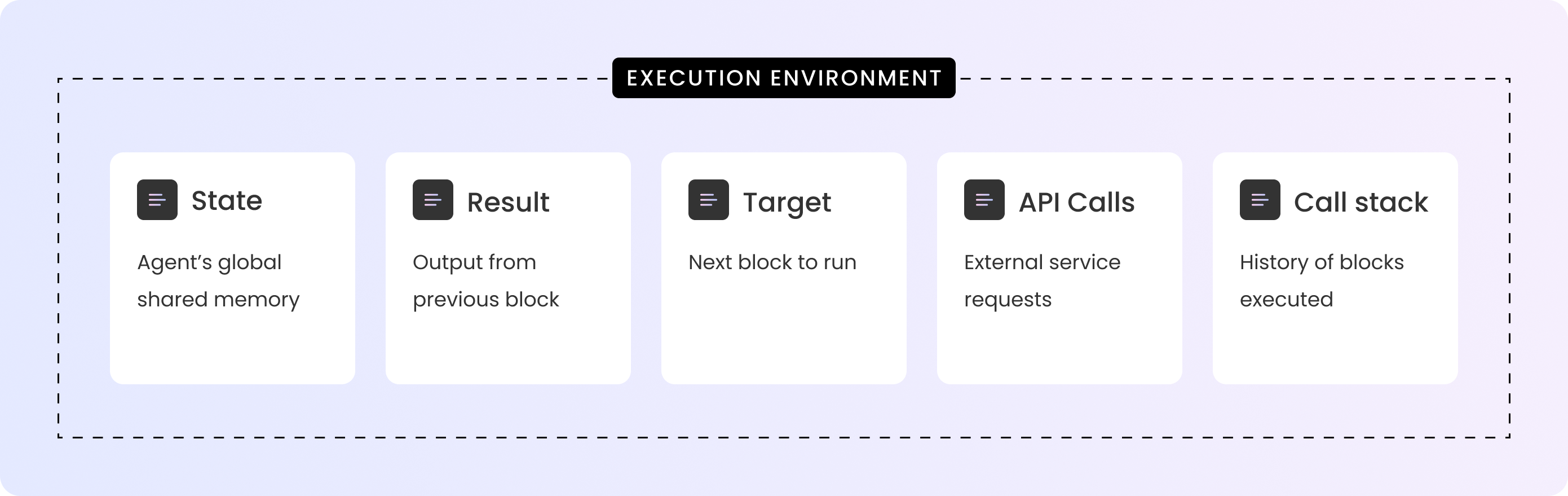
The execution environment includes the agent's [state variables](/agent-builder/state) and [secrets](/agent-builder/secrets), along with the results and inputs from the preceding blocks in the blueprint. You can access variables from the execution environment in the blueprint and in custom code.
The most common use case for the execution environment is to access the result of the preceding block. Each blueprint block that runs passes its result to the next block in the blueprint, which you can access with the `@{result}` variable in the following block.
The execution environment is specific to each block in the blueprint and changes based on the block's inputs, outputs, and state.
This document includes:
* [An explanation of the execution environment](#execution-environment-explained)
* [A table of variables available in the execution environment](#variables-available-to-each-block)
* [Examples of how to access variables in the execution environment](#access-execution-environment-variables)
## Execution environment explained
Think of an execution environment like a toolbox that a block can access while it's running. This toolbox contains useful information that your agent needs to do its job, like remembering information from earlier steps or accessing important values you've saved. Blocks can add, remove, and update variables in the execution environment as they run.
Most of the information in the toolbox is primarily useful for internal use, debugging, and advanced use cases, but `@{result}` is particularly important for you as you build workflows.
Whenever a block finishes running, it adds its result to the execution environment. This result is then available to the next block in the blueprint so it can act on it.
 ### Example from a blueprint
Consider the following section of a blueprint that generates text based on a specific prompt. It shows two connected blocks:
* A **Text generation** block that generates text based on a specific prompt
* A **Set state** block that sets a state variable with the results of the **Text generation** block
### Example from a blueprint
Consider the following section of a blueprint that generates text based on a specific prompt. It shows two connected blocks:
* A **Text generation** block that generates text based on a specific prompt
* A **Set state** block that sets a state variable with the results of the **Text generation** block
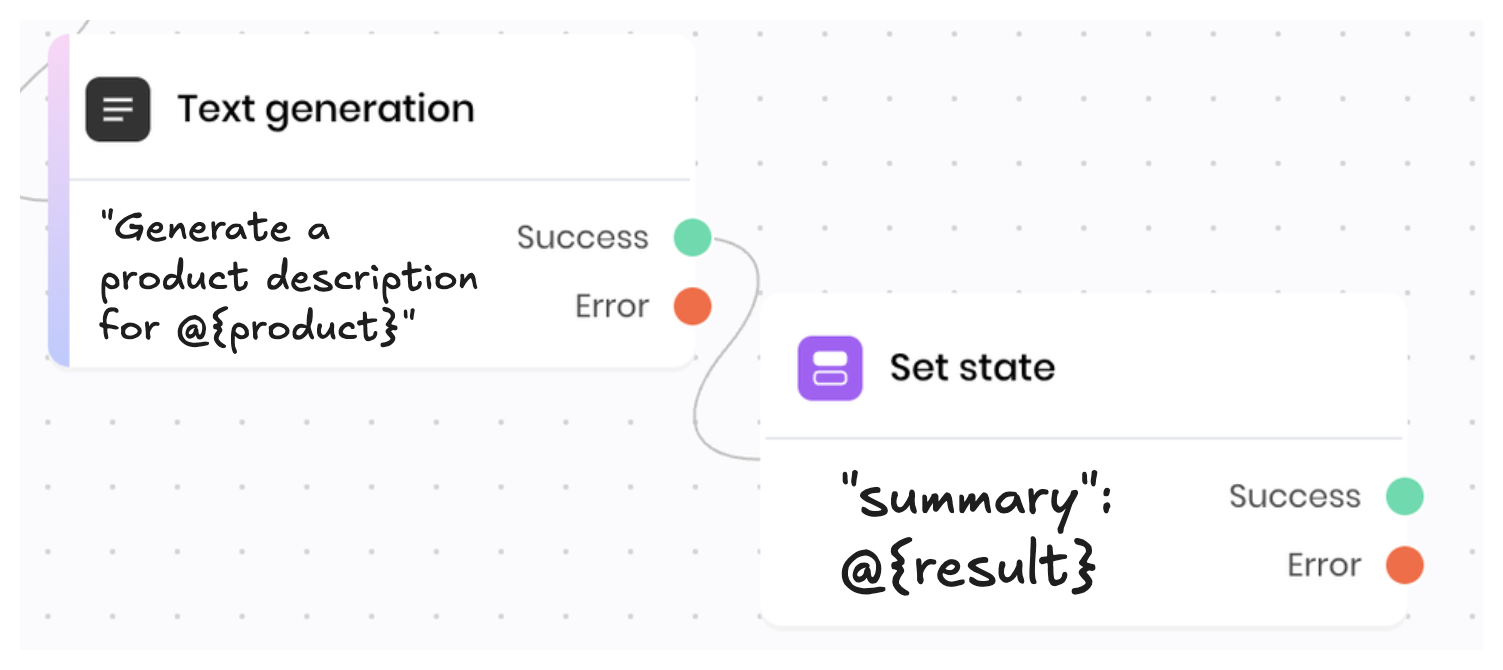 * The **Text generation** block uses the state variable `product` to access information that the user input via the UI. It then generates text based on that information.
* The **Set state** block's execution environment includes the `result` variable from the **Text generation** block, which is the summary of the file. It sets a state variable with that result so that the UI can display the summary.
## Variables available to each block
The following table shows the variables that are available to each block in the execution environment. Not all variables are available in all blocks; for example, the `api_calls` variable is only available when the block makes an API call.
Many of these variables are primarily useful for internal use, debugging, and advanced use cases. However, the `result` variable is particularly useful for building workflows.
| Variable | Type | Description | Example |
| ---------------- | ------------- | ------------------------------------------------------------------------------------------------------------------------------------------------------------------------------------------------------------------------------------------------- | ---------------------------------------------------------------------------------------------------------------------------- |
| `api_calls` | `array[dict]` | Any Writer API calls that the agent made at this block, including the request and the response. For example, API calls from a **Text generation** block to the Writer [chat completions](/api-reference/completion-api/chat-completion) endpoint. | `[{'request': {'method': 'POST', ...}, 'response': {'status_code': 200, ...}}]` |
| `call_stack` | `dict` | The call stack of the agent. The key is the index of the block in the call stack and the value is the block ID. | `{0: "123abc", 1: "456def"}` |
| `context` | `dict` | The ID of the block that triggered the blueprint execution and the event that triggered it. | `{'target': '123abc', 'event': 'wf-click'}` |
| `httpx_requests` | `array[dict]` | Any HTTP requests that the agent made at this block, including the request and the response. | `[{'request': {'method': 'POST', ...}, 'response': {'status_code': 200, ...}}]` |
| `item` | Any | An individual item in a **For-each** block loop. The type of the item varies based on the values provided to the **For-each** block. For a dictionary, this is the value of the item. For a list, this is the item itself. | `file123` |
| `itemId` | `str` | The ID of the individual item in a **For-each** block loop. For a list, this is its index in the loop, starting at 0. For a dictionary, this is the key of the item. | `0` |
| `message` | `str` | The error message if a block failed with an error. | `"Invalid input: age must be a number"` |
| `result` | varies | The result of the preceding block. The type of the result varies based on the block. | `Thank you so much for your wonderful review! We're thrilled to hear that you've found the perfect tailored blazer with us.` |
| `results` | `dict` | The full list of results from all blocks in the blueprint. It's a dictionary where the key is the block ID and the value is the result of the block. If the block hasn't run yet, the value is `null`. | `{'123abc': 'Thank you so much...', '456def': '%Generating response...', '789ghi': null}` |
| `session` | `dict` | Session information, such as the session ID, cookies, headers, and user information. | `{'id': '123', 'cookies': {...}, 'headers': {...}, 'userInfo': {}}` |
| `state` | `dict` | The agent's [state variables](/agent-builder/state). | `{'user_name': 'John', 'persona': 'sales'}` |
| `target` | `str` | The ID of the next block to run. | `'123abc'` |
| `ui` | `object` | The UI of the agent as a WriterUIManager object. This is a Python object that allows you to interact with the UI of the agent via custom code. | |
## Access execution environment variables
### In blueprint blocks
You can read the execution environment variables in blueprint blocks using `@{variable_name}` syntax. For example, `@{result}` accesses the result of the preceding block.
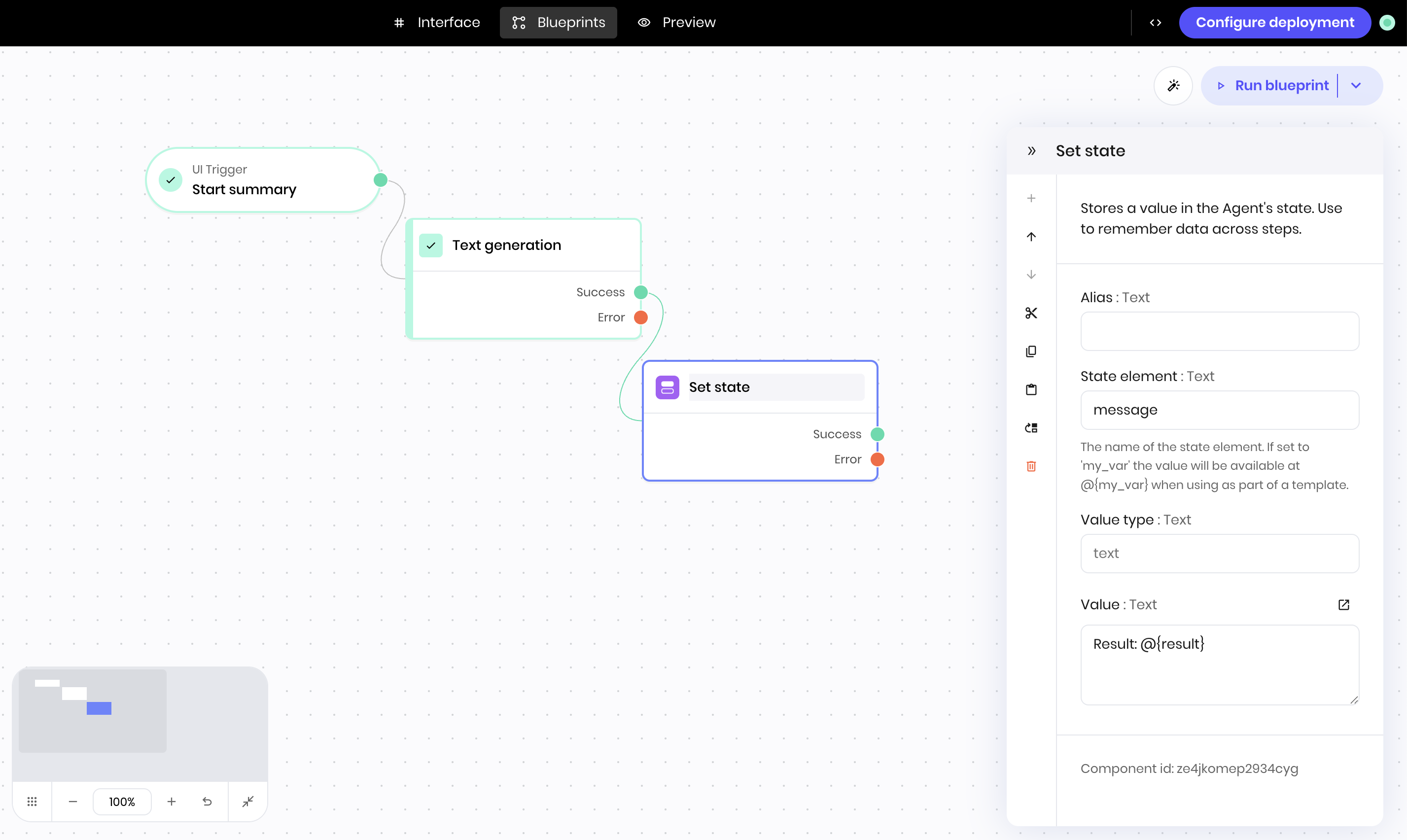
This example shows a **Set state** block that uses the `@{result}` variable to access the result of the preceding block. The block sets a state variable `message` with the string `Result: ` and the output of the preceding block.
* The **Text generation** block uses the state variable `product` to access information that the user input via the UI. It then generates text based on that information.
* The **Set state** block's execution environment includes the `result` variable from the **Text generation** block, which is the summary of the file. It sets a state variable with that result so that the UI can display the summary.
## Variables available to each block
The following table shows the variables that are available to each block in the execution environment. Not all variables are available in all blocks; for example, the `api_calls` variable is only available when the block makes an API call.
Many of these variables are primarily useful for internal use, debugging, and advanced use cases. However, the `result` variable is particularly useful for building workflows.
| Variable | Type | Description | Example |
| ---------------- | ------------- | ------------------------------------------------------------------------------------------------------------------------------------------------------------------------------------------------------------------------------------------------- | ---------------------------------------------------------------------------------------------------------------------------- |
| `api_calls` | `array[dict]` | Any Writer API calls that the agent made at this block, including the request and the response. For example, API calls from a **Text generation** block to the Writer [chat completions](/api-reference/completion-api/chat-completion) endpoint. | `[{'request': {'method': 'POST', ...}, 'response': {'status_code': 200, ...}}]` |
| `call_stack` | `dict` | The call stack of the agent. The key is the index of the block in the call stack and the value is the block ID. | `{0: "123abc", 1: "456def"}` |
| `context` | `dict` | The ID of the block that triggered the blueprint execution and the event that triggered it. | `{'target': '123abc', 'event': 'wf-click'}` |
| `httpx_requests` | `array[dict]` | Any HTTP requests that the agent made at this block, including the request and the response. | `[{'request': {'method': 'POST', ...}, 'response': {'status_code': 200, ...}}]` |
| `item` | Any | An individual item in a **For-each** block loop. The type of the item varies based on the values provided to the **For-each** block. For a dictionary, this is the value of the item. For a list, this is the item itself. | `file123` |
| `itemId` | `str` | The ID of the individual item in a **For-each** block loop. For a list, this is its index in the loop, starting at 0. For a dictionary, this is the key of the item. | `0` |
| `message` | `str` | The error message if a block failed with an error. | `"Invalid input: age must be a number"` |
| `result` | varies | The result of the preceding block. The type of the result varies based on the block. | `Thank you so much for your wonderful review! We're thrilled to hear that you've found the perfect tailored blazer with us.` |
| `results` | `dict` | The full list of results from all blocks in the blueprint. It's a dictionary where the key is the block ID and the value is the result of the block. If the block hasn't run yet, the value is `null`. | `{'123abc': 'Thank you so much...', '456def': '%Generating response...', '789ghi': null}` |
| `session` | `dict` | Session information, such as the session ID, cookies, headers, and user information. | `{'id': '123', 'cookies': {...}, 'headers': {...}, 'userInfo': {}}` |
| `state` | `dict` | The agent's [state variables](/agent-builder/state). | `{'user_name': 'John', 'persona': 'sales'}` |
| `target` | `str` | The ID of the next block to run. | `'123abc'` |
| `ui` | `object` | The UI of the agent as a WriterUIManager object. This is a Python object that allows you to interact with the UI of the agent via custom code. | |
## Access execution environment variables
### In blueprint blocks
You can read the execution environment variables in blueprint blocks using `@{variable_name}` syntax. For example, `@{result}` accesses the result of the preceding block.
This example shows a **Set state** block that uses the `@{result}` variable to access the result of the preceding block. The block sets a state variable `message` with the string `Result: ` and the output of the preceding block.
 #### Nested variable syntax
You can access nested variables in blueprint blocks using dot notation. For example, `@{result.0.id}` accesses the `id` field of the first result of the preceding block.
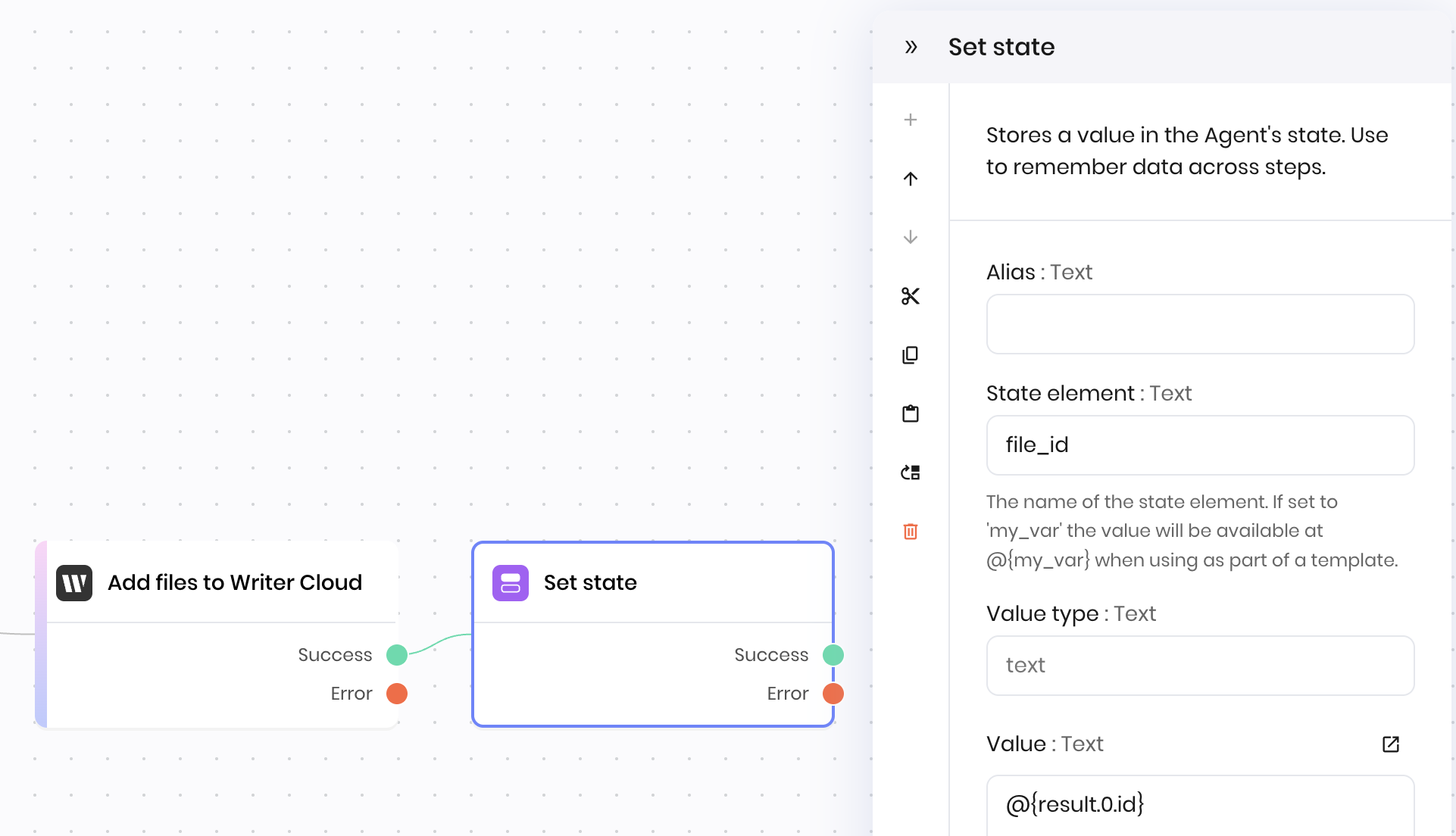
This example shows a **Set state** block to set a `file_id` state variable from an **Add files to Writer Cloud** block. It uses `@{result.0.id}` to access the `id` field of the first item in the result of the preceding block.
Here is the what the `result` variable looks like in the execution environment. It's possible to add multiple files to Writer Cloud, so the `result` variable from this block is an array of dictionaries. The `0` index accesses the first item in the array.
#### Nested variable syntax
You can access nested variables in blueprint blocks using dot notation. For example, `@{result.0.id}` accesses the `id` field of the first result of the preceding block.
This example shows a **Set state** block to set a `file_id` state variable from an **Add files to Writer Cloud** block. It uses `@{result.0.id}` to access the `id` field of the first item in the result of the preceding block.
Here is the what the `result` variable looks like in the execution environment. It's possible to add multiple files to Writer Cloud, so the `result` variable from this block is an array of dictionaries. The `0` index accesses the first item in the array.
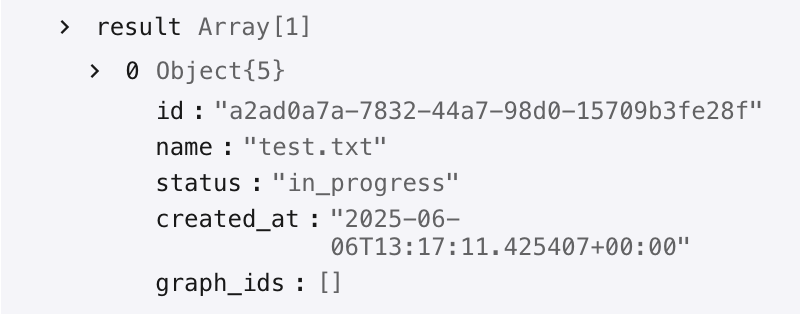 The **Set state** block uses `@{result.0.id}` to access the `id` field of the first item in the result of the preceding block.
 ### In custom Python code
You can access the execution environment variables in custom Python code directly as variables.
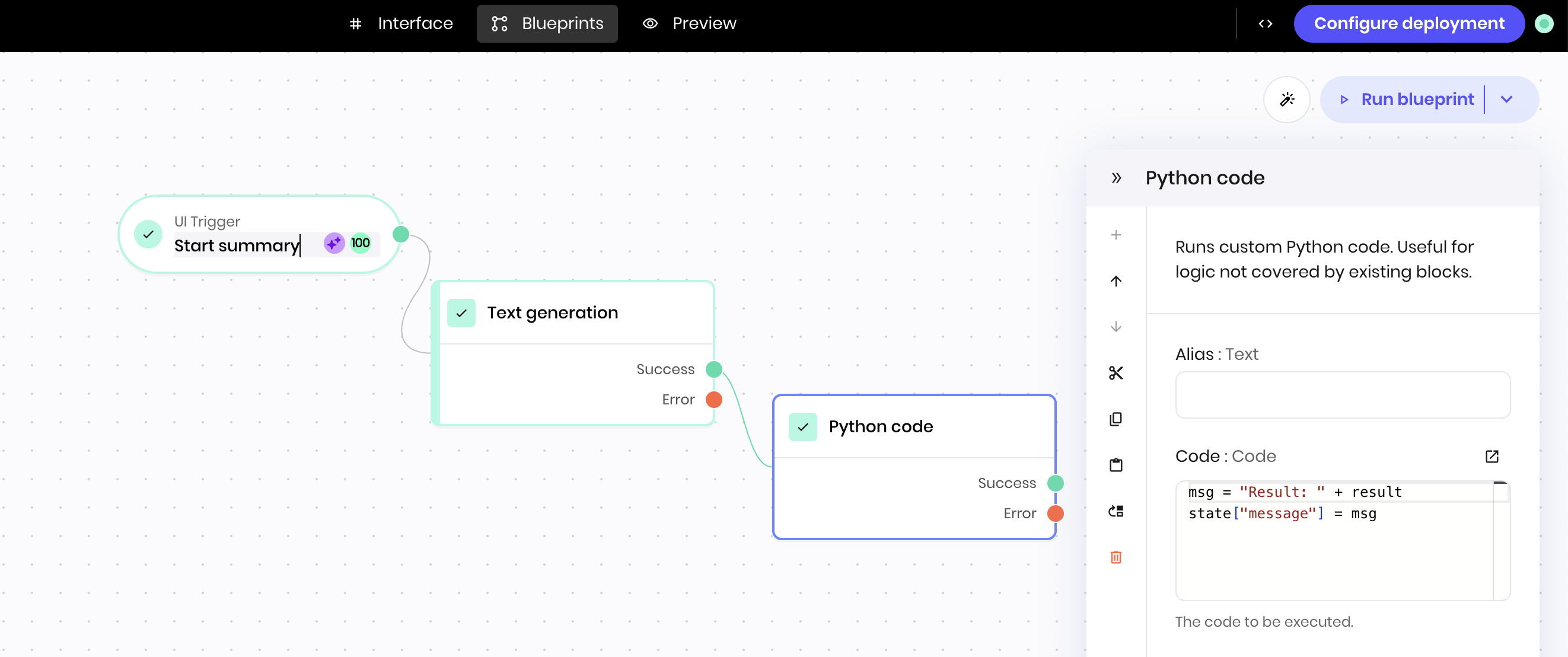
For example, this Python block in the blueprint accesses the output of the preceding block and prepends the string `Result: ` to it. It then sets state variable `message` with the final result.
### In custom Python code
You can access the execution environment variables in custom Python code directly as variables.
For example, this Python block in the blueprint accesses the output of the preceding block and prepends the string `Result: ` to it. It then sets state variable `message` with the final result.
 #### Environment variables
Your `WRITER_API_KEY` is also available when you run custom Python code. It's available as an environment variable (as opposed to an execution environment variable), so you can access it using `os.getenv('WRITER_API_KEY')`.
```python theme={null}
import os
api_key = os.getenv('WRITER_API_KEY')
```
#### Environment variables
Your `WRITER_API_KEY` is also available when you run custom Python code. It's available as an environment variable (as opposed to an execution environment variable), so you can access it using `os.getenv('WRITER_API_KEY')`.
```python theme={null}
import os
api_key = os.getenv('WRITER_API_KEY')
```